Part of the generative engine optimization guide and AEO Hub.
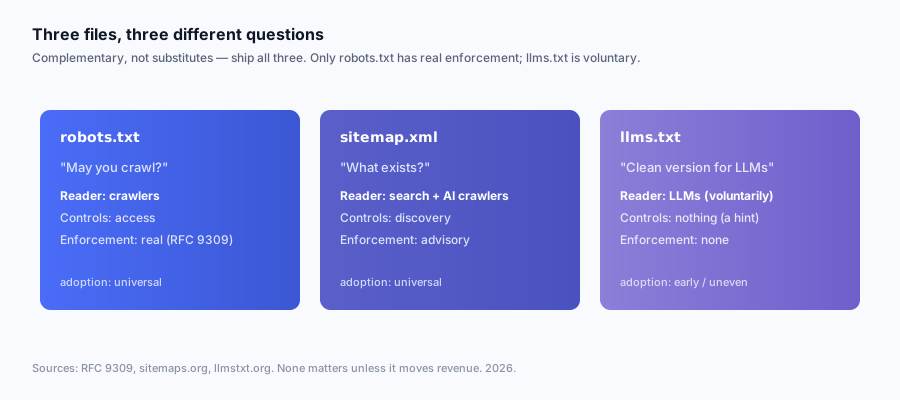
The question lands in my inbox almost weekly now, phrased a dozen ways: "Is llms.txt the new robots.txt?" "Do I still need a sitemap if I have llms.txt?" "Which one controls whether ChatGPT crawls me?" Underneath all the phrasings is a single confusion: people assume these three files compete for the same job, so picking the right one feels like a decision. It is not a decision. They do three different things, and the clean way to hold them in your head is that robots.txt restricts, sitemap.xml enumerates, and llms.txt curates. You ship all three. The only real decisions are how aggressively to use robots.txt's enforcement and how much to believe llms.txt's still-unproven upside.
This is the technical companion to my skeptical deep-dive on whether llms.txt moves revenue. That piece is about ROI and the honest evidence audit; if you want to know whether llms.txt earns citations and dollars, read it. This one is narrower and more mechanical: what each of the three files actually controls, who reads it, which directives exist, what enforcement looks like, and how to write all three correctly so you never break production with a stray Disallow. It is the field reference I wish existed when I shipped my own three files on attrifast.com. If you also want to know which crawlers are hitting you and how to detect them, the AI crawler tracking guide is the sibling on the bot-detection side.
Quick Facts
| Item | robots.txt | sitemap.xml | llms.txt |
|---|---|---|---|
| Core question it answers | May you crawl this? | What URLs exist? | What matters, and why? |
| Format | Plain text, directive syntax | XML | Markdown (CommonMark) |
| Standard body | RFC 9309 (IETF) [1] | sitemaps.org protocol [2] | Informal, llmstxt.org [3][4] |
| Year established | 1994 convention; RFC 2022 | 2005 protocol | Sept 2024 proposal |
| Enforced by major crawlers? | Yes | Yes (as discovery) | No public commitment |
| Google honors it? | Yes [11] | Yes [11] | No (per John Mueller) [12] |
| Worst-case misconfiguration | Deindex entire site | Wasted crawl budget | Nothing reads it |
| Typical location | /robots.txt | /sitemap.xml | /llms.txt |
Two rows do most of the work in this whole article. "Enforced by major crawlers" is the dividing line: robots.txt and sitemap.xml sit on the enforced side of a real fence, and llms.txt sits on the voluntary side. And "worst-case misconfiguration" is the row that should govern how careful you are with each file. The rest is detail, and the detail is what this piece walks through.
llms.txt vs robots.txt vs sitemap.xml: the one table that ends the confusion
The fastest way to stop conflating these files is to put them side by side across every dimension that matters at once. If you read nothing else, read this.
| Dimension | robots.txt | sitemap.xml | llms.txt |
|---|---|---|---|
| Primary purpose | Allow/deny crawler access | Enumerate indexable URLs | Curate + explain key pages for LLMs |
| One-word job | Restrict | Enumerate | Curate |
| Format | Plain text, directive syntax | XML | Markdown |
| Location at root | /robots.txt | /sitemap.xml (or linked) | /llms.txt |
| Curated or exhaustive? | Rules, not a list | Exhaustive list | Curated subset |
| Human-readable prose? | No (directives only) | No (machine XML) | Yes (descriptions encouraged) |
| Per-user-agent targeting? | Yes (User-agent: blocks) | No | No |
| Grants or denies access? | Yes (its entire job) | No | No |
| Enforced by major crawlers? | Yes | Yes | No public commitment |
| Standardized body | RFC 9309 + de facto [1] | sitemaps.org protocol [2] | Informal (llmstxt.org) [3] |
| Google honors it? | Yes [11] | Yes [11] | No (per Mueller) [12] |
| GPTBot honors it? | Yes (robots rules) [5] | Reads sitemaps [5] | Not documented |
| ClaudeBot honors it? | Yes (robots rules) [8] | Reads sitemaps [8] | Ships own; consumption undocumented |
| Typical size | <1 KB | KB to many MB | 1-5 KB (llms-full.txt larger) |
| Risk of misconfiguration | High (can deindex you) | Low-medium | Near zero |
| Time to author | 10 min | Auto-generated | ~30 min |
| Discoverable how? | Convention: always at root | Sitemap: line in robots.txt + GSC submit | Convention: at root |
The single most useful column is "grants or denies access." Only robots.txt does. That one fact dissolves the "is llms.txt robots.txt for AI?" question instantly: llms.txt has no access semantics at all, so it cannot be a substitute for the file whose entire job is access. If you want to control whether GPTBot crawls you, you edit robots.txt. If you want to give an LLM a clean map of your best pages, you write llms.txt. These are not two ways to do one thing; they are two different things.
Here is the same idea as the mental model I actually use when explaining it out loud.
| File | Think of it as | The model gets | The model cannot get |
|---|---|---|---|
| robots.txt | A bouncer at the door | Permission rules per bot | Any sense of what is inside |
| sitemap.xml | A full inventory list | Every URL that exists | Any sense of which matter |
| llms.txt | A curated guided tour | Which pages matter, and why | Anything you chose not to list |
A bouncer, an inventory, and a tour guide. You want all three at a well-run venue. The bouncer (robots.txt) decides who gets in. The inventory (sitemap.xml) makes sure nothing in the building goes uncounted. The tour guide (llms.txt) walks the important visitor straight to the three rooms worth seeing. Dropping any one of them does not make the other two do its job.
Why they are complementary, not substitutes (the original POV)
The framing I keep coming back to, and the one I think the whole "vs" genre gets wrong: these three files answer three different questions, so comparing them as alternatives is a category error. The right question is never "llms.txt or robots.txt?" It is "do all three of my files answer their own question correctly?"
| The question | The file that answers it | What a wrong answer costs |
|---|---|---|
| "May you fetch this URL?" | robots.txt | Deindexed pages or leaked private paths |
| "Which URLs exist on this site?" | sitemap.xml | Slow or missed discovery of deep pages |
| "Which pages matter and what are they about?" | llms.txt | A model crawls boilerplate and misreads you (if it reads the file at all) |
Notice that no two rows answer the same question. robots.txt never tells a crawler what exists — it only rules on access to things the crawler already found. sitemap.xml never tells a model which of your 4,000 URLs is the one worth citing — it lists all 4,000 flatly. llms.txt never grants access and never enumerates everything — it curates a subset and explains it. The jobs do not overlap, which is exactly why substituting one for another leaves a real gap.
The most common substitution mistake I see in the wild is people deleting or neglecting their sitemap because they added an llms.txt and "the AI can read that instead." This is backwards on two counts. First, an AI crawler that respects sitemaps still wants the exhaustive list for coverage — your curated 20-link llms.txt does not tell it about the 380 pages you left off. Second, llms.txt is the file with the least enforcement, so leaning on it to replace the file with the most enforcement is trading a proven mechanism for an unproven one. Belt and suspenders is the correct posture: keep all three, each doing its own job.
The honest asymmetry to sit with is that the three files are not equally proven. Here is the evidence tier for each, stated plainly.
| File | Evidence it does its job | Confidence |
|---|---|---|
| robots.txt | RFC 9309; every major crawler documents honoring it; decades of observed compliance | High |
| sitemap.xml | sitemaps.org protocol; Google/Bing/AI crawlers document consuming it | High |
| llms.txt | Real in developer-doc tooling and IDE assistants; no documented consumer-chat consumption; Google says no | Mixed/low for consumer surfaces |
So my actual recommendation, which I will earn over the rest of this article: ship robots.txt and sitemap.xml because they are proven and enforced and getting them wrong has real cost. Ship llms.txt too, because it is cheap and the downside is essentially zero, but hold your expectations honestly and instrument the revenue line so you find out for yourself rather than trusting a vendor's citation chart. Cheap bets plus honest measurement beats both the hype and the cynicism.
robots.txt, in depth: the access-control file
robots.txt is the oldest of the three and the only one with formal IETF standing. The Robots Exclusion Protocol began as a 1994 convention and was finally standardized as RFC 9309 [1] in September 2022. It is a plain-text file at your domain root, read top to bottom, that groups directives under User-agent: lines so you can give different rules to different crawlers.
The thing to internalize: robots.txt is a request, but a request that the major crawlers have publicly and durably committed to honoring. Google, Bing, GPTBot, ClaudeBot, PerplexityBot, and Google-Extended all document compliance [5][8][11][13]. It is not a technical wall — a bad-actor scraper can ignore it — but for the named crawlers that matter to AI visibility, it is the real control surface.
The directive set
| Directive | What it does | Honored by |
|---|---|---|
User-agent: | Opens a rule block targeting a named bot (or * for all) | All compliant crawlers |
Disallow: | Forbids crawling of a path prefix | All compliant crawlers |
Allow: | Carves an exception inside a Disallow | Most major crawlers |
Sitemap: | Points to your sitemap.xml (absolute URL) | Google, Bing, most AI crawlers |
Crawl-delay: | Requests seconds between requests | Bing/Yandex yes; Google ignores |
$ / * wildcards | Pattern-match path ends and segments | Google, Bing, major crawlers |
A few rules trip people up constantly:
- The match is longest-rule-wins between
AllowandDisallowfor Google. A more specificAllowbeats a broaderDisallow. Disallow:with an empty value means "allow everything."Disallow: /means "block everything." The difference between those two lines is your entire site.- Crawlers read the rule block whose
User-agenttoken matches them most specifically, and they read only that block — they do not merge a named block with the*block. If GPTBot has its own block, the*rules do not also apply to it. - robots.txt controls crawling, not indexing. A page blocked in robots.txt can still appear in search results (URL only, no snippet) if other pages link to it. To keep a page out of the index you use a
noindexmeta tag or header, which requires the page to be crawlable, which means you do not block it in robots.txt. This contradiction surprises people every time.
How AI crawlers specifically use robots.txt
This is where robots.txt becomes the real "AI control" file. Each AI crawler reads its own User-agent token.
| Crawler | robots.txt token | Blocking it stops |
|---|---|---|
| GPTBot | GPTBot | OpenAI training-corpus crawls [5] |
| ChatGPT-User | ChatGPT-User | Some live user-triggered fetches [5] |
| OAI-SearchBot | OAI-SearchBot | ChatGPT search index crawls [5] |
| ClaudeBot | ClaudeBot | Anthropic training crawls [8] |
| Google-Extended | Google-Extended | Gemini/Vertex training (not Search) [13] |
| Googlebot | Googlebot | Google Search + AI Overviews indexing [11] |
| PerplexityBot | PerplexityBot | Perplexity index crawls [10] |
| Applebot-Extended | Applebot-Extended | Apple Intelligence training [13] |
The subtle and important one is Google-Extended. It shares Googlebot's actual HTTP user-agent — there is no separate UA string in your logs — but it reads its own token in robots.txt. So you can opt out of Gemini training (Disallow under Google-Extended) while still allowing Search indexing (Allow under Googlebot). I cover this and the full crawler roster in the AI crawler tracking guide; the point here is that robots.txt is the surface where you make those allow/deny decisions, and llms.txt is not.
A complete, copy-pasteable robots.txt with AI-bot directives
This is the "allow everything, declare your sitemap, instrument the rest" default I recommend for almost every SaaS and ecommerce site. Blocking AI training crawlers is the wrong default for businesses that want brand presence inside model knowledge.
# robots.txt — allow AI crawlers, point them at the sitemap, log everything.
# Recommended default for SaaS / ecommerce that want to be cited by AI engines.

# OpenAI
User-agent: GPTBot
Allow: /

User-agent: ChatGPT-User
Allow: /

User-agent: OAI-SearchBot
Allow: /

# Anthropic
User-agent: ClaudeBot
Allow: /

User-agent: anthropic-ai
Allow: /

User-agent: Claude-Web
Allow: /

# Perplexity
User-agent: PerplexityBot
Allow: /

User-agent: Perplexity-User
Allow: /

# Google AI training (separate from Search indexing)
User-agent: Google-Extended
Allow: /

# Apple Intelligence training
User-agent: Applebot-Extended
Allow: /

# Everyone else
User-agent: *
Allow: /
Disallow: /admin/
Disallow: /api/
Disallow: /cart/
Disallow: /*?*sessionid=

# Always declare the sitemap with an absolute URL
Sitemap: https://yoursite.com/sitemap.xml
Two things to notice. First, the only Disallow lines are for genuinely non-public paths (admin, API, cart, session-tagged URLs) — nothing that you want cited. Second, the Sitemap: line is how robots.txt and sitemap.xml connect: the sitemap is declared inside robots.txt, which is one more reason the two files are partners, not rivals.
sitemap.xml, in depth: the discovery file
sitemap.xml is the inventory. It is an XML file conforming to the sitemaps.org protocol [2], introduced in 2005 and adopted by Google, Bing, Yahoo, and the major AI crawlers. Its job is to hand a crawler a machine-readable list of every canonical URL you want discovered, so deep pages with few internal links do not get missed, and so freshness signals (lastmod) reach the crawler quickly.
A sitemap does not grant access (that is robots.txt) and it does not curate (that is llms.txt). It enumerates. It is also the file most likely to be auto-generated for you — most CMSes, static-site generators, and frameworks build it at deploy time — which is why people forget it exists until it breaks.
The element set
| Element | Required? | Purpose |
|---|---|---|
<urlset> | Yes | Root element; declares the namespace |
<url> | Yes | One entry per page |
<loc> | Yes | The absolute canonical URL |
<lastmod> | Recommended | Last-modified date (freshness signal) |
<changefreq> | Optional | Hint at update cadence (largely ignored now) |
<priority> | Optional | Relative priority 0.0-1.0 (largely ignored now) |
<sitemapindex> | For large sites | Points to multiple child sitemaps |
A few practical rules:
- A single sitemap caps at 50,000 URLs and 50 MB uncompressed. Past that you split into multiple sitemaps and reference them from a sitemap index file.
lastmodis the element Google actually pays attention to in 2026;changefreqandpriorityare mostly vestigial and Google has said it largely ignores them. Setlastmodaccurately or omit it — a sitemap that claims everything changed today, every day, trains the crawler to distrust it.- Every
<loc>should be a canonical, indexable, 200-status URL. Listing redirects, 404s,noindexpages, or non-canonical variants is the most common way to waste crawl budget and dilute the signal. - Declare the sitemap in robots.txt with a
Sitemap:line and submit it in Google Search Console. Belt and suspenders again.
A copy-pasteable sitemap.xml snippet
<?xml version="1.0" encoding="UTF-8"?>
<urlset xmlns="http://www.sitemaps.org/schemas/sitemap/0.9">
  <url>
    <loc>https://yoursite.com/</loc>
    <lastmod>2026-05-26</lastmod>
    <changefreq>weekly</changefreq>
    <priority>1.0</priority>
  </url>
  <url>
    <loc>https://yoursite.com/features/revenue-attribution</loc>
    <lastmod>2026-05-20</lastmod>
    <changefreq>monthly</changefreq>
    <priority>0.9</priority>
  </url>
  <url>
    <loc>https://yoursite.com/blog/llms-txt-vs-robots-txt</loc>
    <lastmod>2026-05-26</lastmod>
    <changefreq>monthly</changefreq>
    <priority>0.7</priority>
  </url>
  <url>
    <loc>https://yoursite.com/track-chatgpt-traffic</loc>
    <lastmod>2026-05-18</lastmod>
    <changefreq>monthly</changefreq>
    <priority>0.8</priority>
  </url>
</urlset>
For a large catalog, you would generate one of these programmatically and split it across a <sitemapindex>. The point of the snippet is the shape: a flat list of canonical URLs with freshness dates. There is no place in this file to say "this page is the one worth citing" — that is precisely the gap llms.txt tries to fill, and precisely why the two are not interchangeable.
How AI crawlers use sitemaps
AI crawlers that follow the sitemaps.org protocol use your sitemap exactly the way search crawlers do: as a discovery and freshness aid. GPTBot and ClaudeBot read sitemaps to find pages [5][8]. Google-Extended, sharing Googlebot infrastructure, benefits from the same sitemap that powers Search [13]. The sitemap does not tell these crawlers which page to cite or how to rank it; it tells them the page exists and when it last changed. That is genuinely valuable — a page no crawler discovers cannot be cited — but it is discovery, not curation, and not access control.
llms.txt, in depth: the curation file
llms.txt is the newest and the only voluntary one. Jeremy Howard of Answer.AI proposed it in September 2024 [4], and the spec lives at llmstxt.org [3]. It is a markdown file at your domain root that summarizes what your site is and lists your most LLM-relevant pages with one-line descriptions. The motivating problem is real: models have limited context budgets, and most web pages are full of navigation, scripts, and boilerplate that waste tokens and confuse extraction. A curated markdown map gives a model a clean, high-signal view of what matters, in the format it parses most cleanly.
The crucial distinction from the other two files: llms.txt is a content file, not a control file. It has no Allow, no Disallow, no <loc> enumeration. It is prose and links. And, as covered in my companion piece on llms.txt revenue impact, no major consumer chat engine has documented consuming it at inference time as of mid-2026 — Google's John Mueller has said Google does not use it [12]. Where it is genuinely consumed is developer-documentation tooling (Mintlify auto-generates it [9]) and IDE coding assistants that fetch a docs map to answer a developer in-context.
The format spec
| Element | Required? | Markdown form | Purpose |
|---|---|---|---|
| H1 title | Required | # Project Name | The single H1; names the site/product |
| Blockquote summary | Recommended | > One-paragraph summary | High-signal description of what the site is |
| Free-form detail | Optional | Plain paragraphs | Extra context, caveats, pricing notes |
| H2 sections | Optional | ## Section | Group links (Docs, Guides, Optional) |
| Link list items | Required (in sections) | - [name](url): description | The curated pages with descriptions |
## Optional section | Special | ## Optional | Pages a model may skip if context is tight |
Rules that matter: exactly one H1, first; absolute URLs in link items so a lifted link still resolves; and the ## Optional section as an explicit "drop these if context is tight" signal. There is a companion llms-full.txt that inlines the entire markdown content of those pages into one file for agents that want to ingest everything in a single fetch — valuable for docs-heavy products, overkill for a marketing site.
A complete, copy-pasteable llms.txt
This is close to what runs on attrifast.com, edited for clarity. The format uses no angle brackets at all, and it lives in a fenced block here regardless.
# Attrifast

> Attrifast is a privacy-first, Stripe-native revenue attribution tool for SMB SaaS and ecommerce. The cookieless 4kb script captures first-party sessions and joins them to Stripe webhook events server-side, so you can see revenue by channel — including AI engines like ChatGPT and Perplexity — without third-party cookies or a consent banner in most jurisdictions.

This file curates the pages most useful for understanding what Attrifast does, how the attribution architecture works, and how we think about measurement. Prices are USD. Founder: Vincent Ruan.

## Core product
- [Homepage](https://attrifast.com/): Product overview, positioning, and pricing ($9.99/mo).
- [Revenue attribution by channel](https://attrifast.com/features/revenue-attribution): How channel-level revenue attribution works without third-party cookies.
- [Track ChatGPT traffic](https://attrifast.com/track-chatgpt-traffic): Detecting and attributing ChatGPT referral sessions server-side.

## Guides
- [How to get cited by AI engines](https://attrifast.com/blog/how-to-get-cited-by-ai-engines): The GEO playbook, with honest limits.
- [AI crawler tracking 2026](https://attrifast.com/blog/ai-crawler-tracking-2026): Logging GPTBot, ClaudeBot, and friends.
- [llms.txt vs robots.txt vs sitemap.xml](https://attrifast.com/blog/llms-txt-vs-robots-txt): What each file actually does.

## Optional
- [About / founder](https://attrifast.com/about): Vincent Ruan's background and the entity page.
That is the entire file — one H1, one blockquote summary, sectioned links with descriptions, an ## Optional block. The hard part is editorial (which pages are genuinely your best?), not technical. Write each description as a tiny piece of honest retrieval bait: "How channel-level revenue attribution works without third-party cookies" beats "Our revenue feature" because it names the concepts a user might actually ask about.
The three-way comparison, directive by directive
People who already know one of these files well tend to reason about the others by analogy, which is where the analogies break. Here is what each file's primitives map to — and where there is simply no equivalent.
| Concept | robots.txt | sitemap.xml | llms.txt |
|---|---|---|---|
| "Block this path" | Disallow: /path | (no equivalent) | (no equivalent) |
| "Allow this path" | Allow: /path | (no equivalent) | (no equivalent) |
| "Target a specific bot" | User-agent: GPTBot | (no equivalent) | (no equivalent) |
| "List a URL" | (no equivalent) | <loc>...</loc> | - [name](url) |
| "Mark freshness" | (no equivalent) | <lastmod> | (no equivalent; edit by hand) |
| "Explain what a page is" | (no equivalent) | (no equivalent) | : one-line description |
| "Mark a page skippable" | (no equivalent) | <priority> (weakly) | ## Optional section |
| "Point to another file" | Sitemap: line | <sitemapindex> | (links only) |
The blank cells are the whole story. robots.txt has access primitives and nothing else. sitemap.xml has enumeration and freshness primitives and nothing else. llms.txt has description and prioritization primitives and nothing else. No file is a superset of another, which is the mechanical reason none can substitute for another.
Who reads each file
| Reader | robots.txt | sitemap.xml | llms.txt |
|---|---|---|---|
| Googlebot (Search, AI Overviews) | Reads + honors [11] | Reads [11] | No (per Mueller) [12] |
| Google-Extended (Gemini training) | Reads + honors [13] | Reads (shared infra) | Not documented |
| GPTBot (OpenAI training) | Reads + honors [5] | Reads [5] | Not documented |
| ChatGPT-User (live fetch) | Reads (per docs) [5] | n/a | Not documented |
| OAI-SearchBot (ChatGPT search) | Reads + honors [5] | Reads [5] | Not documented |
| ClaudeBot (Anthropic training) | Reads + honors [8] | Reads [8] | Ships own; consumption undocumented |
| PerplexityBot | Reads (disputed compliance) [10] | Reads [10] | Not documented |
| IDE coding assistants (Cursor etc.) | Varies | Sometimes | Yes, in practice [9] |
| Mintlify-hosted docs search | n/a | Yes | Yes (generates it) [9] |
Read the right two columns honestly and the maturity gap is stark. robots.txt and sitemap.xml have near-universal, documented support across the crawlers that drive marketing-relevant citations. llms.txt's reliable consumers are developer tooling and IDE agents. If your buyers live in ChatGPT and Google AI Overviews, robots.txt and sitemap.xml are doing real, enforced work for you today; llms.txt is a bet on an undocumented mechanism for those surfaces.
What controls what
| Outcome you want | robots.txt | sitemap.xml | llms.txt |
|---|---|---|---|
| Stop a bot from fetching a page | Yes (the tool) | No | No |
| Get a deep page discovered | Indirectly (must allow) | Yes (the tool) | Weakly (a link) |
| Tell a model which page matters | No | No | Yes (the tool) |
| Opt out of AI training | Yes (per-bot Disallow) | No | No |
| Speed up re-crawl after an edit | No | Yes (lastmod) | No |
| Explain your product to an LLM | No | No | Yes (the tool) |
| Raise a page's ranking/citation | No (gate only) | No (discovery only) | No (no mechanism) |
The bottom row is the one to tattoo on the back of your hand: none of the three files raises a ranking or earns a citation by itself. They are plumbing. robots.txt is a gate, sitemap.xml is a discovery aid, llms.txt is a curation aid. Whether a page that is allowed, discovered, and curated then earns citations and revenue is a content question, and a measurement question — not a file question.
Enforcement and risk, side by side
| Property | robots.txt | sitemap.xml | llms.txt |
|---|---|---|---|
| Enforcement mechanism | Crawler self-commitment + de facto compliance | Protocol adoption | None (voluntary) |
| Can a bad actor ignore it? | Yes (scrapers do) | Yes (it is a hint) | Yes (trivially) |
| Worst-case error | Deindex entire site | Wasted crawl budget, stale signals | Nothing reads it |
| Reversal speed if you change it | Days (re-crawl) | Days (re-crawl) | Days (re-crawl) |
| How often to review | On every infra change | When site structure changes | Quarterly |
| Validation tooling | GSC robots.txt tester | GSC sitemap report | None official |
This is the asymmetry that should drive your behavior. The blast radius of a robots.txt mistake is your whole site; the blast radius of an llms.txt mistake is roughly zero. Spend your caution where the risk is.
How a crawler reads each file: the request flow
The hand-wavy version — "the bot reads your files and decides what to do" — hides where the chain actually branches. Here is the real order of operations for a compliant AI crawler arriving at your domain.
The order is the point. robots.txt is read first and gates everything — if it says Disallow, nothing downstream happens. sitemap.xml is read second, for discovery, and is typically pointed to from robots.txt. llms.txt is consulted last and conditionally, mostly by developer tooling, and never gates or enumerates. The files sit at three different stages of one pipeline, which is the clearest possible illustration that they are complementary stages, not competing options.
Contrast that with how the two distinct llms.txt consumption paths actually behave, because this is where marketers' expectations diverge from reality.
The left branch works and is the use case the spec was written for. The right branch — the one marketers care about — is where the evidence evaporates. That is not an argument against shipping llms.txt; it is an argument for shipping it cheaply and measuring honestly rather than expecting it to behave like robots.txt.
Do you need all three? A decision guide by site type
The short answer is "almost always yes for robots.txt and sitemap.xml, usually yes for llms.txt." But the why and the what to put in each vary by site type, so here is the by-category breakdown.
| Site type | robots.txt | sitemap.xml | llms.txt | llms.txt payoff |
|---|---|---|---|---|
| Developer tool / API product | Yes | Yes | Yes (+ llms-full.txt) | High — IDE agents fetch it |
| Documentation-heavy SaaS | Yes | Yes | Yes (+ llms-full.txt) | High — docs are the cited surface |
| General B2B SaaS (marketing site) | Yes | Yes | Yes | Low-medium — speculative |
| DTC ecommerce (large catalog) | Yes | Yes (critical) | Optional (curate guides only) | Low — sitemap matters more |
| Content publisher (tech) | Yes | Yes | Yes | Low-medium — training-crawl only |
| Local services / SMB | Yes | Yes | Often skip | Very low |
| Open-source library | Yes | Yes | Yes (+ llms-full.txt) | High — spec's home use case |
Two reads. First, robots.txt and sitemap.xml are a flat "yes" for everyone — they are table stakes, not a judgment call. Second, llms.txt's payoff tracks how much your value lives in documentation an agent would deliberately fetch. The higher the payoff, the more it is a developer-documentation play. For a general B2B SaaS marketing site, llms.txt is "cheap insurance plus a plausible training-crawl benefit," not "a citation lever" — and you should size your effort accordingly.
A second cut: what to actually put in each file by type, because the ecommerce case in particular gets botched.
| Site type | robots.txt focus | sitemap.xml focus | llms.txt focus |
|---|---|---|---|
| Developer tool | Allow AI bots; block staging | All docs + API pages | API docs, quickstart, auth; ship llms-full.txt |
| B2B SaaS | Allow AI bots; block /admin, /api | All public pages | Core features, methodology, pricing, top guides |
| Ecommerce | Allow AI bots; block faceted-filter URLs | Every product (this is the win) | Category + buying guides only — never 4,000 SKUs |
| Content publisher | Allow or selectively block training | All articles | Pillar/cornerstone pages only |
| Local services | Allow AI bots | Service + service-area pages | Often skip entirely |
The ecommerce row is the one people invert. For a 4,000-SKU store, the sitemap is where every product belongs — that is enumeration, exactly its job. The llms.txt should list your category pages and buying guides, not the SKUs, because a 4,000-line "curated" file is a contradiction in terms. Curation means choosing. Enumeration means listing everything. Use the right file for each.
Common mistakes I see with all three files
Eight failure patterns I have seen often enough to name, with the fix for each.
Mistake 1: A stray Disallow: / in robots.txt. The single highest-stakes error on this list. One line, usually copy-pasted from a staging config, deindexes the whole site and blocks every compliant AI crawler at once. Fix: validate robots.txt in Google Search Console's tester on every infra change, and never deploy a staging robots.txt to production.
Mistake 2: Blocking a page in robots.txt to "noindex" it. A page blocked in robots.txt cannot be crawled, so the crawler never sees your noindex tag, so the URL can still show up in results (snippet-less). Fix: to keep a page out of the index, allow crawling and use a noindex meta tag or header. The two mechanisms are not interchangeable.
Mistake 3: Deleting sitemap.xml because you added llms.txt. Covered above and worth repeating: the curated 20-link llms.txt does not tell crawlers about the 380 pages you left off. Fix: keep both; they answer different questions.
Mistake 4: A sitemap full of non-canonical URLs, redirects, or noindex pages. Wastes crawl budget and trains the crawler to distrust the file. Fix: every <loc> is a canonical, indexable, 200-status URL. Audit quarterly.
Mistake 5: Treating llms.txt as access control. "I'll block GPTBot in my llms.txt" — there is no such thing; llms.txt has no Disallow. Fix: access control lives in robots.txt. llms.txt only curates.
Mistake 6: Lying in your lastmod dates. Claiming every page changed today, every day, makes the crawler ignore your freshness signal entirely. Fix: set lastmod to the real last-modified date, or omit it.
Mistake 7: A stale llms.txt pointing at moved or dead pages. Mild, but for any agent that does read the file, dead links are counterproductive. Fix: quarterly review, same as you would for any curated resource.
Mistake 8: Believing the files are the work. The biggest strategic error. Shipping three perfect files and then assuming citations and revenue will follow. Fix: the files are plumbing; the work is content quality and measurement. Instrument the revenue line so you know what actually moved.
The measurement angle: none of this matters unless it moves revenue
Here is the part the rest of the genre skips, and the through-line of everything I write. You can ship a flawless robots.txt, a pristine sitemap.xml, and a beautifully curated llms.txt, and still have no idea whether any of it earned you a dollar. The files are plumbing. Revenue is the point. And the standard analytics stack cannot connect the two.
The reason is the same structural gap that breaks all AI-engine measurement: AI engines frequently strip the Referer header on outbound clicks, and they never append UTM tags to your URLs. When the referer is empty and there is no UTM, GA4 has nothing to match against its channel rules, so the session lands in Direct/(none) alongside bookmarks and email-app clicks. I walk the full mechanics in the ChatGPT referral analytics breakdown; the summary is that in default GA4, the majority of AI-engine clicks are invisible as AI.
So the measurement problem splits into two halves that people constantly conflate:
| Question | Where you answer it | What it proves |
|---|---|---|
| "Is anything fetching my files?" | Server access logs (grep /robots.txt, /sitemap.xml, /llms.txt) | Consumption only |
| "Did the files change my AI revenue?" | First-party server-side attribution joined to Stripe | Impact |
The first half is answerable today: grep your logs for fetches of each file by GPTBot, ClaudeBot, PerplexityBot, Google-Extended, and IDE-agent user-agents. That tells you the file was retrieved. But a fetch is not a citation, a citation is not a click, and a click is not revenue — four different things measured four different ways.
| Layer | What it means | Where you measure it | Proves revenue? |
|---|---|---|---|
| Fetch | A bot retrieved your file or page | Server access logs | No |
| Citation | Your page appears in an AI answer | Citation monitor / manual query | No |
| Click | A human clicked through to your site | First-party AI-referrer attribution | No |
| Revenue | That click paid via Stripe | Session-to-Stripe webhook join | Yes |
Each layer drops a large fraction of the one above it. Declaring victory because GPTBot fetched your llms.txt (the fetch layer) is three leaps of faith stacked on top of each other. The only layer that survives a board meeting is the bottom one, and GA4 cannot reach it.
The architecture that can is first-party and server-side: detect the AI-engine referrer (and behavioral signals on stripped-referer visits) at the edge, persist a first-party session row scoped to your own domain so ITP and Total Cookie Protection do not touch it, and join that session to a Stripe checkout.session.completed webhook server-side so the click becomes a dollar even across the days-long gap between visit and conversion. That is the revenue attribution Attrifast ships, and it is why I can be calm about llms.txt being unproven: I do not need it to be proven to make a decision. I ship all three files because robots.txt and sitemap.xml are proven and llms.txt is cheap, I instrument the revenue line, and I let the data decide. If you want the surface-specific version, tracking ChatGPT traffic walks the detection layer end to end.
Limitations
Five things this article does not claim, and where you should not extrapolate.
- The crawler-support tables are a mid-2026 snapshot. AI vendors change behavior monthly and rarely announce it. Google could adopt llms.txt next quarter; OpenAI could document inference-time use. Re-verify each row before relying on it.
- robots.txt compliance is voluntary, even for the majors. RFC 9309 standardizes the format, not legal enforceability. The major crawlers honor it by commitment, not by law; bad-actor scrapers ignore it. robots.txt is not a security boundary — authenticated content needs auth, not a Disallow.
- The IETF AI-preferences work is still in flight. The
ai-content-usagedirection toward a single cross-crawler opt-out signal [14] is promising but not yet a stable standard, so this article treats robots.txt per-bot blocks as the current mechanism. - I cannot prove llms.txt does nothing on consumer surfaces, either. Absence of public evidence for citation lift is not proof of no effect, especially for training-corpus representation, which is unmeasurable from outside the labs. My position is "unproven and probably small for marketing sites," not "definitively useless."
- Validation tooling differs. Google Search Console validates robots.txt and sitemap.xml; there is no official llms.txt validator, so "is my llms.txt correct" is a manual check against the spec.
FAQ
What is the difference between llms.txt and robots.txt?
They answer two completely different questions. robots.txt answers "may you crawl this?" — it is a per-user-agent allow/deny directive at your domain root that named crawlers like Googlebot, GPTBot, and ClaudeBot publicly commit to honoring, standardized as RFC 9309. llms.txt answers "here's the clean version for an LLM" — it is a curated, markdown-formatted list of your most important pages with one-line descriptions, designed to give a language model a high-signal map instead of forcing it to crawl boilerplate. robots.txt is an access-control mechanism with real enforcement from the major crawlers; llms.txt is a voluntary curation convention with no documented inference-time consumption by the major consumer AI engines as of mid-2026. They are complementary, not substitutes.
Do I need both llms.txt and robots.txt?
If you run a website that AI engines might cite, yes — plus sitemap.xml — but for different reasons and with different confidence. robots.txt is non-negotiable: it is the standard, enforced way to control crawler access, and a missing or broken one can either expose paths you wanted private or accidentally deindex you. sitemap.xml is the standard way to tell crawlers which URLs exist so they get discovered. llms.txt is the speculative one: it costs roughly 30 minutes, carries near-zero downside, and is genuinely consumed inside developer-documentation tooling, but no major consumer chat engine has documented using it at inference time. Ship robots.txt and sitemap.xml because they are proven and enforced; ship llms.txt as a cheap bet, then measure whether it moved revenue.
Is llms.txt the same as robots.txt for AI?
No, and this is the single most common misconception. "robots.txt for AI" already exists — it is just robots.txt, with per-bot User-agent blocks for GPTBot, ClaudeBot, Google-Extended, PerplexityBot, and the rest. That is the file that controls whether AI crawlers may fetch you. llms.txt does not grant or deny access at all; it has no Allow or Disallow semantics. It is a content-curation file that says "here are my best pages and what they are about," in the markdown format models parse most cleanly. Calling llms.txt "robots.txt for AI" conflates access control with content curation, which are different jobs handled by different files with different enforcement.
Does sitemap.xml or llms.txt control what AI crawlers index?
Neither controls access — that is robots.txt's job. sitemap.xml is a discovery aid: a machine-readable XML list of every canonical URL you want crawled, plus optional lastmod hints, consumed by crawlers that follow the sitemaps.org protocol. It helps engines find pages they might otherwise miss. llms.txt is a curation aid: a human-written markdown subset of your most LLM-relevant pages with descriptions, meant to help a model prioritize and understand rather than enumerate everything. A crawler that respects robots.txt still decides what to actually index based on its own ranking logic; the sitemap and the llms.txt are hints, not commands.
Which AI crawlers actually read llms.txt versus robots.txt?
robots.txt is honored by every major AI crawler that documents its behavior: GPTBot, ChatGPT-User, OAI-SearchBot, ClaudeBot, Google-Extended, PerplexityBot, Applebot-Extended, and others all publicly commit to reading and respecting it. llms.txt is different: as of mid-2026 the engines that reliably consume it are developer-documentation tooling and IDE coding assistants, while the high-volume consumer surfaces are largely silent on it — Google's John Mueller has stated Google does not use llms.txt, and OpenAI and Anthropic have not documented inference-time consumption. So robots.txt has near-universal, documented, enforced support across AI crawlers, and llms.txt has narrow, mostly-developer-tooling support.
Can a wrong robots.txt or sitemap.xml hurt my AI visibility?
robots.txt yes, badly; sitemap.xml mildly; llms.txt almost never. A single mistaken Disallow: / under User-agent: * can deindex your entire site from search and block every compliant AI crawler at once, which is the highest-stakes misconfiguration on this list. A broken sitemap.xml is lower-stakes — engines fall back to crawling your links — but a sitemap full of 404s, non-canonical URLs, or noindex pages wastes crawl budget and dilutes the signal. A bad llms.txt is the most forgiving: the worst case is that nothing reads it, identical to not having one, minus the authoring time. This asymmetry is why you treat robots.txt with caution and ship llms.txt as a low-risk experiment.
Do llms.txt, robots.txt, or sitemap.xml affect Google rankings or AI citations?
robots.txt affects what gets crawled and therefore what can rank or be cited at all — blocking a path removes it from consideration — but allowing a path does not raise its rank; it is a gate, not a booster. sitemap.xml helps discovery and freshness signaling, which indirectly helps a page get indexed quickly, but it is not a ranking factor in itself. llms.txt has no documented ranking or citation mechanism on any major consumer AI surface; the strongest honest claim is that it might help a training crawler represent your best pages more efficiently, which is plausible but unmeasured. None of the three is a magic visibility lever — they are plumbing that makes sure the right pages can be found and fetched.
Where do these three files go, and what are they named?
All three live at your domain root and use conventional names: https://yoursite.com/robots.txt, https://yoursite.com/sitemap.xml, and https://yoursite.com/llms.txt. robots.txt and llms.txt must be at the exact root path to be found by convention. sitemap.xml can technically live elsewhere as long as you declare its location with a Sitemap: line in robots.txt and submit it in Google Search Console, but the root is the conventional default. Large sites often split the sitemap into a sitemap index plus child sitemaps, and docs-heavy sites add a companion llms-full.txt alongside llms.txt. The robots.txt file is also where you connect the set together, via its Sitemap: line.
What is the difference between sitemap.xml and llms.txt?
sitemap.xml enumerates; llms.txt curates. sitemap.xml is a machine-readable XML list of every canonical URL you want discovered, with freshness dates, consumed by search and AI crawlers for coverage and re-crawl timing — it lists all 4,000 of your pages flatly with no notion of which matter. llms.txt is a human-written markdown file that lists only your most LLM-relevant pages with one-line descriptions explaining what each is about, plus a summary of what your site is. One is exhaustive and for discovery; the other is selective and for understanding. The classic mistake is enumerating thousands of products in llms.txt — that belongs in the sitemap; the llms.txt should list your category and guide pages.
Should I block AI crawlers in robots.txt to protect my content?
For most SaaS and ecommerce sites, no — blocking is the wrong default. Blocking GPTBot or ClaudeBot in robots.txt removes you from future training corpora, which slowly degrades how often the model cites your brand for queries it answers without browsing, while not stopping live user-triggered fetches. For businesses that want brand presence inside model knowledge, that is a net loss. Blocking makes sense for a narrow set: paid publishers whose business model is access to content, news organizations preserving licensing leverage, or brands under specific legal pressure. The asymmetry to remember is that allowing and later blocking costs nothing, while blocking for a year and then unblocking means a year of lost training-corpus presence. Allow by default; block only with a specific reason.
Is llms.txt going to become a real standard like robots.txt?
Possibly, but it is not there yet. As of mid-2026 it is an informal convention hosted at llmstxt.org, not an IETF RFC the way robots.txt is RFC 9309, and the relevant standards work — the IETF effort around AI crawler preferences — is more focused on access and usage signals than on curated content maps. For llms.txt to become a robots.txt-class standard, the major AI engines would need to publicly commit to consuming it, which most have not done and Google has declined. It could happen if adoption and pressure grow. Until a major consumer-chat engine documents using it at inference time, treat llms.txt as a useful convention with an uncertain future, not a settled standard.
How do I check whether anything is reading these files?
Check your server access logs, not GA4 — GA4 is a client-side tag that bots do not execute, so it never sees a crawler fetch. In your raw logs, grep for requests to /robots.txt, /sitemap.xml, /llms.txt, and /llms-full.txt, then look at the user-agents: GPTBot, ChatGPT-User, OAI-SearchBot, ClaudeBot, PerplexityBot, Google-Extended, and various IDE-assistant agents. A fetch tells you the file was retrieved; it does not tell you the content was used in an answer, produced a citation, or drove a click. Consumption, citation, click, and revenue are four separate things measured four separate ways, so never read a log hit as proof of revenue lift.
How do I know if any of these files actually moved revenue?
You cannot see it in default GA4, because AI-engine clicks usually arrive with a stripped Referer and no UTM tag, so GA4 buckets them as Direct/(none). The measurable approach is first-party server-side attribution: detect AI-engine referrers and behavioral signals at the edge, persist a first-party session row, and join that session to a Stripe checkout.session.completed webhook so a click becomes a dollar. Shipping or fixing robots.txt, sitemap.xml, and llms.txt is plumbing; the only way to know whether the plumbing changed anything is to watch AI-attributed revenue per visitor before and after, against a baseline. A bot fetching your llms.txt shows up in server logs, not GA4, and a fetch is not a citation is not a click is not revenue. This revenue join is the architecture Attrifast ships.
Do I need llms-full.txt as well as llms.txt?
Only if you are a developer tool or docs-heavy product. llms.txt is a curated map — an H1, a summary, and sectioned links with descriptions, typically 1-5 KB. llms-full.txt is the same idea taken further: it inlines the entire markdown content of those pages into one large file (often 50 KB to over 1 MB) so an agent can ingest your whole relevant corpus in a single fetch with no crawling. The full file does real work in the IDE-assistant use case, where a coding agent ingesting your complete documentation in-context produces a directly observable improvement in its answers about your product. For a general marketing site, llms-full.txt is mostly cargo-culting — ship the lean llms.txt and skip the full one.
Related reading from the Attrifast research stack
To dive deeper, explore AI citation tracking.
The links below are the primary specifications, vendor docs, and standards references behind the comparisons in this article. For the standards, the IETF and sitemaps.org documents are the authoritative texts; for crawler behavior, each vendor's own bot documentation is the source of record and the most likely thing to change month over month.
Sources
Primary sources for the claims in this article. Numbered citations in the text link to the matching entry.
- [1]RFC 9309: Robots Exclusion Protocol — IETF (2022).
- [2]Sitemaps XML protocol — Sitemaps.org (2026).
- [3]The /llms.txt specification — llmstxt.org (2026).
- [4]The /llms.txt file proposal — Jeremy Howard, Answer.AI (2024).
- [5]Overview of OpenAI's bots and how to control them — OpenAI (2026).
- [6]Introducing ChatGPT search — OpenAI (2024).
- [7]How to control GPTBot with robots.txt — OpenAI (2026).
- [8]Does Anthropic crawl data from the web, and how can site owners block the crawler? — Anthropic (2026).
- [9]Claude documentation (publishes an llms.txt for docs) — Anthropic (2026).
- [10]Perplexity crawler and bot documentation — Perplexity (2026).
- [11]How Google interprets the robots.txt specification — Google Search Central (2026).
- [12]Google does not use llms.txt (John Mueller statement) — Search Engine Land (2025).
- [13]Google-Extended and Google crawlers overview — Google Developers (2026).
- [14]AI Preferences (aipref) Working Group — IETF (2026).
- [15]Build and submit a sitemap — Google Search Central (2026).
- [16]llms.txt — Mintlify documentation — Mintlify (2026).
- [17]Guidance and patterns for llms.txt — Vercel (2026).
- [18]AI crawler and bot traffic insights — Cloudflare Radar (2026).
- [19]Applebot and Applebot-Extended documentation — Apple (2026).
- [20]llms-txt repository and ecosystem — AnswerDotAI / GitHub (2026).
For the ROI side of this — whether llms.txt actually earns citations and revenue, with an honest evidence audit and a before/after test design — see the llms.txt revenue impact deep-dive. For the crawlers themselves (every user-agent, IP verification, and when to block), the AI crawler tracking guide is the technical companion. For the content side of earning AI citations, how to get cited by AI engines and the AI search optimization checklist walk the playbook, and where Google AI gets its information covers the highest-volume AI surface. For the measurement layer that turns all this plumbing into a revenue number, Attrifast's revenue attribution joins AI-engine sessions to Stripe server-side, with the surface-specific guide for tracking ChatGPT traffic.