01Install
Add one lightweight script
Paste the 4 KB Attrifast script into your site header. It works on Webflow, Framer, WordPress, Shopify, and custom sites without a tag manager.
Follow every visit from its exact source to the pages viewed, conversion, and revenue — across search, ads, email, referrals, social, and AI engines.
Source
ChatGPT
Landing
/pricing
Revenue
$149
Session
3m 31s
Pages
6 viewed
Status
Converted
The product, not a placeholder
Start with the trend, then break it down by channel, exact referrer, AI engine, campaign, keyword, page, country, and device. Every table stays tied to the same date range.
Every channel in one view — visitors and revenue on the same chart, every referrer with its own line, and the 109 AI visits GA4 files under “Direct” split by engine. $1,150 attributed to source, not guessed.
How we track traffic
Attrifast does not guess from a monthly aggregate. It captures the source when the visit begins, keeps it attached to an anonymous first-party journey, and joins the final outcome server-side.
<script defer data-tracking-id="YOUR_TRACKING_ID" src="https://api.attrifast.com/af.js"></script>Paste the 4 KB Attrifast script into your site header. It works on Webflow, Framer, WordPress, Shopify, and custom sites without a tag manager.
On the first pageview, Attrifast reads the referrer, landing page, UTM parameters, ad click IDs, and known search, social, referral, and AI-engine domains.
A random first-party ID groups pageviews into a website session. There are no third-party cookies, fingerprints, names, or cross-site identity graphs.
The original source stays attached to the journey. Connect Stripe or Shopify and Attrifast joins a completed payment back to the session that produced it.
The dashboard puts visitors, conversions, revenue, and revenue per visitor next to every channel, referrer, campaign, AI engine, and page.
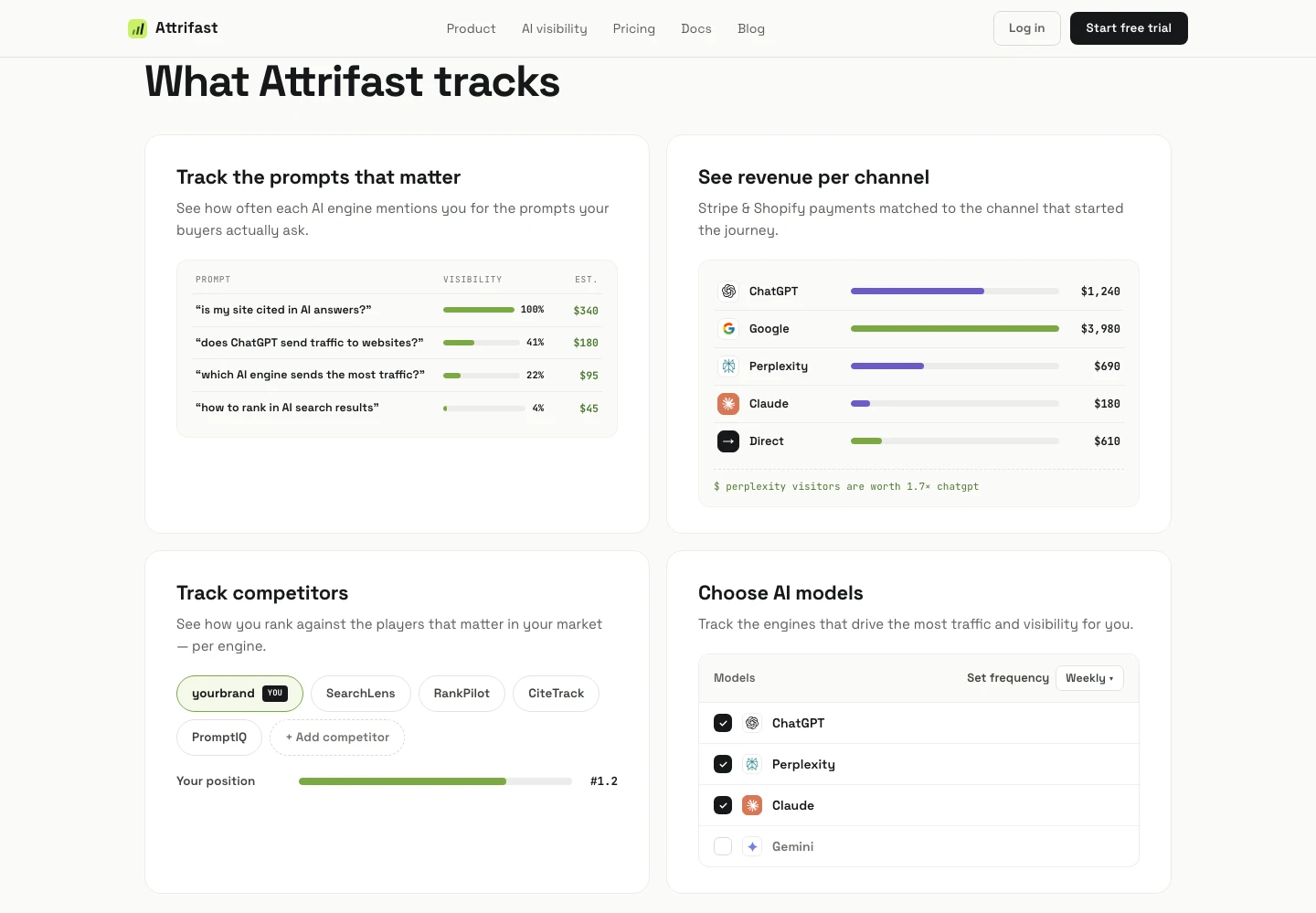
What Attrifast tracks
Traffic volume tells you what happened. Source, session, content, and revenue together tell you what to do next.
4,286
128
3m 31s
$7,150
Acquisition
Organic search
ChatGPT
AI referral
Newsletter
UTM campaign
Direct
No source signal
Content + session
Audience & activity
Acquisition
Content & context
Outcomes
Session analytics
Attrifast groups pageviews into an anonymous website session so you can understand acquisition and conversion without watching or identifying the person behind the screen.
Not session recording
Attrifast is not a heatmap or replay tool today. It does not record mouse movement, clicks as a visual replay, form contents, or screen video. That boundary keeps the product focused on traffic and revenue analytics.
Need qualitative UX research too? Run a dedicated heatmap product alongside Attrifast; use Attrifast to identify which channel and page deserve investigation first.
Attrifast vs GA4
Google Analytics 4
General-purpose analytics
Attrifast
Traffic → customer → revenue
Daily workflow
AI traffic
Revenue
Implementation
Add one Attrifast script tag to your site. The 4 KB script captures each visit, groups it into an anonymous first-party session, detects the source from referrer and campaign signals, and sends the result to your real-time dashboard. Setup takes about 2 minutes and does not require a tag manager.
Tracking traffic by source means grouping visitors by where they came from: organic search, paid ads, social platforms, email campaigns, AI engines, referring sites, or direct traffic. Attrifast also preserves the exact referrer and UTM campaign so you can move from a broad channel to the specific source that produced a visit.
Attrifast offers a 7-day free trial with Pro features. After the trial it is $9.99/month for Starter (1 website, 50k events/mo, 1 seat) or $49/month for Pro (3 websites, 100k events/mo, 5 seats). There is no permanent free tier.
Yes. Attrifast uses a random first-party anonymous ID stored in localStorage rather than third-party cookies or fingerprinting. The ID is scoped to your site, carries no personal identity, and cannot follow a visitor across other websites.
Yes. Connect Stripe with a restricted API key or connect Shopify, and Attrifast matches completed payments to the first-party visitor journey that produced them. Each source then shows visitors, conversions, revenue, conversion rate, and revenue per visitor in the same dashboard.
No. Attrifast tracks session-level analytics, such as pageviews, landing pages, traffic source, duration, conversions, and revenue. It does not record the screen, mouse movements, keystrokes, or form contents. Use a dedicated heatmap or session-replay tool alongside Attrifast if you need qualitative UX research.
No analytics tool can identify every AI referral with certainty. Attrifast identifies AI traffic when an engine preserves a referrer, UTM parameter, or another supported source signal. If a native AI app strips every signal before opening the page, the visit may remain Direct. Attrifast keeps that limitation visible instead of inventing a source.
Attrifast splits ChatGPT, Perplexity, Claude and Gemini into their own revenue lines — joined to real Stripe payments, not estimates.
7-day free trial · $0 due today · then $9.99/mo · cancel anytime