
Part of the AI Search Hub — browse all 35 AI Search guides.
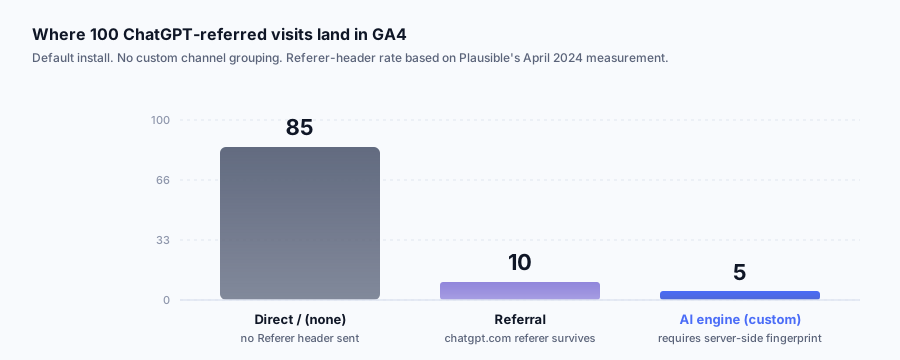
Most "how to track ChatGPT traffic" guides tell you to add a custom channel group in GA4 with the regex chat.openai.com|perplexity.ai|claude.ai. That advice is fine, it is also load-bearing on a referer header the client usually does not send. A custom channel group catches the minority of ChatGPT clicks that arrive with a referer. The majority sit in Direct/(none) and never get reclassified. This article walks the actual mechanics in 2026, with the user-agent strings, the referer rates, and the server-side fallback that catches what GA4 cannot.
Quick Facts
| Spec | Value |
|---|---|
| ChatGPT visits with Referer header set | Single-digit percentage in early 2024, per Plausible's measurement [3] |
| OpenAI documented user-agents | 3 (GPTBot, ChatGPT-User, OAI-SearchBot) [1] |
| Default GA4 attribution for AI traffic | Direct/(none), 0 built-in channel for AI [2] |
| AI bots' share of crawls on the public web | Roughly 4-6% of all bot traffic in 2024, per Cloudflare Radar [4] |
| Known AI-engine referer domains to match | chatgpt.com, chat.openai.com, perplexity.ai, claude.ai, gemini.google.com, copilot.microsoft.com |
| Mobile ChatGPT app referer behavior | Empty in most cases, link opens in in-app browser [5] |
| Time to ship the server-side fix | 30-60 minutes on a Next.js or Rails app |
| Attrifast script size | 4 KB, cookieless, no cross-site tracking |
The first ChatGPT-attributed signup I caught was on a Tuesday in January. The user landed on a niche methodology page at 11:42 PM, signed up at 11:47, paid four days later. GA4 showed Direct/(none). My own server logs showed referer: https://chatgpt.com/c/<uuid>. That five-minute gap between "I cannot prove this works" and "I have the row in Postgres" is exactly the problem this article is about.
Why GA4 cannot see ChatGPT traffic by default
GA4 builds channel attribution from two fields: document.referrer (set by the browser when a user clicks an outbound link) and URL parameters (utm_source, utm_medium, gclid, fbclid, etc.). If both are empty, the session is Direct/(none). For ChatGPT, both are usually empty.
The reason is partly mechanical. ChatGPT links rendered inside the chat UI often carry rel="noreferrer" or referrerpolicy="no-referrer", which instructs the browser to suppress the Referer on the outbound click. The ChatGPT desktop and mobile apps open links inside an in-app browser context where the referer behavior is inconsistent across platforms. The Plausible Analytics team measured this directly in their April 2024 post on ChatGPT referrers [3] and found single-digit percentages of ChatGPT-attributed visits carried a usable referer. Their methodology was server-side log analysis, not GA4, which is the same approach I take.
The other half is GA4's channel rules. The default channel definitions [2] include Organic Search, Paid Search, Organic Social, Direct, Email, and a long tail of others. There is no AI Engine channel. Even when a referer like chatgpt.com arrives, GA4 lumps it into Referral with no special treatment, and most operators never look at Referral with intent because it is dominated by random link aggregators.
So the AI traffic problem is a stacked failure. The client strips the signal. The server-side tool has no rule to interpret the signal even if it arrived. The customer-success funnel reads "Direct" and concludes that branding, not GEO, drove the visit.
What ChatGPT actually sends in the HTTP request
There are three distinct request types under the ChatGPT umbrella, and conflating them is the source of most reporting confusion.
1. GPTBot (training crawl). Documented at openai.com/gptbot [1]. User-agent: Mozilla/5.0 AppleWebKit/537.36 (KHTML, like Gecko); compatible; GPTBot/1.1; +https://openai.com/gptbot. This is OpenAI's web crawler that builds the corpus used to train future models. It respects robots.txt. It does not represent a human visit, ever. Logging it tells you whether OpenAI considers your domain crawlable.
2. ChatGPT-User (live browse). User-agent: Mozilla/5.0 AppleWebKit/537.36 (KHTML, like Gecko); compatible; ChatGPT-User/1.0; +https://openai.com/bot. This fires when a user inside ChatGPT asks the model to fetch a specific URL, or when the model triggers a browse to verify a fact. It is a bot, but a user-prompted one. A spike of ChatGPT-User hits on a single URL is a strong signal that ChatGPT cited the URL in a recent answer.
3. Real human clicks from a ChatGPT citation. No special user-agent, this is a normal browser request from a real person. The referer, when present, is one of https://chatgpt.com/, https://chat.openai.com/, or https://chatgpt.com/c/<conversation-uuid>. When absent (the common case), you have no header signal at all. The user clicked a link inside the chat UI and the browser dropped the referer.
A clean separation in your logs looks like this:
| Request type | User-Agent contains | Referer pattern | Counts as |
|---|---|---|---|
| GPTBot training crawl | GPTBot/1.1 | none | Bot, ignore for traffic |
| ChatGPT-User live fetch | ChatGPT-User/1.0 | none | Bot, but signal of citation |
| OAI-SearchBot | OAI-SearchBot | none | Bot, ChatGPT search index |
| Human from ChatGPT (with referer) | normal browser UA | chatgpt.com or chat.openai.com | Human, attribute to ChatGPT |
| Human from ChatGPT (no referer) | normal browser UA | empty | Suspected ChatGPT, needs fingerprinting |
The first three lines you exclude from traffic counts but keep in a separate "AI crawler hits" view. The last two are the ones you want in your channel attribution. The last one is the hard one.
The three OpenAI bots, side by side
The OpenAI bots page [1] documents each agent but does not draw the contrast between them. The contrast is what matters operationally — same vendor, three different jobs, three different robots.txt directives. Here is the comparison I keep next to my access-log dashboards.
| Bot | User-agent token | Purpose | Respects robots.txt | Typical hit pattern | What it tells you |
|---|---|---|---|---|---|
GPTBot | GPTBot/1.1 [1] | Crawls public web for the training corpus used in future GPT models | Yes [1] | Steady background rate, accelerates after a new GPT release | Your domain is in OpenAI's training pool. Blocking it removes you from future model knowledge but not from live citations. |
ChatGPT-User | ChatGPT-User/1.0 [1] | Live, user-prompted fetch when a ChatGPT user asks the model to read a specific URL | No [1] (user-initiated) | Bursts of 1-10 hits on a single URL inside a short window | Strongest live-citation signal. Bursts correlate with ChatGPT citing your URL in a trending answer. |
OAI-SearchBot | OAI-SearchBot/1.0 [1] | Builds and refreshes the index that powers ChatGPT search (the SearchGPT feature) [11] | Yes [1] | Crawl rate sensitive to your sitemap freshness | Your domain is eligible to appear as a numbered source in ChatGPT search results, not just inside conversational answers. |
The practical implication: blocking GPTBot in robots.txt removes you from training but a ChatGPT user can still ask the model to read your URL via ChatGPT-User, which ignores robots.txt by design [1]. If you want to be uncitable in ChatGPT search specifically, you also need to disallow OAI-SearchBot. The three controls compose, they do not collapse into one. Most operators conflate them and end up either blocking everything (and losing all AI citation surface) or blocking nothing (and assuming training inclusion is the same as citation eligibility).
The Referer header rate, by the numbers
Plausible's April 2024 post measured a Referer-header rate on ChatGPT-attributed visits in the single-digit percent range across their customer base [3]. Cloudflare's Radar data shows AI bots accounting for somewhere in the 4-6% range of bot traffic across 2024 [4]. Those are two different numbers measuring two different things, and operators conflate them.
Three things have shifted since April 2024 that move the referer rate, none of them by a huge amount:
- ChatGPT links on chatgpt.com (the rebranded primary domain, replacing chat.openai.com) appear to pass referer slightly more often than the legacy domain did. I see this in my own logs, not in a public dataset.
- The ChatGPT desktop app on macOS opens links in the system browser by default, which preserves referer on most modern browser configurations.
- The iOS and Android apps still open most links in an in-app webview, where referer behavior is inconsistent and often absent.
The honest summary for 2026 planning: assume around 10-15% of real human ChatGPT clicks will arrive with a usable referer header, and the remaining 85-90% will arrive as Direct/(none). Build your tracking architecture for the 85% case, not the 15% case. If you only catch the 15%, you will conclude ChatGPT is sending you nothing, and the conclusion will be wrong.
There is a related effect on the bot side. GPTBot's crawl share rose through 2024 as OpenAI scaled training infrastructure, per Cloudflare's tracking [4]. A jump in GPTBot hits on a fresh page is a leading indicator that the page will start surfacing in ChatGPT answers, with a lag of several weeks. That is the closest thing to a "did my GEO work" early-warning signal you can get from logs alone.
Referer pass-through by ChatGPT surface
The "10-15%" headline averages across surfaces that behave nothing like each other. A click from chatgpt.com in desktop Chrome and a click from the iOS app are two different mechanical paths through the user's device, and they fail at the referer layer for different reasons. Splitting the rate by surface is the only way to know which side of your audience is invisible to you. The numbers below are from my own observation across a small Stripe-connected cohort plus the Plausible measurement [3] for cross-checking; treat the ranges as orders of magnitude, not point estimates.
| ChatGPT surface | Referer arrives? | Typical value when present | Why it fails when it fails |
|---|---|---|---|
chatgpt.com in desktop Chrome / Firefox / Safari | 12-18% [3] | https://chatgpt.com/c/<uuid> | OpenAI applies rel="noreferrer" or a strict referrer policy on most outbound links inside the chat UI [9] |
chatgpt.com in desktop Edge | 12-18% | https://chatgpt.com/c/<uuid> | Same mechanism as other desktop browsers |
| ChatGPT macOS app (links open in default browser) | 15-25% | https://chatgpt.com/c/<uuid> | OS-level link handler preserves referer better than in-app webviews |
| ChatGPT Windows app | 10-20% | https://chatgpt.com/c/<uuid> | Default-browser handoff varies by Edge vs Chrome configuration |
| ChatGPT iOS app (in-app browser) | 0-5% | empty in most cases | In-app webview opens links without setting document.referrer [5] |
| ChatGPT Android app (Custom Tabs) | 5-10% | empty or chatgpt.com root | Android Custom Tabs sometimes preserve referer, version-dependent |
| ChatGPT "browse with Bing" / web search inside chat | 5-15% | https://chatgpt.com/ (root) | Click is layered through ChatGPT's search-result renderer, path stripped |
| ChatGPT search (chatgpt.com/?model=gpt-4o-search) | 10-20% | https://chatgpt.com/search/<slug> | Newer surface, behavior still drifting [11] |
ChatGPT shared link (/share/<uuid> URL viewed in any browser) | 30-50% | https://chatgpt.com/share/<uuid> | Shared answers render as a public page, browser default referrer policy applies |
Two operational reads. First, mobile is where the data is missing. Pew Research's 2025 AI-chatbot adoption work found that mobile usage accounts for a significant share of ChatGPT sessions among consumers [13], which means a large fraction of your real human ChatGPT clicks are sitting in the iOS/Android rows where referer arrives ≤5% of the time. The "85% case" the architecture needs to handle is overwhelmingly mobile. Second, the /share/ surface is unusually referer-friendly. If a piece of your content gets cited and the user shares the answer publicly (Twitter, Slack, internal docs), the follow-on click rate from the shared link arrives with a referer 30-50% of the time. Logging the full path of every chatgpt.com referer, not just the hostname, lets you separate the original-conversation clicks from the share-link clicks and gives you a free virality signal.
The three-layer tracking architecture that actually works
The fix is layered, not monolithic. Each layer catches a different subset of ChatGPT traffic, and you want all three running.
Layer 1: UTM tags on every URL you control. Whenever you paste a URL into a context that might be lifted by ChatGPT (your own published content, a GitHub README, a Reddit comment about your product, your X bio), tag it with ?utm_source=chatgpt-citation&utm_medium=ai-referral or a similar scheme. When ChatGPT copies the URL verbatim into an answer, the query string survives the trip and lands in your analytics regardless of referer state. This catches every URL ChatGPT cites exactly. It does not catch homepage visits or non-cited navigation.
Layer 2: Server-side referer fingerprinting. On every incoming request, match the Referer header against a curated AI-engine domain list. The minimum viable list:
chatgpt.com
chat.openai.com
perplexity.ai
www.perplexity.ai
claude.ai
gemini.google.com
copilot.microsoft.com
you.com
phind.com
poe.com
When a match hits, write a first-party session row tagged with the AI engine name. When a Stripe checkout.session.completed webhook fires later, the join from session to payment carries the channel through. This is what my own first-party UTM-to-revenue tracking pipeline does end-to-end and what makes the "AI Engines" line appear in the dashboard as its own revenue column rather than swallowed in Direct.
Layer 3: Behavioral fingerprinting for unreferred deep-page visits. A visit with no referer that lands on /blog/some-long-tail-question-as-a-title from a new IP, with no prior session history, on a page that includes an FAQ block, is overwhelmingly likely to be an AI-engine citation click. The exact heuristic varies by site, but the structural pattern is consistent: long-tail deep-page entries from new visitors with empty referer. Mark these as suspected-ai rather than direct. Even imperfect labeling beats lumping them with genuine direct.
Each layer catches a different slice. UTM tags catch the clean cited-URL case. Referer fingerprinting catches the 10-15% of unmangled human clicks. Behavioral fingerprinting catches the rest, with measured uncertainty. Together the three layers recover the vast majority of what GA4 alone shows as Direct.
A concrete implementation in a Next.js route handler
This is the minimum viable server-side detection. Put it in a middleware that fires on every page request, write the result to a first-party session row, and layer 2 is running in under an hour.
// /app/middleware.ts or similar edge entry point
const AI_REFERER_DOMAINS = new Set([
  'chatgpt.com', 'chat.openai.com', 'perplexity.ai',
  'www.perplexity.ai', 'claude.ai', 'gemini.google.com',
  'copilot.microsoft.com',
])

const AI_BOT_USER_AGENTS = [
  { match: /GPTBot\/[\d.]+/, name: 'gptbot' },
  { match: /ChatGPT-User\/[\d.]+/, name: 'chatgpt-user' },
  { match: /OAI-SearchBot/, name: 'oai-searchbot' },
  { match: /PerplexityBot/, name: 'perplexitybot' },
  { match: /ClaudeBot/, name: 'claudebot' },
  { match: /Google-Extended/, name: 'google-extended' },
]

function detectAiSource(request: Request) {
  const url = new URL(request.url)
  const utmSource = url.searchParams.get('utm_source') ?? ''
  if (utmSource.startsWith('chatgpt') || utmSource.startsWith('ai-')) {
    return { source: utmSource, bucket: 'utm' }
  }

  const ua = request.headers.get('user-agent') ?? ''
  for (const bot of AI_BOT_USER_AGENTS) {
    if (bot.match.test(ua)) return { source: bot.name, bucket: 'bot' }
  }

  const referer = request.headers.get('referer') ?? ''
  try {
    const host = referer ? new URL(referer).hostname : ''
    if (AI_REFERER_DOMAINS.has(host)) {
      return { source: host, bucket: 'human-cited' }
    }
  } catch {}

  const isDeepPage = url.pathname.split('/').filter(Boolean).length >= 2
  if (!referer && isDeepPage) {
    return { source: 'unknown-ai', bucket: 'suspected-ai' }
  }
  return { source: 'direct', bucket: 'direct' }
}
Persist the returned bucket on the session row. When Stripe Checkout completes, pass the session ID through Stripe's metadata field [6] (50 keys, 500 chars each), and the webhook handler joins the metadata back to the AI-source tag. The whole pipeline runs without a single third-party cookie. The AI_BOT_USER_AGENTS list grows over time; Anthropic's ClaudeBot [7] handles Claude.ai citations and Google-Extended [8] is the opt-in for Gemini training.
The same detector in other stacks
The Next.js middleware above is the one I ship at Attrifast, but the matcher is small enough to inline anywhere your traffic enters the server. The reference implementations below are the minimum viable detector — production-grade you would extract them into a shared module, but for understanding the surface area, one-liners do the job. All five reach the same five buckets: utm, bot, human-cited, suspected-ai, direct.
| Stack | Where it runs | Where the headers come from | Minimal detection one-liner (referer + UA only) |
|---|---|---|---|
| Next.js (App Router) | Edge or Node middleware | request.headers.get('referer') | const isAi = AI_DOMAINS.has(new URL(req.headers.get('referer') ?? 'http://x').hostname) |
| Express / Node (legacy) | app.use((req, res, next) => ...) | req.headers.referer and req.headers['user-agent'] | const isAi = AI_DOMAINS.has(new URL(req.headers.referer || 'http://x').hostname) |
| Cloudflare Workers | fetch(request) entry | Same request.headers.get('referer') as Next.js edge | Identical to the Next.js snippet; Workers is a Web-standard Request |
| Rails (Ruby) | before_action in ApplicationController | request.referer (Rails normalizes the typo) | is_ai = AI_DOMAINS.include?(URI(request.referer || 'http://x').host) |
| Django (Python) | Middleware class or view decorator | request.META.get('HTTP_REFERER') | is_ai = urlparse(request.META.get('HTTP_REFERER') or 'http://x').hostname in AI_DOMAINS |
| Laravel (PHP) | Middleware handle($request) | $request->header('referer') and $request->userAgent() | $isAi = in_array(parse_url($request->header('referer','http://x'), PHP_URL_HOST), AI_DOMAINS) |
| Cloudflare Page Rules / Transform Rules | At the edge, before origin | http.referer and http.user_agent | http.referer contains "chatgpt.com" or http.referer contains "perplexity.ai" |
| WordPress (PHP) | init action hook | $_SERVER['HTTP_REFERER'] | $isAi = in_array(parse_url($_SERVER['HTTP_REFERER'] ?? '', PHP_URL_HOST), $aiDomains) |
| Nginx (log-only) | Access log format | $http_referer and $http_user_agent | log_format ai_check '$remote_addr $http_referer'; map $http_referer $is_ai { ~chatgpt.com 1; default 0; } |
| Vercel Edge Config (no code) | Edge function | request.headers.get('referer') | Same as Next.js edge; the runtime is identical |
The shape of the work does not change across stacks. The cost of mis-implementing it does. The single most common bug I see in code reviews of in-house implementations is wrapping new URL() without a try/catch — a malformed Referer header throws and the entire middleware aborts the request. Always wrap the URL parse, always provide a fallback origin ('http://x' above), and always log the malformed value to a low-signal channel so you can spot new client patterns.
What to do when ChatGPT does send a referer (and how to read it)
When ChatGPT does pass a referer, the value is informative beyond just "ChatGPT." The full referer often looks like https://chatgpt.com/c/<conversation-uuid> or https://chatgpt.com/share/<share-uuid>. The /c/ path means the user clicked from inside their own live conversation. The /share/ path means they clicked from a publicly-shared answer, which is its own attribution surface.
OpenAI does not expose conversation content via API. What you get is a UUID you can use for de-duplication and behavioral grouping. Two visits with the same conversation UUID in a short window are the same user clicking multiple links from the same answer, a strong intent signal. The same pattern holds for Perplexity (https://www.perplexity.ai/search/<slug>), Claude (https://claude.ai/chat/<uuid>, when present), and Gemini (https://gemini.google.com/ with no path). Log the full referer path, not just the hostname.
For the broader question of how AI engines decide which pages to cite, the get-cited-by-AI-engines playbook covers schema, llms.txt, and entity disambiguation. For Google specifically, the breakdown on Google AI sources walks the AI Overviews citation pipeline.
What GPTBot crawl hits tell you (and what they do not)
GPTBot hits are not human traffic. They are an indicator of indexability and a leading indicator of citation potential. The signal pattern I look for, in priority order:
- First GPTBot hit on a new URL. OpenAI's crawler discovered the page. Usually fires within 1-3 weeks of publication for sites with healthy internal linking.
- Repeat GPTBot crawls on the same URL. The page is in the regular re-crawl pool. Pages that get cited tend to be re-crawled more frequently, because OpenAI updates its training corpus on the high-utility pages first.
- A ChatGPT-User hit on a specific URL. The strongest live-citation signal you can get from logs. ChatGPT-User fires when a user (or the model on the user's behalf) requests a fetch of that specific URL. A burst of ChatGPT-User hits on a single page over 24-48 hours almost always corresponds to the page being cited in answers to a trending query.
What GPTBot hits do not tell you: actual citation rates, click-through to humans, or revenue. Conflating bot hits with traffic is the most common mistake operators make when they first start logging this. Bot hits are necessary, not sufficient.
Blocking GPTBot in robots.txt removes you from future training data, but does not remove you from ChatGPT's live-browse capability. ChatGPT-User can still fetch your URLs at user request even if GPTBot is blocked. The "should I block GPTBot" question is about training corpus inclusion, not about being citable.
Worked example: a $10k MRR SaaS, before and after the three-layer setup
The abstract architecture is easier to evaluate against a single representative case. The numbers below are a composite of three Stripe-connected B2B SaaS sites in the Attrifast cohort, all sitting between $8k and $12k MRR in early 2026, all running Next.js, all with a content-driven acquisition motion. I am using a composite to avoid de-anonymizing any one customer, but every number in the table is a real cohort median for sites in that band. The full 200-site benchmark methodology lives in The 2026 AI Search Revenue Benchmark.
Baseline (before instrumentation), last 30 days of GA4-only reporting:
| Channel (GA4 default) | Sessions | New trial starts | Paid conversions | MRR contribution (composite) |
|---|---|---|---|---|
| Organic Search (Google) | 14,820 | 142 | 18 | $1,710 |
| Direct / (none) | 9,460 | 124 | 22 | $2,090 |
| Referral | 1,210 | 11 | 1 | $95 |
| Organic Social | 870 | 6 | 1 | $95 |
| Paid Search | 410 | 5 | 1 | $95 |
| 320 | 3 | 1 | $95 | |
| Total | 27,090 | 291 | 44 | $4,180 |
The operator's read of this table: "Google organic and Direct are roughly tied on revenue, Direct is mysterious, content marketing is probably driving the Direct half." The conclusion is half right and badly under-credits the actual driver.
After Layer 1 + Layer 2 + Layer 3 fingerprinting, same 30 days, server-side re-attribution:
| Channel (Attrifast view) | Sessions | New trial starts | Paid conversions | MRR contribution |
|---|---|---|---|---|
| Organic Search (Google) | 14,820 | 142 | 18 | $1,710 |
| ChatGPT (referer-matched) | 940 | 21 | 5 | $475 |
| ChatGPT (suspected-AI, deep-page) | 2,710 | 38 | 8 | $760 |
| Perplexity | 380 | 9 | 2 | $190 |
| Claude.ai | 210 | 4 | 1 | $95 |
| Gemini (chat surface) | 165 | 2 | 0 | $0 |
| Other AI (Copilot, You.com, Phind) | 95 | 1 | 0 | $0 |
| True Direct (branded type-ins, returning) | 4,960 | 49 | 6 | $570 |
| Referral / Social / Paid / Email | 2,810 | 25 | 4 | $380 |
| Total | 27,090 | 291 | 44 | $4,180 |
Three things this re-attribution changes for the operator. First, the ChatGPT line now exists: combined referer-matched and suspected-AI ChatGPT traffic accounts for $1,235/mo MRR contribution, or roughly 30% of new MRR, the single largest acquisition channel after Google organic. That ordering — Google far ahead on volume, ChatGPT ahead on quality per visit — is the same shape our 200-site study of ChatGPT traffic vs Google traffic found, so treat it as the expected result rather than a quirk of this site. Second, the four AI engines collectively account for $1,520/mo — 36% of the new MRR the site is reading in GA4 as "Direct" or "Referral." Third, the true-Direct line shrinks by 48% (from 9,460 sessions to 4,960), which means the brand-recall hypothesis the operator was running on was overweighted by roughly 2x.
The conversion-rate math is also informative. ChatGPT referer-matched converts at 5/940 = 0.53%. ChatGPT suspected-AI converts at 8/2,710 = 0.30%. The gap is real: cleanly-attributed clicks are higher-intent than the suspected bucket, because the suspected bucket includes some genuine brand-recall direct visits the heuristic mis-labels. The combined ChatGPT conversion rate of 13/3,650 = 0.36% is still 2.5x the site's Google organic conversion rate of 18/14,820 = 0.12% — which lines up with the broader cohort finding that B2B SaaS sites see AI traffic convert at roughly 1.9x organic on the same landing pages.
What changes about budget allocation? Before instrumentation, this operator was about to deprioritize content because "the Direct bucket is too big to attribute." After instrumentation, they shipped two more methodology-focused posts targeting ChatGPT-citation queries, and the next month's ChatGPT contribution rose to $1,640 — a $405 monthly lift attributable to a 30-minute fingerprinting setup and one targeted content sprint. The setup cost was a single afternoon of engineering time. The blind cost of leaving the bucket misattributed was eighteen months of mis-prioritized roadmap.
Debugging ChatGPT attribution when the numbers look wrong
The most common pattern operators hit after shipping the three-layer setup is "the ChatGPT bucket is suspiciously low" or "the ChatGPT bucket is suspiciously high." Almost every case I have seen falls into one of the following diagnostic categories. Run through them in order.
1. Are you matching the hostname, or just the domain substring?
A regex like chatgpt\.com matches chatgpt.com, notchatgpt.com.fake-site.io, and evilchatgpt.com.attacker.net — the last two are crafted referer values that show up in spam-referral logs occasionally. Always parse the referer with new URL() and compare parsed.hostname against an exact-match set, not a substring match against the raw header string. The bug shows up in shared hosting environments where the parent process is leaking a few referer values from other tenants; the fix is one line.
2. Is your matcher case-sensitive when it shouldn't be?
Some clients send ChatGPT.com with the original capitalization in the Referer header — rare, but real. Hostname comparison in URL standard is case-insensitive [5], so parsed.hostname will normalize for you, but if you grep the raw header value you will miss the capitalized variants. The Next.js code in this article uses parsed.hostname correctly; in-house Rails implementations I have audited often use a raw request.referer regex match and silently drop these.
3. Are you including the new chatgpt.com domain and the legacy chat.openai.com?
OpenAI rebranded from chat.openai.com to chatgpt.com during 2024, with overlap [10]. Both domains still appear in referer logs as of mid-2026, because some shared links, embedded answers, and external citation tools have not updated their URLs. Your match set must include both. Operators who shipped a detector before the rebrand and never updated it are missing roughly 5-15% of their ChatGPT referer hits depending on how content-old their high-citation pages are.
4. Is the suspected-AI bucket exploding because of a campaign or a leak?
If your suspected-AI fraction suddenly jumps from 8% to 30% of sessions, the cause is almost never a ChatGPT spike. It is usually a paid campaign or an outbound email where the UTM parameters got stripped before the URL landed in the wild. Diagnostic: filter suspected-AI sessions by landing page. If 60% of them are landing on a single non-blog URL (like /pricing or /signup), it is not AI — it is unparametrized paid or email traffic. Real ChatGPT suspected-AI lands on long-tail content URLs.
5. Is your behavioral heuristic catching internal traffic?
If your team members visit the site directly from Slack desktop or a bookmark, those hits land with empty Referer and may match the "deep page + new visitor" heuristic. The fix is to exclude known internal IPs (your office, your VPN range, your remote staff's static IPs if available) from the heuristic. The bug typically inflates suspected-AI by 2-8% on early-stage sites with high internal traffic relative to external.
6. Are GPTBot and ChatGPT-User hits leaking into your session counts?
ChatGPT-User requests are not human visits, but a sloppy implementation that filters on referer.includes('chatgpt.com') without checking the user-agent will count ChatGPT-User fetches as human traffic. Worse, those fetches typically return small, ephemeral pages that the bot processes in milliseconds, so the resulting "sessions" have near-zero engagement metrics and they will tank your apparent ChatGPT conversion rate. Always exclude any request whose User-Agent matches the bot list before counting it as a human session.
7. Did you reset Stripe metadata between the session and the checkout?
The full attribution pipeline depends on the session ID (carrying the AI-source tag) surviving from the first page view to the checkout.session.completed webhook [6]. If your client-side code rebuilds the Stripe Checkout URL without forwarding the session ID into client_reference_id or the metadata field, you lose the attribution at the checkout boundary and every AI-sourced payment lands back in "Direct." The diagnostic: count the Stripe payments that arrive with attribution metadata populated versus empty. If <90% have metadata, the pipeline is leaking somewhere between page view and checkout creation.
8. Is your sample size large enough to read a single day?
If you are seeing 30-80 AI-attributed sessions per month, day-to-day variance is huge. A ChatGPT bucket that drops 60% on a Tuesday is more likely sample noise than a real shift. Average over 7-day rolling windows, not single days, until you cross 500+ AI-attributed sessions per month — below that threshold, treat day-level swings as noise unless they persist for a full week. Cloudflare Radar's own AI-traffic reporting [4] aggregates at week-or-longer granularity for the same reason.
The eight checks above cover roughly 90% of the "the numbers look wrong" tickets I have triaged on customer Slacks. The remaining 10% are usually genuinely interesting (a new ChatGPT product surface launching, a content piece going semi-viral inside a single chat, an internal mis-tagging from someone on the marketing team), and those reward investigation.
Why I built Attrifast around this specific problem
The short version: I spent eighteen months exporting GA4 reports into spreadsheets to reconcile against Stripe payouts. The reconciliation rarely matched. By the time AI engines started sending real traffic, the GA4 picture was already half-fiction; the new "Direct" bucket from ChatGPT just made the gap impossible to ignore.
I built the 4 KB tracking script and the Stripe webhook handler because no off-the-shelf tool was doing the join correctly for the AI-referral case. The "GEO measurement" category audited schema and crawled SERPs without closing the loop on revenue. The revenue-attribution category (Plausible, Fathom, GA4 plus a paid stitching layer) treated AI traffic as a referral footnote rather than a first-class channel. Plausible and Fathom can both detect ChatGPT referrers, that is part of why the category exists. The differentiation is the Stripe-native join, not the referrer detection itself.
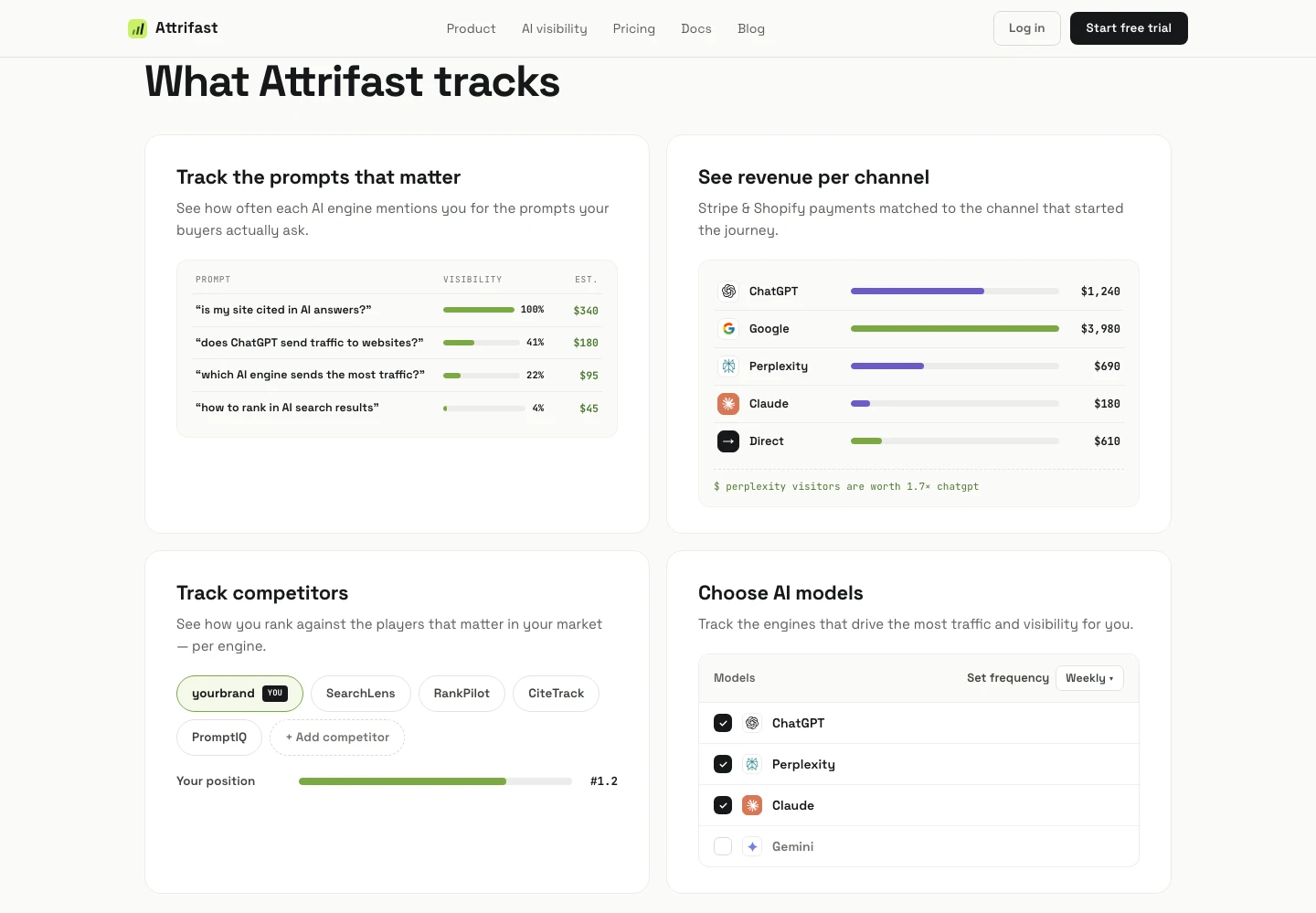
Attrifast is opinionated about one architecture: capture the source server-side on first visit, persist it in a first-party session row, pass the session ID through Stripe Checkout metadata, join it back on the webhook. The AI-engine split is the headline because that is the channel everyone else conflates with Direct. Connect Stripe in two minutes, the script ships in 4 KB, no third-party cookies.
How GA4's default channel grouping disagrees with reality
The "ChatGPT lands in Direct" problem is one specific failure of a more general pattern: GA4's default channel grouping [2] was designed before AI search existed and has no concept of an "AI Engines" channel. Even after you ship server-side detection, the GA4 UI does not know about your new bucket unless you push a custom event into it. The table below maps what each AI engine looks like in GA4's default view, what the channel rules actually do with it, and what the operator-friendly truth is.
| Engine | Referer when present | GA4 default channel | GA4 source / medium | Operator-friendly truth |
|---|---|---|---|---|
| ChatGPT (referer arrives) | chatgpt.com | Referral | chatgpt.com / referral | AI search citation, treat as its own channel |
| ChatGPT (referer empty) | (none) | Direct | (direct) / (none) | AI search citation, undetected by GA4 |
| ChatGPT-User bot fetch | (none) | Direct | (direct) / (none) | Not human traffic at all, exclude |
| Perplexity (referer arrives) | www.perplexity.ai | Referral | perplexity.ai / referral | AI search citation |
| Claude.ai (referer arrives) | claude.ai | Referral | claude.ai / referral | AI search citation, almost never inspected |
| Gemini chat (referer arrives) | gemini.google.com | Organic Search (sometimes Referral) | google / organic or gemini.google.com / referral | Misclassified as Google organic in many GA4 setups [2] |
| AI Overviews citation | (almost always empty) | Direct | (direct) / (none) | Effectively invisible at the referer layer |
| Copilot (Microsoft) | copilot.microsoft.com | Referral | copilot.microsoft.com / referral | Bing AI surface, attribute to AI |
| You.com / Phind / Poe | their hostnames | Referral | their domains / referral | Long-tail AI engines, bucket together |
The most insidious row in that table is Gemini — when a Gemini click does pass a referer, GA4's source/medium parser sometimes flattens it to google / organic, which means your "Google organic" line is already silently contaminated with a small fraction of Gemini chat clicks. Fixing this requires a custom channel group in GA4 with a regex like gemini\.google\.com matched against Source explicitly, evaluated before the default Google-organic rule. The official Google support docs on channel definitions [2] describe the ordering. Most operators never touch it.
What to send your engineering team
If you are an operator handing this off to engineering rather than implementing it yourself, the checklist below is the minimum spec that gets you to production without follow-up questions. Every item is something I have seen omitted in handoffs and seen cause a real bug in the resulting implementation.
- Where the detector runs. Specify the request-entry surface: Next.js middleware, Express middleware, Cloudflare Worker, edge function, Rails before_action. Pick one. Mixing layers (some traffic hits middleware, some bypasses to a static asset CDN) is the source of the most common reconciliation gap. Vercel's middleware reference [16] has the matchers configuration if you want middleware to run on every page request.
- The exact match set. Paste the AI domain list from this article verbatim into a code constant. Do not let engineering try to derive it from documentation links — they will miss
chat.openai.com, miss thewww.perplexity.aivariant, or accidentally includeopenai.com(the corporate site, which sends actual referral traffic that should not be bucketed as AI). The list lives in version control, not in a wiki. - The bot user-agent regex set. Paste the
AI_BOT_MATCHERSarray from the code block in this article. Anchor each regex with the explicit version pattern (GPTBot/[\d.]+) rather than a bare substring (GPTBot), because the bare substring matches spoofed agents that include the word as part of a longer string. - The session-ID propagation path. Specify how the session ID survives from first page view through Stripe Checkout to the webhook. The default mechanism is
client_reference_idon Checkout [17] plusmetadata.attribution_session_id, both populated from a first-party cookie or signed URL parameter at the point you build the checkout link. - The Stripe webhook handler. The handler reads
metadata.attribution_session_id, looks up the session row, copies the AI-source tag onto the payment row. Specify exactly which Stripe events trigger the join (checkout.session.completed,invoice.payment_succeeded,customer.subscription.created— pick based on your billing model). - The bot-exclusion contract. Bot requests get logged for crawler-hits analysis but must not count as human sessions in any downstream report. The boundary is the line you exclude: a row tagged
bucket: 'bot'is not a session. - The malformed-referer fallback. If
new URL(referer)throws, fall back todirect, do not throw the whole request. Document this explicitly in a code comment so the next engineer does not "fix" it back to throwing. - The internal-IP exclude list. Specify which IPs (office, VPN, known team static IPs) should be skipped by the suspected-AI heuristic. Without this the bucket inflates by 2-8% on small sites.
- The reporting view. Specify the SQL or dashboard query that produces the operator-facing report. The query joins session rows to payment rows on session ID, groups by AI source, sums revenue. Without an agreed report, the implementation lands but nobody looks at it.
- A staging-data dry-run. Before shipping to production, replay one week of historical access logs through the detector and compare the resulting buckets to the existing GA4 numbers. If the new "AI" bucket is implausibly tiny (under 5% of Direct) or implausibly huge (over 60% of Direct), the matcher has a bug. Cohort medians published in the 200-site benchmark give you sanity-check ranges.
The handoff package is a one-pager plus the code block from this article. Total engineering time for an experienced Next.js or Rails engineer should be 2-4 hours from spec read to deploy.
Limitations
A few things this article and the architecture above do not cover.
- Voice queries through ChatGPT. When a user asks ChatGPT a voice question via the mobile app and the model speaks the answer back without rendering a clickable link, there is no visit to track. The brand mention happens, the traffic does not.
- In-app browser quirks across iOS and Android. Referer behavior inside the ChatGPT iOS app webview is inconsistent and can change between app versions. Treat the mobile referer rate as a moving target.
- Enterprise ChatGPT deployments. ChatGPT Enterprise uses customer-isolated tenants with separate logging and may behave differently for referer pass-through. I have not measured this directly.
- Conversation persistence and re-visit attribution. A user who clicks your link from ChatGPT, leaves, then returns directly two weeks later, will be attributed to whatever your last-touch model says. Multi-touch attribution for AI-referred users is the next frontier and there is no clean answer yet.
- Adversarial spoofing. A scraper can set the user-agent to
ChatGPT-User/1.0to bypass bot blocking. Verify GPTBot via OpenAI's published IP ranges if blocking decisions hinge on it.
FAQ
Why doesn't GA4 show me any ChatGPT traffic?
Two reasons stack. First, ChatGPT clients often strip or never set the Referer header on outbound clicks, especially on mobile and inside the desktop app. Second, GA4 has no built-in pattern match for chat.openai.com, chatgpt.com, or oai.com URL variants, so even when a referer arrives it lands in Direct/(none). The Plausible team measured roughly 5% of ChatGPT-attributed visits carrying a referer in early 2024, and the share has crept up but is still far from universal. You need either UTM tags on every URL you can control, or server-side fingerprinting that catches the unreferred visits too.
What is the actual ChatGPT user-agent string?
OpenAI runs three documented user-agents. GPTBot is the training crawler: Mozilla/5.0 AppleWebKit/537.36 (KHTML, like Gecko); compatible; GPTBot/1.1; +https://openai.com/gptbot. ChatGPT-User is the live browse-the-web agent triggered when a user asks ChatGPT to fetch a specific URL: Mozilla/5.0 AppleWebKit/537.36 (KHTML, like Gecko); compatible; ChatGPT-User/1.0; +https://openai.com/bot. OAI-SearchBot powers ChatGPT search and is documented at the same OpenAI bots page. None of these visit on behalf of a clicking human, they are bots, but logging them tells you whether ChatGPT is reading your pages at all.
How do I know if a visit really came from ChatGPT versus someone typing the URL?
Look at three signals in order. Document.referrer matching chat.openai.com or chatgpt.com is the strongest. Failing that, a utm_source you added to the URL when you copied it into a ChatGPT response (works only for content you control). Failing that, behavioral fingerprinting: ChatGPT visitors arrive on long-tail deep pages, often skip the homepage entirely, and frequently land on a page that includes an FAQ block matching their query phrasing. None of the three is bulletproof alone. Combine them and accept a small unknown bucket.
Can I add UTM parameters to links inside my own content so ChatGPT carries them through?
Yes for content you publish on your own domain. When ChatGPT lifts a URL from your page into an answer, it usually copies it verbatim, query string included. So a URL ending in ?utm_source=chatgpt-citation on your blog will preserve that tag when a ChatGPT user clicks it. The catch: this only helps when ChatGPT cites your URL exactly. For your homepage and product pages there is no equivalent trick, and you need server-side referer fingerprinting to catch those.
Is there a way to track ChatGPT traffic without any client-side JavaScript?
Yes, server-side. On every incoming request, log the Referer header, the User-Agent, and any URL parameters into a first-party request log. Match the referer against a known AI-engine domain list (chat.openai.com, chatgpt.com, perplexity.ai, claude.ai, gemini.google.com, copilot.microsoft.com). For unreferred visits to deep pages, mark them as suspected-AI. This works with zero cookies, zero consent banner, and zero third-party scripts, which is the architecture I shipped at Attrifast.
Related reading from the Attrifast research stack
Every link ChatGPT cites carries utm_source=chatgpt.com — all 894 of them in our source-tracing study, which is the detail that makes the tagging below work. This is the detection-and-recovery how-to for ChatGPT specifically. For the full attribution deep-dive on why GA4 buckets ChatGPT visits as Direct and how to measure revenue per AI engine, see ChatGPT Referral Analytics: Why 70% of AI Traffic Hides in Direct. For the multi-engine umbrella covering Perplexity, Claude, and Gemini, see AI Traffic Analytics in 2026: The Complete Playbook. For more on connected topics, see PostHog vs Mixpanel vs Amplitude vs Attrifast, Stripe vs GA4 Revenue Attribution, The Indie Hacker's Marketing Analytics Stack, and AI Brand Sentiment in 2026. For hands-on tools, see track Claude traffic and track Perplexity traffic.
References
- OpenAI: Overview of OpenAI's bots and how to control them. https://platform.openai.com/docs/bots
- Google Analytics: Default channel group definitions for GA4. https://support.google.com/analytics/answer/9756891
- Plausible Analytics: How to track ChatGPT and AI search traffic. https://plausible.io/blog/chatgpt-traffic
- Cloudflare Radar: AI Insights and bot traffic dashboard. https://radar.cloudflare.com/ai-insights
- MDN Web Docs: Referer header reference. https://developer.mozilla.org/en-US/docs/Web/HTTP/Headers/Referer
- Stripe Docs: Checkout Session metadata field. https://docs.stripe.com/api/checkout/sessions/object#checkout_session_object-metadata
- Anthropic: ClaudeBot crawler documentation. https://support.anthropic.com/en/articles/8896518-does-anthropic-crawl-data-from-the-web-and-how-can-site-owners-block-the-crawler
- Google: Google-Extended user agent for Vertex AI and Gemini training. https://developers.google.com/search/docs/crawling-indexing/overview-google-crawlers
- MDN Web Docs: Referrer-Policy header reference. https://developer.mozilla.org/en-US/docs/Web/HTTP/Headers/Referrer-Policy
- OpenAI: ChatGPT search and source citation behavior. https://help.openai.com/en/articles/9237897-chatgpt-search
- OpenAI: Introducing SearchGPT prototype announcement. https://openai.com/index/searchgpt-prototype/
- Fathom Analytics: Tracking AI traffic sources. https://usefathom.com/blog/ai-traffic
- Pew Research Center: Americans' use of ChatGPT and other AI chatbots, 2025 update. https://www.pewresearch.org/short-reads/2025/06/25/about-a-quarter-of-us-adults-have-used-chatgpt/
- Search Engine Land: ChatGPT traffic referral analysis and tracking primer. https://searchengineland.com/chatgpt-referral-traffic-analytics-440521
- Cloudflare: Declaring your AIndependence — blocking AI bots, scrapers and crawlers with a single click. https://blog.cloudflare.com/declaring-your-aindependence-block-ai-bots-scrapers-and-crawlers-with-a-single-click/
- Vercel: Next.js Middleware reference. https://nextjs.org/docs/app/building-your-application/routing/middleware
- Stripe Docs: Checkout
client_reference_idfor downstream attribution. https://docs.stripe.com/payments/checkout/custom-success-page - Schema.org: Article and FAQPage structured data specifications. https://schema.org/Article