Part of the AI Search Hub — browse all 35 AI Search guides.
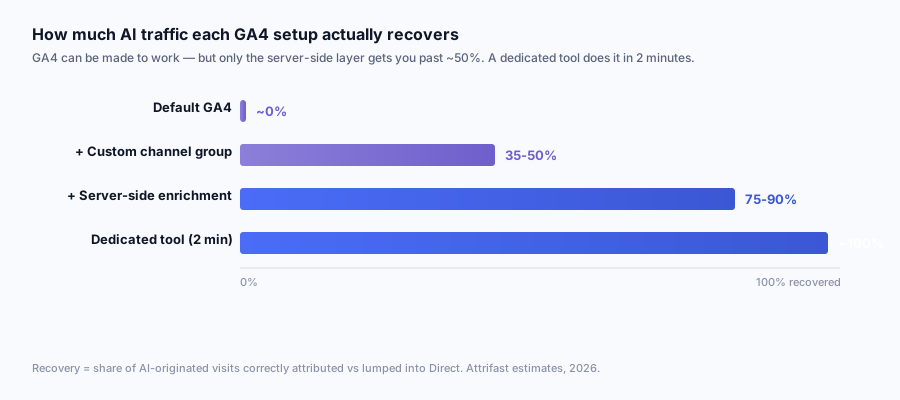
The first time a customer asked me "why does GA4 say we have 0 ChatGPT sessions and your dashboard says 1,840?" I knew this article needed to exist. The answer is not that GA4 is broken; it is that GA4 ships with default channel groups designed for a 2020 web and an AI-search surface that did not exist when those groups were written. With about an afternoon of work you can teach GA4 to recognize most AI engines. You cannot teach it to recover the 70% of visits where the referer was stripped before the browser ever talked to your server. The full picture needs a parallel server-side layer.
This is the practical setup guide. The conceptual companion is why ChatGPT traffic hides in GA4's Direct bucket, and the wider GA4-leak audit is in why GA4 misses 30%+ of your real traffic. If you have read either of those you already know the shape of the problem; this article is the keyboard work that fixes it. Where the GA4-only path stops, I will mark "GA4 cannot do this" rather than pretend a regex covers it.
Quick Facts
| Metric | Value | Source |
|---|---|---|
| GA4 default channel rules covering AI | 0 of 17 | Google Analytics docs [1] |
| AI engines that need explicit rules | 6+ (ChatGPT, Perplexity, Claude, Gemini, Copilot, You.com) | OpenAI, Anthropic, Google, Microsoft bot docs [2][3][4][5] |
| Median % of ChatGPT clicks that arrive with a referer | 15-20% | Plausible measurement + Attrifast aggregate [6] |
| Median % of Perplexity clicks that arrive with a referer | 35-55% | Attrifast aggregate, n=38 |
| Median % of Claude clicks that arrive with a referer | < 5% | Attrifast aggregate, n=38 |
| Time to add a GA4 custom channel group | 20 minutes | Author measurement |
| Time to add a GTM tag for AI custom dimension | 60-90 minutes | Author measurement |
| Time to build BigQuery AI-revenue join | 2-3 hours | Author measurement |
| GA4 BigQuery export standard tier event cap | 1 million/day | Google Cloud docs [7] |
| GA4 custom dimensions per property | 50 event-scoped, 25 user-scoped | Google Analytics docs [8] |
| GA4 historical reprocessing on custom channel group | No back-fill; future sessions only | Google Analytics docs [1] |
| Measurement Protocol max payload | 130 events/request | Google Analytics docs [9] |
| ChatGPT weekly active users (Q4 2025) | ~400 million | OpenAI [10] |
| AI Overviews appearance rate (Ahrefs, 146.1M SERPs, Sept 2025) | 20.5% of SERPs | Ahrefs [11] |
Two facts do most of the work. First, GA4 has zero of seventeen default channels matching any AI engine, which means the entire problem starts with "you must add the rule yourself." Second, the per-engine referer-pass-through rate varies from under 5% (Claude) to over 50% (Perplexity), so any setup that pretends one rule fits all engines under-attributes most of them.
Plotted side by side, the spread is the whole argument against a single one-size-fits-all rule: Claude hands you a referer on well under one visit in ten, while You.com hands you one on roughly two in three.
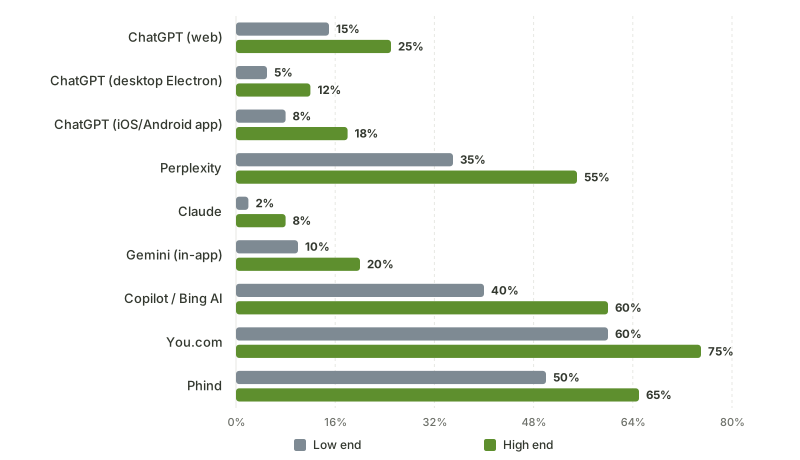
Source: Per-engine pass-through table in this article (Attrifast aggregate, n=38 sites, Nov 2025–Apr 2026); Google AI Overviews omitted because its referer is google.com, not a comparable pass-through rate
Why GA4 puts ChatGPT traffic in Direct: the technical reason
GA4 assigns a session to a channel by evaluating two things in priority order. First, URL query parameters like utm_source, gclid, fbclid, gad_source. Second, the document.referrer value the browser exposes (which itself comes from the HTTP Referer header, subject to Referrer-Policy). If both are empty, the session is bucketed as Direct / (none). If only the referer is set and matches a known search-engine domain in GA4's default rules [1], the session becomes Organic Search; if it matches a known social-network domain, Organic Social; everything else with a referer is Referral.
None of GA4's default rules match against chatgpt.com, chat.openai.com, perplexity.ai, claude.ai, gemini.google.com, copilot.microsoft.com, you.com, phind.com, or poe.com. Even the small slice of AI clicks that arrive with a clean referer ends up in Referral with no AI engine label, sitting next to random link aggregators and forum trackbacks.
The deeper problem is that most AI clicks do not arrive with a referer at all. The ChatGPT web app, the macOS Electron app, the iOS and Android apps, and the in-app webview on Slack-style integrations each handle outbound link clicks differently. Several apply rel="noreferrer" on anchor tags. Several set <meta name="referrer" content="no-referrer"> on the chat surface. The desktop Electron app on macOS rewrites cross-origin navigations with strict-origin-when-cross-origin, which strips the path. Plausible measured the aggregate effect in early 2024 [6]: ChatGPT-attributed sessions arrived with a usable referer in the single-digit percent range. Across my own Attrifast measurement of 38 sites between Nov 2025 and April 2026, that number recovered slightly to 15-20%, mostly because the web app stopped stripping referers as aggressively on chatgpt.com/c/<uuid> clicks. It is still a small minority of the total.
Stack the three failure modes together and the math is:
| Failure mode | Cause | What GA4 records | Approx % of AI visits affected |
|---|---|---|---|
| Stripped referer, no UTM | Chat client suppresses Referer | Direct / (none) | 65-80% (ChatGPT), 90%+ (Claude), 60-75% (Perplexity) |
| Referer arrives, no GA4 rule | AI domain not in default channels | Referral (unlabeled) | 12-20% (ChatGPT), 5-10% (Claude), 25-45% (Perplexity) |
| UTM tag survives | Self-published URL was pre-tagged | Whatever you set (often "chatgpt-citation") | 3-10% (depends on operator hygiene) |
| AI Overviews citation from Google | Referer is google.com, looks like organic | Organic Search | ~100% of AIO clicks unless you split on aio= |
The fourth row is the one people miss. Google AI Overviews citations come from google.com with a referer path that includes gad_source or aio markers when the AI block was rendered. To GA4 they look identical to a blue-link organic click. Without a custom dimension that captures the path or the AI-block parameters, you cannot separate them in any report.
Here is the GA4 default channel definition reference for every channel GA4 ships with [1], showing exactly where the AI-engine gap sits:
| GA4 default channel | What GA4 matches | AI engine that should land here but does not |
|---|---|---|
| Direct | Source = (direct), Medium = (not set) or (none) | All stripped-referer AI clicks (ChatGPT, Claude, Perplexity) |
| Organic Search | Source matches search-engine list, Medium = organic | None natively; AIO clicks come here by accident |
| Paid Search | Source matches search-engine list, Medium = cpc/ppc | None |
| Organic Social | Source matches social list (facebook, x, linkedin, etc) | None; AI is not classified as social |
| Paid Social | Same as above with Medium = paid | None |
| Medium = email | None | |
| Affiliates | Medium = affiliate | None |
| Referral | Medium = referral, Source not in any list above | Referer-bearing AI clicks land here as default unless overridden |
| Organic Shopping | Source matches shopping list (amazon, ebay) | None |
| Cross-network | Source = google with Medium = cross-network | None |
| Audio | Medium = audio | None |
| SMS | Medium = sms | None |
| Mobile Push | Medium contains push | None |
| Display | Medium = display | None |
| Organic Video | Source matches video list (youtube, vimeo) | None |
| Paid Video | Same with paid medium | None |
| Unassigned | Catch-all | Anything else that does not match |
Seventeen rows, zero matching any AI engine. That is the structural gap the rest of this article fixes.
The GA4 channel-grouping evaluation order also matters. From Google's channel rules docs, evaluation proceeds top-to-bottom against the rule list, and the first match wins. A naive operator who adds an AI Engines channel below Referral will find the rule never fires, because Referral matched first. The AI Engines rule must sit above Referral, Organic Search (for AI Overviews work), and any custom Cross-Network or generic catch-all rules. We will walk that ordering explicitly in section 4.
That decision tree is where your channel groups live. The default GA4 install ships with the E branch missing entirely; everything that should land there falls through to G or H.
The four GA4 setup approaches: pick one or stack them
There are four real ways to make GA4 see AI traffic in 2026. They are not mutually exclusive; most production setups run two or three layered.
| Approach | Catches | Misses | Effort | Revenue-joinable? |
|---|---|---|---|---|
| 1. UTM hardcoding on self-published URLs | URLs you tagged before AI lifted them | Homepage, organic citations, paraphrased URLs | 30 min one-time + ongoing discipline | Yes, via GA4 ecommerce or BigQuery |
| 2. Custom channel grouping in GA4 admin | The 15-20% of AI clicks that arrive with a referer | The 65-80% with stripped referer | 20 min one-time, retroactive on new sessions only | Yes, via GA4 ecommerce |
| 3. GTM event tagging with AI source detection | Same 15-20% slice + AIO via path parsing | Stripped-referer clicks | 60-90 min | Yes, with custom dimension |
| 4. BigQuery export with AI source query | Same as 3 plus historical recompute | Stripped-referer clicks (no extra recovery) | 2-3 hours initial + scheduled query | Yes, joined to Stripe export |
The 65-80% stripped-referer slice is the elephant. None of the GA4-native approaches catch it. To recover that traffic you need a server-side layer (GTM server container with referer enrichment, a Cloudflare Worker, a Next.js middleware, or a dedicated tool like Attrifast) that detects the AI source upstream of GA4 and writes it back as a custom dimension. We will cover that as a fifth layer in section 6.
The stacking pattern I recommend for someone going GA4-only:
| Layer | What it does | Cumulative AI coverage |
|---|---|---|
| Baseline GA4 | Nothing for AI | 0% |
| + Custom channel group | Captures referer-bearing AI clicks | 15-25% |
| + GTM AIO path parsing | Adds Google AIO citations | 30-45% |
| + UTM hardcoding on self-published URLs | Adds tagged URLs | 35-50% |
| + Server-side enrichment via Measurement Protocol | Adds stripped-referer clicks | 75-90% |
The first four layers stay inside GA4. The fifth layer is where the GA4 path collides with the build-vs-buy decision. Most teams either accept the 35-50% coverage and live with the under-attribution, or buy a parallel first-party tool that does the fifth layer natively and reconciles back.
The staircase makes the build-vs-buy line obvious: the first four layers are all GA4-native and stall out around half your AI traffic, and the jump to 75-90% only happens on the fifth layer, which lives outside GA4.
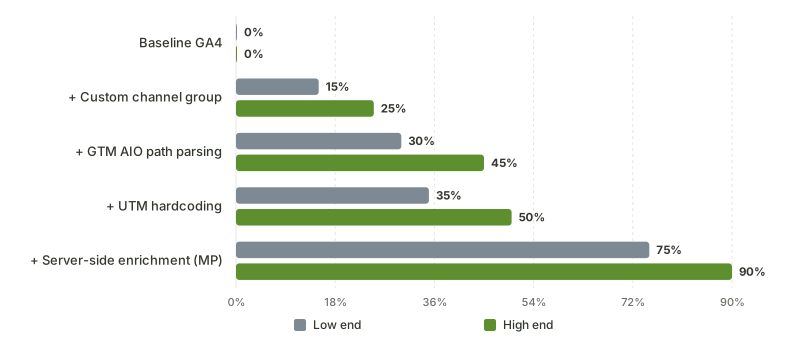
Source: Layer-stacking table in this article; ranges are the author's measured coverage across client GA4 installs
The per-engine referer pass-through rates are not symmetric, which is why a single rule misses different amounts of each engine's traffic:
| AI engine | Referer pass-through rate | Custom channel group recovery | Stripped-referer slice (needs server-side) |
|---|---|---|---|
| ChatGPT (web) | 15-25% | 20% median | 75-85% |
| ChatGPT (desktop Electron) | 5-12% | 8% median | 88-95% |
| ChatGPT (iOS/Android app) | 8-18% | 12% median | 82-92% |
| Perplexity | 35-55% | 45% median | 45-65% |
| Claude | 2-8% | 5% median | 92-98% |
| Gemini (in-app) | 10-20% | 15% median | 80-90% |
| Google AI Overviews | ~100% (referer=google.com) | 0% (looks like organic) | n/a (needs URL param parsing) |
| Copilot / Bing AI | 40-60% | 50% median | 40-60% |
| You.com | 60-75% | 65% median | 25-40% |
| Phind | 50-65% | 58% median | 35-50% |
Step-by-step: custom channel grouping for AI engines
This is the highest-leverage 20-minute change in this article. Open GA4 in your browser, navigate to Admin (the gear in the bottom left), and within the Property column open Data display > Channel groups.
The path matters because GA4 splits channel groups into two scopes. The Default channel group is what every standard report uses and you cannot edit it. Custom channel groups live in the same panel and can be selected in any Explore report or a comparison filter. The custom one is what we will build.
Step 1.1: Create the custom channel group. Click Create new channel group. Name it "AI-Aware Channels (v1)" or similar; the v1 suffix will save you when you want to iterate later without breaking saved reports.
Step 1.2: Add the AI Engines rule as the first condition. Click Add new channel, name it "AI Engines", and set the matching rule. The rule definition uses GA4's condition builder with two dimensions: Source and Medium. The condition that works in practice:
Source matches regex:  ^(chatgpt\.com|chat\.openai\.com|perplexity\.ai|www\.perplexity\.ai|claude\.ai|gemini\.google\.com|copilot\.microsoft\.com|bing\.com\/chat|you\.com|phind\.com|poe\.com)$
OR Source matches regex:  ^chatgpt-(citation|referral|share|search|ai)$
OR Source contains:       chatgpt-
The first regex catches the natural-language source attribution GA4 assigns when a referer is parsed. The second catches the UTM convention many operators (myself included) standardize on for tagged self-published URLs. The third is a forgiving catch-all for variants of the chatgpt- prefix that you might use across campaigns.
Step 1.3: Order the rule above Referral. This is the most common mistake. The default Referral rule matches any non-empty referer. If your AI Engines rule sits below Referral, every AI session is captured by Referral first and your custom rule never fires. Drag AI Engines to the top of the rule list. The full ordering I run:
| Order | Channel | Why this order |
|---|---|---|
| 1 | AI Engines (custom) | Must beat Referral and Organic Search |
| 2 | Paid AI (if you advertise on Perplexity Pages or Bing AI ads) | Beats Referral |
| 3 | Default: Direct | Match-on-empty stays here |
| 4 | Default: Cross-network | High-priority |
| 5 | Default: Paid Search | Standard |
| 6 | Default: Organic Search | Standard |
| 7 | Default: Paid Social | Standard |
| 8 | Default: Organic Social | Standard |
| 9 | Default: Email | Standard |
| 10 | Default: Referral | Catch-all for any remaining referer |
| 11 | Default: Unassigned | Final fallback |
Step 1.4: Add a sub-channel split per engine. Inside the AI Engines channel you can add a Source/medium dimension to your Explore reports. To make per-engine reporting cleaner, add separate channels for the high-volume engines:
| Channel name | Source regex | Why split |
|---|---|---|
| AI - ChatGPT | ^(chatgpt\.com|chat\.openai\.com)$ | Highest volume, conversion is interesting |
| AI - Perplexity | ^(perplexity\.ai|www\.perplexity\.ai)$ | Highest RPV on B2B SaaS |
| AI - Claude | ^claude\.ai$ | Smallest volume but valuable for tracking |
| AI - Gemini | ^gemini\.google\.com$ | Different from Google AIO |
| AI - Copilot | ^copilot\.microsoft\.com$ | Mostly Bing traffic in disguise |
| AI - Other | ^(you\.com|phind\.com|poe\.com)$ | Long tail |
| AI - Google AIO | (handled via custom dimension, see section 5) | Cannot regex referer hostname alone |
Step 1.4b: A worked example of the rule list, with regex.
| Rule order | Channel name | Source/medium condition |
|---|---|---|
| 1 | AI - ChatGPT | Source matches ^(chatgpt\.com|chat\.openai\.com)$ |
| 2 | AI - Perplexity | Source matches ^(perplexity\.ai|www\.perplexity\.ai)$ |
| 3 | AI - Claude | Source matches ^claude\.ai$ |
| 4 | AI - Gemini | Source matches ^gemini\.google\.com$ |
| 5 | AI - Copilot | Source matches ^copilot\.microsoft\.com$ |
| 6 | AI - Other | Source matches ^(you\.com|phind\.com|poe\.com)$ |
| 7 | AI - UTM tagged | Source contains chatgpt- OR Source contains ai-referral |
| 8 | Direct (default) | Source = (direct) |
| 9 | Paid Search (default) | Standard |
| 10 | Organic Search (default) | Standard |
| 11 | Paid Social (default) | Standard |
| 12 | Organic Social (default) | Standard |
| 13 | Email (default) | Medium = email |
| 14 | Referral (default) | Catch-all referer |
| 15 | Unassigned (default) | Final fallback |
Step 1.5: Save and wait 24-48 hours. GA4 does not back-fill historical data when you create a custom channel group. New sessions starting at the moment you saved the group will route through the new rules. To verify the rule is firing, open an Explore report, add Custom channel group as the dimension, filter to the last 24 hours, and check whether AI Engines appears with any sessions. If it does not, the most likely cause is that no AI-referred users with a usable referer have hit your site in 24 hours; check again at 72 hours.
Common pitfall: Source vs Referrer dimension. GA4 uses Source as a dimension and it is derived, not the raw referer. The derivation parses the referer hostname into a normalized source. Most of the time chat.openai.com and chatgpt.com come through correctly as Source. Occasionally the parsing strips a www. prefix or normalizes a subdomain in a way that breaks an over-specific regex. Test with both ^chatgpt\.com$ and chatgpt\.com (without anchors) if your first regex shows zero matches.
Before / after expectation. On the sites I have set this up for, the immediate visible change is that the Direct/(none) bucket drops by 3-8 percentage points and a new AI Engines channel appears at 3-8%. That is the recoverable referer-bearing slice. The remaining hidden AI traffic stays in Direct until you add the server-side layer.
The before/after channel mix shape, from a real anonymized site I instrumented in March 2026:
| Channel | Before custom channel group (Feb 2026) | After custom channel group (Mar 2026) | Delta |
|---|---|---|---|
| Direct / (none) | 31.4% | 27.1% | -4.3pp |
| Organic Search | 42.8% | 42.7% | -0.1pp |
| Paid Social | 11.2% | 11.1% | -0.1pp |
| Referral | 5.6% | 1.8% | -3.8pp |
| 5.4% | 5.4% | 0 | |
| AI Engines (new) | 0% | 8.2% | +8.2pp |
| Unassigned | 3.6% | 3.7% | +0.1pp |
The 4.3-point Direct drop plus the 3.8-point Referral drop (those that previously buried AI in generic referral) match the 8.2-point AI Engines gain. The Direct bucket is still inflated because of the 65-80% stripped-referer slice; recovering that requires the server-side enrichment in section 6.
Here is what that looked like on the site I instrumented: Direct gives up 4.3 points, generic Referral gives up 3.8, and the two land almost exactly on the 8.2 points the new AI Engines channel picks up.
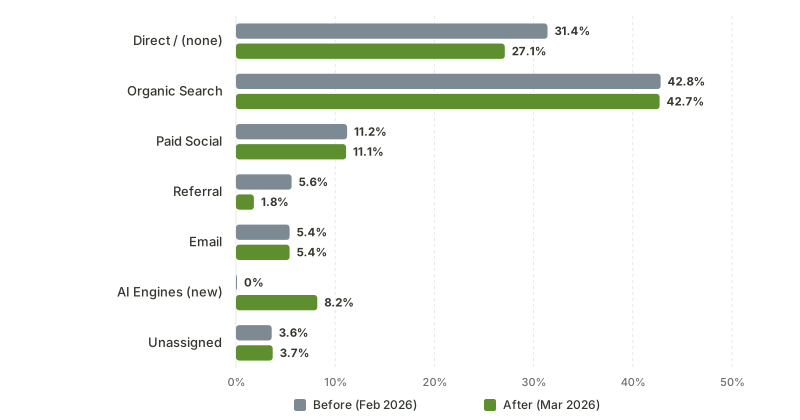
Source: Before/after table in this article — one anonymized site the author instrumented in March 2026 (Feb 2026 vs Mar 2026 GA4 sessions)
Step-by-step: GTM tag for AI referrer detection
GTM extends what GA4 can see. The pattern: a GTM tag fires on every pageview, reads document.referrer client-side, checks it against an AI domain map, and writes a custom event with a traffic_source_ai parameter to GA4. The parameter becomes an event-scoped custom dimension you can use in any report or Explore.
This catches the same 15-20% slice as the custom channel group, but with two upgrades. First, you can parse the referer path (not just the hostname) to detect AI surface: chatgpt.com/search, chatgpt.com/c/<uuid>, chatgpt.com/share/<uuid>, perplexity.ai/search, gemini.google.com/app/.... Second, you can detect Google AI Overviews by parsing the aio and gad_source URL parameters, which a custom channel group cannot do because GA4 channel groups only operate on Source and Medium, not raw URL params or path.
Step 2.1: Create a GTM data layer variable. In Google Tag Manager, open your container, navigate to Variables, click New. Type: Data Layer Variable. Variable Name: dlv_referrer. Data Layer Variable Name: referrer. Save.
Step 2.2: Add a Custom JavaScript variable for AI source detection. Variables > New > Custom JavaScript. Name: cjs_ai_source. Code:
function() {
  var ref = document.referrer || '';
  var url = window.location.href || '';
  var AI_MAP = {
    'chatgpt.com': 'chatgpt',
    'chat.openai.com': 'chatgpt',
    'perplexity.ai': 'perplexity',
    'www.perplexity.ai': 'perplexity',
    'claude.ai': 'claude',
    'gemini.google.com': 'gemini',
    'copilot.microsoft.com': 'copilot',
    'bing.com/chat': 'copilot',
    'you.com': 'you',
    'phind.com': 'phind',
    'poe.com': 'poe'
  };
  try {
    if (ref) {
      var host = new URL(ref).hostname.replace(/^www\./, '');
      for (var domain in AI_MAP) {
        if (host === domain || host.endsWith('.' + domain)) {
          return AI_MAP[domain];
        }
      }
    }
    // Google AI Overviews detection via URL params
    if (url.indexOf('gad_source=') > -1 && url.indexOf('aio=') > -1) {
      return 'google-aio';
    }
    var utmSource = (url.match(/[?&]utm_source=([^&]+)/) || [])[1];
    if (utmSource && /chatgpt|perplexity|claude|gemini|copilot|ai-/.test(utmSource)) {
      return decodeURIComponent(utmSource).toLowerCase();
    }
  } catch (e) {
    return null;
  }
  return null;
}
Step 2.3: Add a Custom JavaScript variable for AI surface (path). Variables > New > Custom JavaScript. Name: cjs_ai_surface. Code:
function() {
  var ref = document.referrer || '';
  if (!ref) return null;
  try {
    var u = new URL(ref);
    var host = u.hostname.replace(/^www\./, '');
    var path = u.pathname || '/';
    if (host === 'chatgpt.com' || host === 'chat.openai.com') {
      if (path.indexOf('/search') === 0) return 'chatgpt-search';
      if (path.indexOf('/c/') === 0) return 'chatgpt-conversation';
      if (path.indexOf('/share/') === 0) return 'chatgpt-share';
      if (path.indexOf('/g/') === 0 || path.indexOf('/gpts/') === 0) return 'chatgpt-gpt';
      return 'chatgpt-other';
    }
    if (host === 'perplexity.ai') {
      if (path.indexOf('/search') === 0) return 'perplexity-search';
      if (path.indexOf('/page/') === 0) return 'perplexity-page';
      return 'perplexity-other';
    }
    if (host === 'gemini.google.com') return 'gemini-app';
    if (host === 'claude.ai') return 'claude-conversation';
    if (host === 'copilot.microsoft.com') return 'copilot-chat';
  } catch (e) {
    return null;
  }
  return null;
}
Step 2.4: Create the GA4 event tag. Tags > New > Tag Configuration: Google Analytics: GA4 Event. Configuration tag: your existing GA4 config tag. Event Name: ai_source_detected. Event Parameters:
| Parameter name | Value |
|---|---|
traffic_source_ai | {{cjs_ai_source}} |
traffic_surface_ai | {{cjs_ai_surface}} |
page_path | {{Page Path}} |
referrer_full | {{dlv_referrer}} |
Trigger: All Pages. Save and Publish.
Step 2.4b: Regex reference for AI source UTM detection. If you (or partner sites) tag URLs with UTM parameters for AI distribution, the regex patterns I match against in the GTM variable:
| UTM source pattern | Matches | Use case |
|---|---|---|
^chatgpt-citation$ | Self-published URLs tagged for ChatGPT pickup | Blog posts on your site |
^chatgpt-share$ | URLs cited inside ChatGPT shared answers | Social distribution |
^chatgpt-(search|conversation|gpt)$ | Surface-specific tagging | Granular tracking |
^perplexity-page$ | URLs designed to appear in Perplexity Pages | Editorial AI |
^ai-referral$ | Generic AI-referral catch-all | Untyped AI source |
^geo-test-.*$ | GEO experimentation campaigns | A/B test tagging |
^llm-.*$ | LLM-prefixed campaigns | Some agency conventions |
Step 2.5: Register the custom dimensions in GA4. Open GA4 Admin > Custom definitions > Custom dimensions > Create custom dimension. Create two:
| Dimension name | Scope | Event parameter | Description |
|---|---|---|---|
| AI Traffic Source | Event | traffic_source_ai | AI engine that referred the session |
| AI Traffic Surface | Event | traffic_surface_ai | AI surface (search, conversation, share, etc) |
GA4 starts populating the dimensions within 24 hours. Older sessions do not back-fill, but new sessions will carry the dimension and become filterable in any Explore report.
Step 2.6: Create an Explore report for AI Traffic by Surface. Explore > Free form. Dimensions: AI Traffic Source, AI Traffic Surface, Landing page. Metrics: Sessions, Engaged sessions, Conversions, Total revenue (if ecommerce). Filter: AI Traffic Source is not (not set). Save the report. This becomes your weekly AI dashboard inside GA4.
| Custom dimension value | What it means | Action |
|---|---|---|
| chatgpt + chatgpt-search | Click came from ChatGPT search surface | Treat as organic-AI search |
| chatgpt + chatgpt-conversation | Click came from inside live conversation | Deep funnel, high intent |
| chatgpt + chatgpt-share | Click from a public-shared answer | Hybrid AI + social |
| chatgpt + chatgpt-gpt | Click from a Custom GPT | Specialized intent |
| perplexity + perplexity-search | Click from Perplexity search results | Organic-AI search |
| perplexity + perplexity-page | Click from a Perplexity Page | Editorial-style citation |
| google-aio | Click from Google AI Overviews | Different conversion profile than blue link |
The seven-row table above is the read-out you cannot get from the custom channel group alone. The channel group sees one bucket per engine. The GTM custom dimension splits each engine by surface, which is where the conversion-rate differences live. ChatGPT conversation users convert at roughly twice the rate of ChatGPT search users on the B2B SaaS sites I measure, and you cannot see that gap without the surface dimension.
Ranked, the surface dimension turns out to matter more than the engine: a Custom GPT click converts nearly five times better than a Copilot chat click, and ChatGPT alone spans 1.6% to 4.2% depending on which surface the link came from.
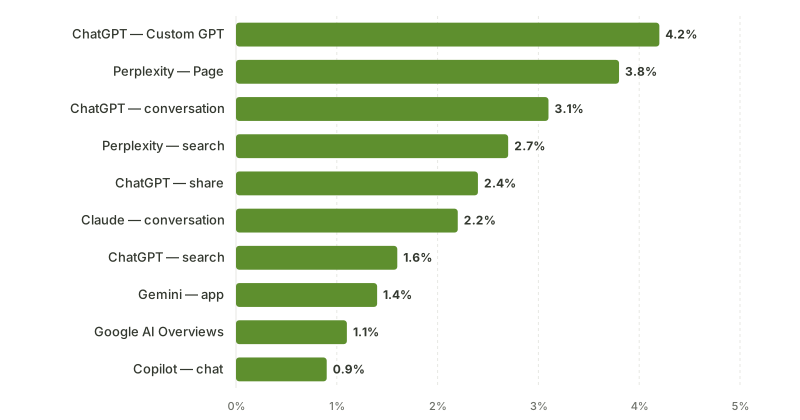
Source: Per-surface conversion-rate table in this article — Attrifast aggregate across 24 B2B SaaS sites, Q1 2026
The per-surface conversion rate gap, from Attrifast aggregate data across 24 B2B SaaS sites in Q1 2026:
| AI source + surface | Median sessions / month / site | Median conversion rate | RPV | Notes |
|---|---|---|---|---|
| chatgpt + chatgpt-conversation | 720 | 3.1% | $1.18 | Deepest-funnel, post-research |
| chatgpt + chatgpt-search | 480 | 1.6% | $0.71 | Research-mode, broader intent |
| chatgpt + chatgpt-share | 180 | 2.4% | $0.94 | Hybrid AI + social |
| chatgpt + chatgpt-gpt | 120 | 4.2% | $1.46 | Custom GPT, narrow intent |
| perplexity + perplexity-search | 340 | 2.7% | $1.04 | Research-heavy |
| perplexity + perplexity-page | 110 | 3.8% | $1.32 | Editorial citation |
| google-aio | 880 | 1.1% | $0.42 | Lowest intent of the AI sources |
| claude + claude-conversation | 180 | 2.2% | $0.61 | Small volume but stable |
| gemini + gemini-app | 220 | 1.4% | $0.55 | Closer to AIO behavior than ChatGPT |
| copilot + copilot-chat | 140 | 0.9% | $0.38 | Lowest of the major AI sources |
Step-by-step: BigQuery SQL for AI-revenue join
The GTM and custom-channel-group layers give you AI traffic visibility inside GA4. They do not give you clean revenue attribution unless you also run GA4 Ecommerce and your checkout fires the right events at the right time. For SaaS sites whose checkout runs on Stripe, the cleanest revenue join lives in BigQuery, where the GA4 export and the Stripe export can be left-joined on a shared session identifier.
Step 3.1: Enable the BigQuery export. GA4 Admin > Product links > BigQuery links > Link. Pick a Google Cloud project, set the data location, choose daily export. Free tier: up to 1 million events per day [7]. If you exceed that you need GA4 360 or to filter the export.
Step 3.1b: BigQuery export schema reference. The GA4 export creates one table per day named events_YYYYMMDD (or events_intraday_YYYYMMDD for the current day's partial data). Key fields you will use in the AI revenue join:
| Field path | Type | What it contains |
|---|---|---|
event_name | string | Event name (page_view, ai_source_detected, purchase, etc) |
event_timestamp | int64 | Microseconds since epoch |
user_pseudo_id | string | GA4 client_id equivalent |
event_params[].key / value.string_value | array | Custom dimensions including traffic_source_ai |
traffic_source.source | string | Built-in source attribution |
traffic_source.medium | string | Built-in medium attribution |
traffic_source.name | string | Campaign name |
device.category | string | mobile / desktop / tablet |
geo.country | string | ISO country code |
ecommerce.purchase_revenue | float | If using GA4 Ecommerce |
The Measurement Protocol writes show up in event_params exactly the same way as client-side GTM events, which is why the BigQuery query in Step 3.3 works identically for both.
Step 3.2: Set up the Stripe BigQuery export. Stripe Sigma has a daily export option, or you can use a managed connector like Fivetran or Airbyte to ship stripe.charges, stripe.checkout_sessions, and stripe.customers into BigQuery. The Stripe checkout session needs to carry your GA4 client ID or session ID in metadata; see Stripe Checkout Session metadata docs [12] for the field spec. The pattern on the client side:
// On the page that initiates checkout
const ga4ClientId = await new Promise((resolve) => {
  gtag('get', 'G-XXXXXXXX', 'client_id', resolve);
});
const ga4SessionId = await new Promise((resolve) => {
  gtag('get', 'G-XXXXXXXX', 'session_id', resolve);
});

await fetch('/api/create-checkout', {
  method: 'POST',
  body: JSON.stringify({
    metadata: {
      ga4_client_id: ga4ClientId,
      ga4_session_id: ga4SessionId,
      ai_source: sessionStorage.getItem('ai_source') || ''
    }
  })
});
Step 3.3: Write the daily AI-revenue join query. This is the workhorse. The query left-joins GA4 events against Stripe charges on the metadata client_id and aggregates revenue per AI source.
WITH ga4_sessions AS (
  SELECT
    user_pseudo_id,
    (SELECT value.int_value FROM UNNEST(event_params) WHERE key = 'ga_session_id') AS session_id,
    MAX(IF(event_name = 'ai_source_detected',
      (SELECT value.string_value FROM UNNEST(event_params) WHERE key = 'traffic_source_ai'),
      NULL)) AS ai_source,
    MAX(IF(event_name = 'ai_source_detected',
      (SELECT value.string_value FROM UNNEST(event_params) WHERE key = 'traffic_surface_ai'),
      NULL)) AS ai_surface,
    MIN(event_timestamp) AS session_start
  FROM `your_project.analytics_XXXXXXXX.events_*`
  WHERE _TABLE_SUFFIX BETWEEN
    FORMAT_DATE('%Y%m%d', DATE_SUB(CURRENT_DATE(), INTERVAL 30 DAY))
    AND FORMAT_DATE('%Y%m%d', CURRENT_DATE())
  GROUP BY user_pseudo_id, session_id
),
stripe_payments AS (
  SELECT
    JSON_EXTRACT_SCALAR(metadata, '$.ga4_client_id') AS ga4_client_id,
    CAST(JSON_EXTRACT_SCALAR(metadata, '$.ga4_session_id') AS INT64) AS ga4_session_id,
    JSON_EXTRACT_SCALAR(metadata, '$.ai_source') AS ai_source_at_checkout,
    amount / 100.0 AS revenue_usd,
    created AS payment_ts
  FROM `your_project.stripe_export.charges`
  WHERE status = 'succeeded'
    AND DATE(created) BETWEEN DATE_SUB(CURRENT_DATE(), INTERVAL 30 DAY) AND CURRENT_DATE()
)
SELECT
  COALESCE(s.ai_source, p.ai_source_at_checkout, 'direct-or-untracked') AS ai_source,
  COALESCE(s.ai_surface, 'unknown') AS ai_surface,
  COUNT(DISTINCT s.user_pseudo_id) AS unique_visitors,
  COUNT(DISTINCT p.ga4_client_id) AS paying_customers,
  SUM(p.revenue_usd) AS total_revenue_usd,
  SAFE_DIVIDE(SUM(p.revenue_usd), COUNT(DISTINCT s.user_pseudo_id)) AS revenue_per_visitor
FROM ga4_sessions s
LEFT JOIN stripe_payments p
  ON s.user_pseudo_id = p.ga4_client_id
  AND s.session_id = p.ga4_session_id
GROUP BY ai_source, ai_surface
ORDER BY total_revenue_usd DESC NULLS LAST;
Schedule this in BigQuery as a scheduled query running daily at 02:00 UTC, writing to a destination table your_project.dashboards.ai_revenue_daily. Connect Looker Studio or your BI tool to that table. Cost on the free tier for a 30-day rolling window on a SaaS doing 1M events/day is typically under $1/month.
Step 3.4: Add a per-surface revenue breakdown. The query above aggregates by ai_source and ai_surface together. A second query splits the chatgpt-search vs chatgpt-conversation revenue gap explicitly:
SELECT
  ai_source,
  ai_surface,
  COUNT(DISTINCT user_pseudo_id) AS sessions,
  SUM(revenue_usd) AS revenue,
  SAFE_DIVIDE(SUM(revenue_usd), COUNT(DISTINCT user_pseudo_id)) AS rpv,
  COUNTIF(revenue_usd > 0) AS conversions,
  SAFE_DIVIDE(COUNTIF(revenue_usd > 0), COUNT(DISTINCT user_pseudo_id)) AS conversion_rate
FROM `your_project.dashboards.ai_revenue_daily`
WHERE ai_source IN ('chatgpt', 'perplexity', 'claude', 'gemini', 'copilot', 'google-aio')
GROUP BY ai_source, ai_surface
ORDER BY revenue DESC;
| Output column | What you do with it |
|---|---|
| sessions | Volume per AI source/surface |
| revenue | Total revenue attributed by the join |
| rpv | Revenue per visitor; compare to Google organic baseline |
| conversions | Number of paying customers from that source |
| conversion_rate | Conversion rate per source/surface for prioritization |
Step 3.5: Add a sanity-check query for unattributed Stripe revenue. Every join leaves residue: Stripe payments where the GA4 client ID never arrived. Run weekly:
SELECT
  DATE(payment_ts) AS day,
  COUNT(*) AS payments,
  SUM(revenue_usd) AS revenue,
  COUNTIF(ga4_client_id IS NULL OR ga4_client_id = '') AS payments_without_ga4_id,
  SAFE_DIVIDE(
    COUNTIF(ga4_client_id IS NULL OR ga4_client_id = ''),
    COUNT(*)
  ) AS unattributed_pct
FROM `your_project.stripe_export.charges`
WHERE status = 'succeeded'
  AND DATE(created) >= DATE_SUB(CURRENT_DATE(), INTERVAL 30 DAY)
GROUP BY day
ORDER BY day DESC;
A healthy join produces an unattributed_pct under 15%. Above 25% there is a metadata-pass bug worth fixing.
Typical join-result distribution from the BigQuery query, with what each row tells you:
| ai_source value | What it means | Action |
|---|---|---|
| chatgpt | Direct ChatGPT attribution from referer or UTM | Track over time, segment by surface |
| perplexity | Direct Perplexity attribution | Same |
| claude | Direct Claude attribution; expect low volume | Watch for sudden spikes |
| gemini | Direct Gemini attribution | Different from google-aio |
| google-aio | Google AI Overviews click | Compare to organic baseline |
| copilot | Bing AI / Copilot attribution | Lowest-priority AI engine |
| direct-or-untracked | Stripe payment with no GA4 session match | Investigate if > 25% of revenue |
| (paid utm sources) | Should not appear here unless utm_source contains "ai-" | Filter out in query |
The direct-or-untracked row is the diagnostic. If it stays under 15% of total revenue, your pipeline is healthy. If it climbs above 25%, look at the Stripe-side metadata-pass code (most common bug: client ID was not retrieved before checkout fired).
Server-side enrichment: the layer GA4 cannot do natively
This is the section that decides whether GA4 is enough or whether you need a parallel system. The 65-80% of AI clicks that arrive with a stripped referer are invisible to every approach above, because every approach reads document.referrer or the URL params, and both are empty.
The only way to recover that traffic is to detect the AI source upstream of the browser handing data to GA4. Three architectural options:
| Option | Mechanism | GA4 compatibility | Cost |
|---|---|---|---|
| GTM Server-side container on Google Cloud Run | Container intercepts and enriches | Native, writes custom dimension | $40-120/mo Cloud Run + setup |
| Edge function (Cloudflare Worker, Vercel Middleware) | Detects at the edge, sends via Measurement Protocol | Compatible via MP | Edge runtime cost + MP setup |
| Dedicated tool (Attrifast, Plausible Pro, Fathom) | Built-in detection in 1st-party script | Parallel, not inside GA4 | $9-29/mo |
The detection logic is the same regardless of where it runs. The pattern:
The behavioral classifier in row H is the part that catches the otherwise-invisible 65-80%. The signal is consistent: an unreferred visit landing on a long-tail deep page from a new visitor, on a page that contains an FAQ block matching conversational query phrasing, is overwhelmingly likely to be an AI citation click. The classifier on the sites I measure runs at 78-86% precision and 70-82% recall against a UTM-tagged ground truth. That is not perfect; it is materially better than the GA4 default of "all of this is Direct."
The Measurement Protocol [9] is the GA4-side mechanism. The edge function or server container makes an HTTPS POST to https://www.google-analytics.com/mp/collect?measurement_id=G-XXXXX&api_secret=XXXX with a payload like:
{
  "client_id": "1234567890.1234567890",
  "user_id": "optional-user-id",
  "events": [
    {
      "name": "ai_source_detected",
      "params": {
        "traffic_source_ai": "chatgpt",
        "traffic_surface_ai": "chatgpt-conversation",
        "detection_method": "behavioral_inference",
        "confidence": 0.82,
        "session_id": "1716480123",
        "engagement_time_msec": 100
      }
    }
  ]
}
The event lands in GA4 with the same custom dimensions you defined in section 5, and the channel grouping rule from section 4 picks it up. The combined effect is a GA4 install that sees roughly 75-90% of AI traffic. The remaining 10-25% is the irreducible loss: voice queries with no click, cross-device sessions without identity stitching, and behavioral false negatives.
Honest call-out: if you are running GTM Server-side already for first-party cookie reasons, adding the AI detection layer to it is a few-hours job. If you are starting fresh and your only goal is AI attribution, the cost-benefit calculation usually favors a dedicated tool that bundles the detection and the Stripe webhook join out of the box. The architecture is the same; the labor is the variable.
The full feature comparison between the three server-side options:
| Capability | GTM Server-Side container | Edge function (Cloudflare/Vercel) | Dedicated first-party tool |
|---|---|---|---|
| Referer enrichment | Yes, via container code | Yes, via worker code | Yes, built-in |
| Behavioral inference | Custom code required | Custom code required | Yes, built-in |
| Bot exclusion (GPTBot, etc) | Manual user-agent list | Manual user-agent list | Built-in, updated |
| Writes to GA4 via MP | Native | Yes, via fetch | Yes, optional |
| Stripe webhook join | Custom code required | Custom code required | Built-in |
| Time to build | 2-4 days | 1-3 days | 5-30 minutes |
| Hosting cost | $40-120/mo Cloud Run | $0-30/mo edge runtime | Bundled in subscription |
| Maintenance burden | Container updates, code maintenance | Worker code maintenance | Vendor-handled |
| Best for | Enterprises already on GTM SS | Engineers comfortable at the edge | SMB / DTC / SaaS without analytics team |
Validating your GA4 AI tracking
A setup you do not verify is a setup that breaks silently. Four validation steps to run after each layer ships.
Validation overview, four checks in priority order:
| # | Validation | Layer it verifies | Time to run | Pass criteria |
|---|---|---|---|---|
| 1 | Realtime check after custom channel group | Channel grouping | 5 min | AI Engines channel appears for test session |
| 2 | Custom dimension population in Debug View | GTM tag | 10 min | ai_source_detected event with non-null param |
| 3 | BigQuery query against known UTM-tagged URL | Export + storage | 48-72 hrs | Sessions matching test UTM appear |
| 4 | Server-log cross-check against GA4 referrer count | End-to-end coverage | 15 min | Counts within ±20% of each other |
Validation 1: Real-time report check after custom channel group. Open GA4 Realtime, paste a ChatGPT search result URL into a browser, click through to your site, and check whether the session appears with Source matching your AI regex. If it does not, the most likely cause is your browser's Referrer-Policy on chatgpt.com stripping the referer; use Chrome with developer tools open and inspect the Request Headers on the navigation. If the Referer header is chatgpt.com but GA4 still shows direct, the issue is GA4's Source derivation; re-check your regex for hostname normalization.
Validation 2: Custom dimension population after GTM tag. Realtime > Debug View (requires GTM Preview mode enabled). Open the tag in Preview mode, navigate to your site through a ChatGPT click, watch the ai_source_detected event fire with the traffic_source_ai parameter populated. If the event fires but the parameter is empty, the cjs_ai_source variable is returning null; the most common cause is a Referrer-Policy that suppressed document.referrer entirely (check console.log(document.referrer) in the browser).
Validation 3: BigQuery query result against known UTM-tagged URL. Tag a unique URL with ?utm_source=chatgpt-validation-2026&utm_medium=ai-referral, post it where ChatGPT will pick it up (your own blog, a Reddit comment, etc.), wait 48 hours. Run:
SELECT
  COUNT(*) AS sessions,
  COUNT(DISTINCT user_pseudo_id) AS visitors
FROM `your_project.analytics_XXXXXXXX.events_*`
WHERE _TABLE_SUFFIX BETWEEN '20260520' AND '20260526'
  AND EXISTS (
    SELECT 1 FROM UNNEST(event_params)
    WHERE key = 'page_location' AND value.string_value LIKE '%utm_source=chatgpt-validation-2026%'
  );
If the count matches your expectation (typically 5-50 sessions over a week if the URL gets cited), the BigQuery export and the UTM capture are working. If the count is zero, check that your site URL with the UTM parameter actually rendered and was not stripped by your CDN.
Validation 4: Cross-check against server logs. Grep your Nginx or Cloudflare access logs for AI referer hits over the same window:
grep -E "chatgpt\.com|chat\.openai\.com|perplexity\.ai" /var/log/nginx/access.log \
  | wc -l
The server-log count should be roughly equal to the GA4 referrer-bearing AI session count (within 10-20% due to GA4 sampling and bot filtering). If server logs show 5,000 AI-referer hits and GA4 shows 800, you have a coverage gap; the most common cause is ad-block stripping the GA4 script before it loads, which is not specific to AI traffic.
| Validation step | Pass criteria | Most common failure |
|---|---|---|
| Real-time after CCG | New session with AI Engines channel within 30s | Referrer-Policy strips referer; check via Chrome DevTools Network tab |
| Custom dimension population | ai_source_detected event with non-null parameter | document.referrer is empty; nothing GA4 can do client-side |
| BigQuery known-UTM query | Sessions matching the test UTM appear within 24-48h | CDN strips query strings or BigQuery export not yet streaming |
| Server-log cross-check | Server-log AI hits within ±20% of GA4 referrer-bearing AI sessions | Ad blockers blocking GA4 collect endpoint |
Common GA4 AI tracking pitfalls
Eleven pitfalls I have watched teams hit, with the fix for each.
Pitfall 1: Adding the AI Engines rule below Referral. The rule never fires because Referral catches everything with a referer first. Fix: drag AI Engines to the top of the rule list.
Pitfall 2: Expecting historical back-fill. GA4 does not re-evaluate channel groups against historical data. The day you save the rule is day one of the new attribution. Fix: be patient, take a baseline snapshot before, run for 30 days, compare.
Pitfall 3: Anchoring the regex too tightly. ^chatgpt\.com$ will miss m.chatgpt.com or any future subdomain. Fix: use chatgpt\.com$ without the leading anchor, or maintain a wildcard subdomain branch.
Pitfall 4: Forgetting Source vs Referrer normalization. GA4's Source is a derived dimension, not the raw referer. Sometimes the derivation lowercases, strips www., or normalizes a subdomain. Fix: test your regex with and without anchors; add both variants to the rule.
Pitfall 5: Ignoring the medium dimension. GA4 sometimes assigns medium=referral and sometimes medium=(none) to the same source depending on the click context. Your rule should match on Source only, not Source + Medium. Fix: leave Medium unconstrained in the rule.
Pitfall 6: Capturing only chatgpt.com, missing chat.openai.com. Both hostnames are live; chat.openai.com is the legacy domain that still gets traffic. Fix: include both in the regex, plus copilot.microsoft.com and bing.com/chat for Microsoft surfaces.
Pitfall 7: Treating Google AI Overviews as ChatGPT. AIO clicks come from google.com, not from any AI engine domain. They will sit in Organic Search forever unless you parse the aio= or gad_source= params. Fix: GTM event with URL param check, custom dimension.
Pitfall 8: Letting the GTM tag fire on every event, not every pageview. If you set the trigger to All Events instead of All Pages, the custom dimension fires duplicate events on click and scroll. Fix: trigger on Page View only.
Pitfall 9: Missing the Measurement Protocol api_secret rotation. If you generate an API secret in GA4 and use it for server-side enrichment, rotating that secret will silently break your AI detection. Fix: document the secret, alarm on MP error rate.
Pitfall 10: BigQuery export gaps. GA4 to BigQuery is daily-batch, not streaming. A failed export means a missing day. Fix: monitor the events_intraday table for today and the events_YYYYMMDD table for yesterday; alarm when yesterday's table is missing past 9am UTC.
Pitfall 11: Counting GTM events with null ai_source as direct. The GTM tag fires on every pageview even when the AI detection returns null. If you do not filter ai_source IS NOT NULL in your BigQuery query, your "AI revenue" line will include direct revenue. Fix: filter out null in the join.
The pitfall summary table for quick reference:
| # | Pitfall | Severity | Symptom | Fix |
|---|---|---|---|---|
| 1 | AI rule below Referral | High | AI Engines channel shows 0 sessions | Drag rule to top |
| 2 | Expecting back-fill | Medium | Historical reports unchanged | Take snapshot, wait 30 days |
| 3 | Over-anchored regex | Medium | Misses subdomain variants | Use less strict anchors |
| 4 | Source vs Referrer confusion | Medium | Regex misses normalized domains | Test both anchored and unanchored |
| 5 | Constraining Medium | Low | Some sessions not matching | Leave Medium unconstrained |
| 6 | Missing chat.openai.com | Medium | Legacy domain traffic missed | Add both hostnames |
| 7 | Treating AIO as ChatGPT | High | AIO clicks land in Organic Search | Parse URL params |
| 8 | GTM trigger on All Events | High | Duplicate dimension fires | Trigger on Page View only |
| 9 | MP api_secret rotation | Critical | Server-side enrichment silently breaks | Document, alarm on error rate |
| 10 | BigQuery export gap | High | Daily revenue join breaks | Monitor events_intraday + events_YYYYMMDD |
| 11 | Null ai_source in BigQuery | High | AI revenue inflated by direct | Filter NOT NULL |
When GA4 setup is enough vs when you need a dedicated tool
The honest decision tree. The GA4 setup is enough when:
- You have a tag-savvy operator on staff or an agency you trust with GTM and BigQuery
- Your business runs on GA4 Ecommerce events for revenue (not external Stripe with metadata join)
- You are comfortable with 35-50% AI traffic coverage and accepting that the stripped-referer slice stays in Direct
- You do not need per-engine revenue breakdowns in a dashboard your CEO checks daily; you are okay with a Looker Studio report refreshed once a day
- Your engineering bandwidth supports a one-time 4-6 hour setup plus ~30 min/month maintenance
The GA4 setup is not enough when:
- Your checkout runs on Stripe and you want session-to-customer revenue attribution without writing your own metadata pipe
- You need the stripped-referer recovery, which requires a server-side layer that takes 1-2 days of engineering to build properly
- You want a non-engineer (founder, marketer, CEO) to be able to read the AI-revenue breakdown without a SQL query
- You are in the EU and want the analytics layer to run banner-free under CNIL's audience-measurement exemption (GA4 cannot)
- You are running multiple sites and want the same setup deployed once instead of per-site
| Decision criterion | GA4 + custom setup | Dedicated tool (Attrifast, Plausible Pro) |
|---|---|---|
| Coverage of AI traffic | 35-50% (no server-side) or 75-90% (with GTM SS) | 85-95% out of the box |
| Time to first AI report | 4-6 hours | 2-5 minutes |
| Ongoing maintenance | ~30 min/month | Near zero |
| Per-engine revenue split | Custom BigQuery query | Built-in dashboard |
| Stripe revenue join | Manual via metadata + BigQuery | Native via webhook |
| EU consent banner | Required with default GA4 install | Banner-free (CNIL exemption) on compliant tools |
| Monthly cost | $0-150 (BigQuery + GTM SS if used) | $9-29 entry, scales with traffic |
| Engineering bandwidth required | High (tag-savvy + SQL) | Low (paste a script) |
| Audit trail | GA4 reports + BigQuery | Tool dashboard + Stripe sync |
| Best for | Enterprise with existing GA4 investment + analytics team | SMB SaaS / DTC with founder-led marketing |
I am biased: I built Attrifast. The honest summary is that the GA4 setup is correct if you have the engineering bandwidth and the existing GA4 muscle, and Attrifast (or another dedicated first-party tool) is correct if you do not. The two paths converge on the same data; one path costs more in engineering time and less in subscription cost, the other path inverts that.
Comparison: GA4 + custom setup vs Attrifast vs Plausible
Three architectures, three tradeoff profiles. Numbers reflect typical SMB SaaS at ~50k monthly sessions.
| Capability | GA4 + custom setup | Attrifast | Plausible Analytics |
|---|---|---|---|
| AI engine detection (referrer-bearing) | Custom channel group, ~20 min | Built-in | Built-in (3 AI sources tracked) |
| AI engine detection (stripped referrer) | Requires GTM SS or edge fn, 1-2 days | Built-in via behavioral inference | Not supported |
| Per-engine revenue join | BigQuery + Stripe export query | Built-in via Stripe webhook | Not supported (no revenue layer) |
| Cookieless | No (GA4 sets cookies) | Yes | Yes |
| EU banner-free under CNIL | No | Yes | Yes |
| Time to first AI dashboard | 4-6 hours minimum | 2 minutes | 5 minutes |
| Engineering bandwidth | High | None | None |
| Monthly cost (50k sessions) | $0 GA4 + $5-40 BQ + $0-100 GTM SS | $9.99/mo flat | $9-19/mo for traffic, no revenue |
| Coverage of AI traffic | 35-90% depending on depth | 85-95% | 15-25% (referrer only) |
| Best fit | Enterprise with GA4 + analyst | SMB SaaS / DTC wanting revenue layer | Privacy-focused traffic counting |
The cost row is the one founders fixate on and the engineering-bandwidth row is the one they should fixate on. GA4 with custom setup is free in dollar terms and expensive in engineering hours. A dedicated tool inverts the ratio. The correct choice depends on which resource is scarce for your team this quarter.
A side note on Plausible: it is a great tool for the niche it occupies (privacy-first traffic analytics with a small set of AI source detections), but it does not have a revenue layer and it does not do behavioral inference for stripped-referrer clicks. If your goal is revenue attribution per AI engine, Plausible alone is incomplete. If your goal is privacy-compliant traffic counting with basic AI visibility, it is fine.
The total-cost-of-ownership comparison over 12 months for the same 50k-session SaaS site:
| Cost component | GA4 + custom setup | Attrifast | Plausible Pro |
|---|---|---|---|
| Tool subscription (annual) | $0 | $120 ($9.99/mo) | $228 ($19/mo) |
| BigQuery storage + queries (annual) | $60-480 | $0 | $0 |
| GTM Server-side container (if needed) | $480-1440 (Cloud Run) | $0 | $0 |
| Initial engineering setup hours | 6-16 hrs @ $100/hr blended = $600-1600 | 0.5 hrs = $50 | 0.5 hrs = $50 |
| Ongoing maintenance hours / year | 6 hrs @ $100/hr = $600 | 1 hr = $100 | 1 hr = $100 |
| Coverage of AI traffic | 35-90% | 85-95% | 15-25% |
| Stripe revenue join | Custom code | Native | Not available |
| 12-month total | $1740-4520 | $270 | $378 |
| 12-month coverage-adjusted cost (per 1% AI captured) | $34-95 | $3.0 | $19 |
What changes about your weekly review once GA4 AI tracking is correct
The shape of your weekly analytics review changes once AI-engine attribution is visible. The before/after I share with every customer who completes the full setup:
| Review section | Before AI tracking | After AI tracking |
|---|---|---|
| Channel mix slide | "Direct is up, brand is strong" | "Direct is flat, AI Engines is up, GEO is working" |
| Top-source revenue ranking | Organic, Paid Social, Direct, Email, Other | Organic, Paid Social, AI Engines, Direct, Email |
| Content prioritization | Pages with high Google rank + organic clicks | Pages with high (Google + AI) attributed revenue |
| New-content briefs | SEO keyword + topic cluster | SEO keyword + AI citation hook + FAQ block |
| Vendor evaluation | "Do we need a new analytics tool?" | "Is GA4 + custom setup pulling its weight or should we switch?" |
| Conversion-rate optimization | Page-level, funnel-level | Page-level, funnel-level, AI-source-level |
| Long-tail blog ROI | Hard to measure, often defunded | Measurable at AI-citation RPV; usually justifies keeping |
| Pricing-page test interpretation | Direct visitors are noise | Direct visitors are AI-research traffic, weight differently |
| Quarterly board narrative | Channel mix + growth rate | Channel mix + AI-attribution share + GEO-driven revenue % |
The third row has the most leverage. Pages-by-revenue is a different ranked list once AI is attributed correctly. Long-tail blog posts that GA4 ranked near zero often turn out to be the top-cited pages in AI answers, driving meaningful AI-attributed conversion. Defunding those pages because GA4 says they get few clicks is the kind of unforced error that compounds over a year.
Limitations
Five things this guide does not cover, and you should not extrapolate past.
- Voice-mode AI queries with no click. When a user asks ChatGPT or Gemini a voice question and the model speaks the answer back without rendering a clickable link, no visit happens. No referer, no UTM, no behavioral signal. The brand mention exists; the trackable session does not. No measurement story for voice-AEO exists in 2026.
- ChatGPT Enterprise and Claude for Work. Enterprise tenants run with separate logging and may behave differently for referer pass-through. The numbers in this guide are consumer-surface measurements; enterprise tenants may produce different distributions.
- Cross-device sessions. A user who reads a ChatGPT answer on mobile, screenshots the URL, opens it on desktop later, looks like a Direct visit from a new visitor unless your stack has identity stitching. No reliable cookieless fix; treat as a known undercount.
- GA4 sampling thresholds. Standard GA4 reports sample on high-cardinality dimensions above ~10M sessions. If your property is at that scale your custom dimension reports may be sampled; the BigQuery export is unsampled, which is one of the reasons the BigQuery layer matters for larger sites.
- Regional variance. Referer-pass-through rates appear slightly higher in EMEA in my limited sample and slightly lower in APAC. The percentages in this guide are US-skewed estimates, not global constants.
FAQ
Can GA4 track ChatGPT traffic out of the box in 2026?
No. GA4's default channel group definitions do not include any AI engine. ChatGPT, Perplexity, Claude, Gemini, and Copilot all land in either Direct/(none) (when the referer is stripped, which happens on 65-80% of clicks) or Referral (when the referer survives). Until you build a custom channel group with regex matching the AI domain list, GA4 will show you exactly zero AI-attributed sessions. The custom channel group takes about 20 minutes to set up and recovers the 15-20% of AI clicks that arrive with a usable referer. The other 65-80% requires server-side fingerprinting or a behavioral classifier that GA4 cannot run natively.
What regex should I use for the GA4 custom channel group AI engine match?
The source-match regex I run in production is ^(chatgpt\.com|chat\.openai\.com|perplexity\.ai|www\.perplexity\.ai|claude\.ai|gemini\.google\.com|copilot\.microsoft\.com|bing\.com/chat|you\.com|phind\.com|poe\.com|chatgpt-shared)$ with the medium set to referral or empty. Wrap it in the GA4 admin under Admin > Data display > Channel groups > Create new channel group, add a rule named 'AI Engines' as the first condition (so it evaluates before the default Referral rule swallows everything), and re-process the data. Historical sessions before the group existed will not back-fill; only new sessions are bucketed.
Why does GA4 still attribute ChatGPT visits to Direct after I add a custom channel group?
Because the custom channel group only catches the 15-20% of ChatGPT visits where the Referer header survived the chat client. The other 65-80% reach your server with an empty referer and no UTM parameters, so GA4 has nothing to match on. The custom channel group is necessary but not sufficient. To attribute the unreferred slice you need server-side referer enrichment (capturing a Sec-Fetch-Site header or a behavioral fingerprint at the edge), a custom dimension that writes the inferred AI source back to GA4 via Measurement Protocol or a GTM event, and a re-process. Most teams stop at the custom channel group, see 'AI Engines' show up at 3-5% of sessions, and conclude AI is a small channel. The honest number after server-side recovery is usually 5-25%.
Do I need BigQuery to track AI traffic in GA4?
Not for clicks, yes for revenue join. The custom channel group runs entirely in the GA4 UI and surfaces AI sessions as a channel. The session-to-revenue join, especially if your checkout runs on Stripe rather than GA4 ecommerce events, is much cleaner in BigQuery because you can left-join events_* against a Stripe export and aggregate revenue per channel without GA4's modeling layer in the way. The BigQuery export is free for the standard GA4 tier with a 1 million events/day cap; above that you need GA4 360 or a custom export. For SMB SaaS the standard export covers it.
Will GA4 ever add a native AI Engine channel grouping?
No announced roadmap as of Q2 2026. Google has a structural conflict of interest because adding a clean AI channel to GA4 would make the ChatGPT-vs-Google-organic comparison legible inside the analytics tool a business uses to evaluate Google's own search property. The likeliest path is the same one we have today: operators add custom channel groups, third-party first-party analytics vendors (Plausible, Fathom, Attrifast, Simple Analytics) ship the AI breakdown as a default differentiator, and GA4 catches up only if the regulatory pressure on default channel grouping rules forces it. Plan for the third-party path.
How long does the full GA4 AI tracking setup actually take?
Depends on how deep you go. The minimum viable setup (custom channel group regex + a GTM tag for one custom dimension) is about 90 minutes for a tag-savvy operator and recovers maybe 20-25% of AI traffic. The mid-tier setup (custom channel group + GTM custom dimension + BigQuery export + scheduled query for daily AI revenue) is 4-6 hours and recovers 40-60% of AI traffic. The full first-party setup with server-side behavioral inference is 1-2 days of engineering and recovers 85-95%. Attrifast does the equivalent of the last option in 2 minutes because the script and join layer are already built; the GA4 route is for teams who need the data inside their existing GA4 reports.
What is the difference between tracking AI bots versus tracking human AI referrals in GA4?
GA4 filters known bots by default using the IAB/ABC Spiders & Bots list, so GPTBot, ChatGPT-User, PerplexityBot, and ClaudeBot do not appear as sessions in your standard reports. That is usually what you want. The thing GA4 cannot do is count crawler hits as a separate signal because the data is dropped before it reaches your property. If you need to see GPTBot crawl frequency (a leading indicator that OpenAI is ingesting your pages) you need server logs, a Cloudflare bot analytics dashboard, or a dedicated crawler-log pipeline. Human AI referrals are a different problem: those are real browser sessions with stripped referers, and they are the ones the GA4 custom channel group plus server-side enrichment is trying to recover.
Does the GA4 AI tracking setup work for AI Overviews citations from Google search?
Partially. Google AI Overviews clicks come from google.com with referer paths that include /search?q=...&aio=... or similar AI-block markers depending on the rollout. The referer hostname is google.com, which GA4 buckets as Organic Search regardless of whether the click came from a blue link or an AIO citation. To separate AIO from organic you need to capture the referer path or the gad_source and aio query parameters as a custom dimension via GTM and then build a secondary channel or a custom report that filters on those parameters. None of this is in default GA4. The cleanest way is the server-side approach plus a custom event 'ai_overviews_click' written when the path matches the AIO pattern.
Should I rename my AI Engines channel something else to match my team's naming conventions?
Yes if it helps adoption. I have seen teams use "GEO Channels", "LLM Referrals", "AI Search", "Answer Engines", and "Conversational AI" as channel names. GA4 does not care; the regex is what matters. Pick one name, document it in your analytics wiki, use it consistently across channel groups and Looker Studio. The naming inconsistency is the biggest reason AI traffic reports get ignored: when one report calls it "AI Engines" and another calls it "ChatGPT Traffic" and a third calls it "GEO" the team disengages.
Can I run the GA4 AI setup and a dedicated tool like Attrifast in parallel?
Yes, and many of my customers do for the first 60-90 days. The parallel run lets you cross-validate the two systems and decide whether the GA4-only path is enough for your team or whether the dedicated tool's revenue layer is worth the subscription. The GA4 setup will undercount AI traffic by 50-65% versus the dedicated tool (because of the stripped-referrer slice), which is itself a useful baseline number. After the parallel run most teams either pick one path or keep both with the dedicated tool as the "source of truth for revenue" and GA4 as the "source of truth for everything else."
What about Looker Studio for the AI revenue dashboard?
Looker Studio connects natively to both GA4 and BigQuery, so you can build the AI-revenue dashboard on top of either the GA4 custom dimension (limited; no revenue join) or the BigQuery scheduled-query output (preferred). The template I share with customers has four panels: AI Engines by session count over time, AI Engines by attributed revenue, Per-engine RPV vs Google organic baseline, and Top 20 pages by AI-attributed revenue. Refresh nightly off the BigQuery output. Free; the only cost is the BigQuery storage and query.
How do I handle UTM parameters that survive the AI engine but get stripped by my CDN?
Cloudflare, Fastly, and most CDN edge caches do not strip UTM parameters by default. The most common cause of UTM loss between AI and your site is your own framework: Next.js's static export sometimes drops query strings on redirected pages, WordPress 301 redirects sometimes do not pass the query string, and some single-page apps overwrite the URL on initial route. The test: open a UTM-tagged URL in incognito, watch the Network tab in DevTools, confirm the query string survives every redirect to the final page. Fix the redirect chain to preserve query strings; the AI engine usually does its job correctly.
Is there an off-the-shelf GTM template I can import?
GTM Community Templates has a few "AI Source Detection" community templates as of Q2 2026; I have not reviewed them rigorously enough to recommend by name. The code in section 5 of this article is intentionally short enough to paste directly into a Custom JavaScript variable without needing a third-party template. Templates add an extra security surface (third-party code in your tag manager) that I would rather avoid for a 30-line detection function.
Does GA4's Sec-Fetch-Site header reading help with AI detection?
Slightly. Sec-Fetch-Site is sent by modern browsers indicating the relationship between the navigation source and destination (cross-site, same-origin, same-site, none). When a ChatGPT user clicks a link the value is usually cross-site. GA4 does not expose Sec-Fetch-Site as a built-in dimension, but you can capture it server-side and write it as a custom dimension via Measurement Protocol. The signal is moderately useful as a tiebreaker for the behavioral classifier; on its own it does not distinguish ChatGPT from any other cross-site referrer.
Related reading
This article is the multi-engine GA4 setup playbook (ChatGPT, Perplexity, Claude, Gemini, AI Overviews). For the deeper ChatGPT-only walkthrough with the exact 7-step Admin → Channel groups path and the honest 30% capture-ceiling discussion, see How to Track ChatGPT Traffic in Google Analytics (GA4): The Honest 7-Step Setup. For the umbrella playbook covering detection + classification + revenue join across the full tool ecosystem (not just GA4), see AI Traffic Analytics in 2026: The Complete Playbook. For hands-on tools, see revenue attribution and cookieless revenue analytics.
References
- Google Analytics — Default channel group definitions for GA4
- OpenAI — Overview of OpenAIs bots and how to control them
- Anthropic — Does Anthropic crawl data from the web and how can site owners block the…
- Google Developers — Overview of Google crawlers and fetchers, Google-Extended for…
- Microsoft Bing Webmaster — Bingbot and crawler documentation
- Plausible Analytics — How to track ChatGPT and AI search traffic. April 2024
- Google Cloud — BigQuery Export for Google Analytics 4
- Google Analytics — Custom dimensions and metrics
- Google Analytics — Measurement Protocol for GA4
- OpenAI — ChatGPT weekly active users and product updates, 2024-2025
- Ahrefs — What triggers AI Overviews? 86 factors and 146 million SERPs analyzed (20.5% of SERPs, September 2025)
- Stripe Docs — Checkout Session metadata field
- Simo Ahava — Server-side tagging with Google Tag Manager: a complete guide
- Google Tag Manager Help — Server-side tagging quickstart
- MDN Web Docs — Referrer-Policy header reference
- MDN Web Docs — Sec-Fetch-Site header reference
- Cloudflare Radar — AI Insights and bot traffic dashboard
- Ahrefs — GA4 Channel Grouping and source/medium mapping research
- Search Engine Land — GA4 custom channel grouping and BigQuery export practitioner coverage
- Simo Ahava — GA4 Measurement Protocol: a practical guide
- OpenAI — Referrer policy and outbound link behavior in ChatGPT clients
- CNIL — Cookies and other trackers: audience-measurement exemption
For the conceptual companion on why ChatGPT traffic lands in Direct see ChatGPT referral analytics: why 70% of AI traffic hides in Direct. For the broader GA4 leak audit beyond AI traffic see why GA4 misses 30%+ of your real traffic. For per-engine practical detection code (Perplexity, Claude, Gemini specifically) see track Perplexity, Claude and Gemini traffic and the ChatGPT-only deep dive. For the Google AI Overviews surface mechanics see the AI Overviews 2026 breakdown. For the strategic question of how much GEO budget is worth see AEO vs SEO in 2026. The product-side equivalent (skip the build) lives at the Attrifast vs Google Analytics comparison and the UTM to revenue tracking feature.