
Part of the attribution software guide.
I have built this container more times than I can count, and for the first couple of years I stopped one step too early every single time.
The setup always looks finished at the same moment. GTM Preview goes green, you click through your own checkout, and there it is in the debug pane: purchase fired, value populated, GA4 acknowledged the hit. Tutorial over. Screenshot of a green checkmark. Ship it.
Then the month closes, and the payment processor tells you a different number.
Not because anything was misconfigured. My container was correct. The trigger matched, the variables resolved, the tag fired exactly when it was supposed to. The problem is subtler and it is baked into what a tag manager is: a fired tag is proof that a browser executed some JavaScript. It is not proof that money arrived. Those are two different events, they happen in two different places, and they disagree in both directions for reasons nobody put in the tutorial.
This guide walks the real GTM setup end to end — container, dataLayer, triggers, the purchase event, consent mode — and then keeps going into the part every other tutorial leaves out: what to do when the tag fired and the revenue did not, and how a server-side payment join turns "a conversion event was recorded" into "this channel produced this many dollars."
What does conversion tracking with Google Tag Manager actually do?
Google Tag Manager is a deployment layer. It is not a measurement system, and confusing the two is the single most expensive misunderstanding in this whole topic.
What GTM does is decide when to run someone else's JavaScript. You define a trigger ("when the browser reports event X"), you attach a tag ("run the GA4 conversion tag, or the Google Ads conversion tag, or the Meta pixel"), and GTM sits between the two so you can change the wiring without a deploy. That is genuinely valuable. Marketing teams ship pixels without engineering tickets, and engineers stop being a bottleneck for a checkbox.
What GTM does not do is know anything about money. It has no connection to your payment processor. It has no idea whether a card was declined, whether a payment was later refunded, whether the customer disputed the charge, or whether the "purchase" it just reported was a test transaction from your own laptop. It knows that a browser told it something. Everything downstream inherits that limitation.
So the honest description of conversion tracking with Google Tag Manager is: a system for telling advertising platforms that a browser reached a particular state. That is exactly what ad platforms need in order to optimise bidding, and it is a poor foundation for a revenue report.
Hold both ideas at once and the rest of this article makes sense.
How do you set up GTM conversion tracking, step by step?
Step 1 — Install the container in both required places
The container is two snippets. The <script> block goes as high in the <head> as you can put it. The <noscript> iframe goes immediately after the opening <body> tag [1]. Plenty of setups I have inherited had only the first one, usually because someone pasted the container into a "header scripts" field in a theme settings panel and never scrolled far enough to see the second block.
If you are on Next.js, Nuxt, or any framework that renders the document shell for you, put both in the document template rather than in a page component — a container that only loads on some routes will produce measurement gaps that look like traffic drops.
Step 2 — Declare the dataLayer above the snippet
This is the step most tutorials get subtly wrong. Google's guidance is to instantiate the data layer "as high up in the source code as possible, above the container snippet," using window.dataLayer = window.dataLayer || []; [2].
<script>
  window.dataLayer = window.dataLayer || [];
</script>
<!-- Google Tag Manager container snippet goes AFTER this -->
The reason is ordering. Anything your app pushes before the array exists lands nowhere. Anything pushed before the container loads is queued and replayed once it does — but only if the array was there to queue into.
Two properties of the data layer catch people out later. First, values persist only as long as the visitor stays on the current page [2] — a single-page app that changes routes without a document load has to re-push anything it wants to remain available. Second, pushing a variable with a name that already exists overwrites the previous value [2]. If you push value: 49 on the pricing page and then push a purchase event without a fresh value, you may end up reporting the wrong number with total confidence.
Step 3 — Push a real conversion event, with the money attached
Do not infer the conversion from a URL. Push it from the code that actually knows a conversion happened:
window.dataLayer.push({
  event: 'purchase',
  ecommerce: {
    transaction_id: 'cs_live_a1b2c3',
    value: 49.0,
    currency: 'USD',
    items: [{ item_id: 'pro_monthly', item_name: 'Pro Monthly' }],
  },
});
GA4's recommended-event reference is specific about purchase: currency, value, transaction_id and items are the required parameters, at least one of item_id or item_name must be present inside each item, and currency is required if you set value [4]. coupon, shipping and tax are optional.
transaction_id is the one to get right, and I would argue it is the most important string in your entire analytics setup. Set it to something your payment processor also knows — a Stripe Checkout Session ID, an invoice ID, a subscription ID. That single decision is what makes the later reconciliation possible. If you generate a random client-side UUID here, you have just made your conversion data permanently un-auditable, and you will not find out for six months.
Step 4 — Build the trigger that matches the event
In GTM, create a Custom Event trigger with the event name purchase, exactly matching the string you pushed. Attach your GA4 event tag (and your Ads conversion tag, if you run ads) to that trigger. Create Data Layer Variables for transaction_id, value and currency and map them into the tag's parameter fields.
Which trigger type you choose is not a stylistic preference — it determines what your conversion number can and cannot mean.
Step 5 — Configure consent mode before you need it
Google's consent mode exposes a set of parameters your tags respect, including ad_storage, ad_user_data, ad_personalization and analytics_storage [5]. Tag Manager surfaces built-in consent checks so a tag can be held back until the relevant consent state is granted [6]. When ad_storage is denied, new cookies are not set for advertising purposes, and with ads_data_redaction enabled, ad click identifiers in network requests from Google Ads and Floodlight tags are redacted [5].
Set the defaults before the container loads, then update them when the visitor answers the banner. Retrofitting consent mode onto a live container after a compliance review is one of the least pleasant jobs in this field, and I have done it twice.
Which GTM trigger should you use for a conversion?
| Trigger type | Fires when | What it actually proves | Safe for revenue? |
|---|---|---|---|
| Page View / DOM Ready | A configured URL loads | Someone reached a URL. Refreshes, bookmarks and back-navigation all re-fire it | No — double-counts |
| Element Visibility | A DOM node enters the viewport | A confirmation banner was rendered. Fires again on scroll-back unless throttled | No |
| Click (All / Just Links) | A matching element is clicked | Intent to pay. The payment may still fail | No |
| Form Submission | A form submit event | The form was submitted. Server-side validation may reject it | No |
| Custom Event (dataLayer push) | Your code pushes the event | Your application decided a conversion occurred, and attached the ID and value [2][3] | Closest, but still browser-side |
| Server container client | Your server sends an event | An event reached your infrastructure [12] | Yes, if the server checked the ledger |
The pattern in that column is worth staring at. Every client-side trigger is measuring an observation of a proxy. Only the last row is measuring something your own backend confirmed.
Why does a fired tag not prove that money arrived?
Because the browser and the ledger are two separate systems that fail independently, and the browser is the less reliable of the two.
Stripe says this out loud in its fulfillment documentation. You cannot trigger fulfillment only from the Checkout landing page — as their example puts it, "someone can pay successfully in Checkout and then lose their connection to the internet before your landing page loads" [9]. Their recommendation is to handle checkout.session.completed and checkout.session.async_payment_succeeded via webhook so events reach your server directly, bypassing the client entirely, with automatic retries if delivery fails [9][10].
Sit with the implication. Stripe — the company whose job is knowing when you got paid — will not trust the browser to tell you that you got paid. But the standard GTM conversion setup asks that same browser to be the sole author of your revenue chart.
The disagreements go in both directions:
| Failure mode | What GTM records | What the ledger records | Net effect |
|---|---|---|---|
| Customer loses connection after paying | Nothing — landing page never loaded [9] | A completed payment | Under-count |
| Customer refreshes the confirmation page | A second purchase event | One payment | Over-count |
| Delayed payment method settles days later | Nothing at the time of checkout | Payment succeeds later [9] | Under-count |
| Refund or chargeback next week | The original conversion, forever | Negative revenue | Over-count |
| Consent denied for analytics storage | Reduced or no measurement signal [5][6] | A completed payment | Under-count |
| Content blocker prevents the container loading | Nothing at all | A completed payment | Under-count |
| Safari user returns after 8 days | A conversion with no attributed source [8] | A completed payment | Source lost |
| Internal or test checkout | A conversion | A test-mode payment | Over-count |
The over-counts and under-counts do not cancel out into a convenient wash. They land on different channels. Refresh-driven double counts cluster on whatever traffic converts fastest. Consent-denied under-counts cluster on EU traffic. Cookie-expiry losses cluster on long consideration cycles, which is exactly where your highest-value enterprise deals live. The result is not a noisy revenue number; it is a systematically biased one, and it biases against the patient channels.
What actually leaks between the tag and the bank?
Four leaks matter more than the rest.
Consent. Consent mode is designed correctly — it gives you a defined vocabulary for what you may store [5][6]. But the CHI 2020 study of 680 consent-pop-up instances across the UK's top 10,000 sites found only 11.8% met minimal legal requirements, and that removing the opt-out button from the first screen increased consent by 22 to 23 percentage points, while offering more granular choices on the first page decreased it by 8 to 20 points [7]. Read that as a measurement fact rather than an ethics finding: your conversion volume moves by tens of percent depending on where you put a button. Any tool whose numbers depend on that is a tool with a design variable inside its arithmetic.
Blocking. Content blockers, privacy browsers and corporate proxies routinely prevent googletagmanager.com from loading at all. There is no clever trigger configuration that recovers a container which never executed.
Cookie lifetime. WebKit's ITP 2.1 capped all persistent client-side cookies — anything created through document.cookie — to a seven-day expiry [8]. Session cookies are unaffected and HttpOnly cookies set in HTTP responses are not impacted [8], but the typical client-side attribution cookie is exactly the thing that gets truncated. B2B buying cycles are not seven days long. This is why so many SaaS dashboards show an enormous "direct" bucket that grows with deal size.
Missing referrers. The newest leak, and the one nobody built for. A large share of AI-assistant traffic arrives from mobile apps and in-app browsers that send no referrer at all. GTM sees a direct session with nothing to classify, so it classifies it as direct. In the Attrifast 200-site benchmark, 34% of what GA4 labels "Direct" is actually AI-referred, and small and mid-size businesses undercount AI traffic by a median of 64% [14]. The revenue difference is not marginal either: Claude referrals run $1.94 revenue per visitor and Perplexity $1.42, against $0.87 for ChatGPT and $0.61 for Google organic [14]. Losing that channel into "direct" does not just misattribute traffic, it hides your highest-yield source. There is more detail in the ChatGPT revenue attribution breakdown.
How do you close the gap with a server-side payment join?
The fix is structural, not a better trigger.
A server-side payment join works like this. Your first-party script captures the session's source at the edge — including the referrer-less cases, resolved server-side rather than guessed in JavaScript — and stores it against a session identifier you control. When the visitor checks out, that identifier travels into the payment record: Stripe's Checkout Session object carries client_reference_id and a metadata map for exactly this purpose [11]. When the payment settles, Stripe fires a webhook to your server [10]. Your server reads the identifier off the payment object and joins the money to the session that produced it.
Nothing in that chain depends on the browser still being open, on a cookie surviving seven days, on a consent banner being answered, or on a content blocker letting a third-party script through. The join key is written once at checkout and read once at settlement, both times server-side.
Three practical consequences follow.
Refunds subtract. Because you are reading the ledger rather than a one-time browser event, a refund or chargeback next month reduces the channel's revenue. Client-side conversion counts never do this — once a conversion is in GA4, it stays there.
Delayed payments land. An ACH debit that succeeds three days later still gets attributed to the session that started it, because the join key is stored on the payment, not in a cookie that expired [9][11].
Every channel gets the same treatment. Paid, organic, email, referral and AI engines are all resolved by the same first-party capture and joined by the same key, so cross-channel comparisons are made in the same unit — settled dollars — instead of each platform's private definition of a conversion.
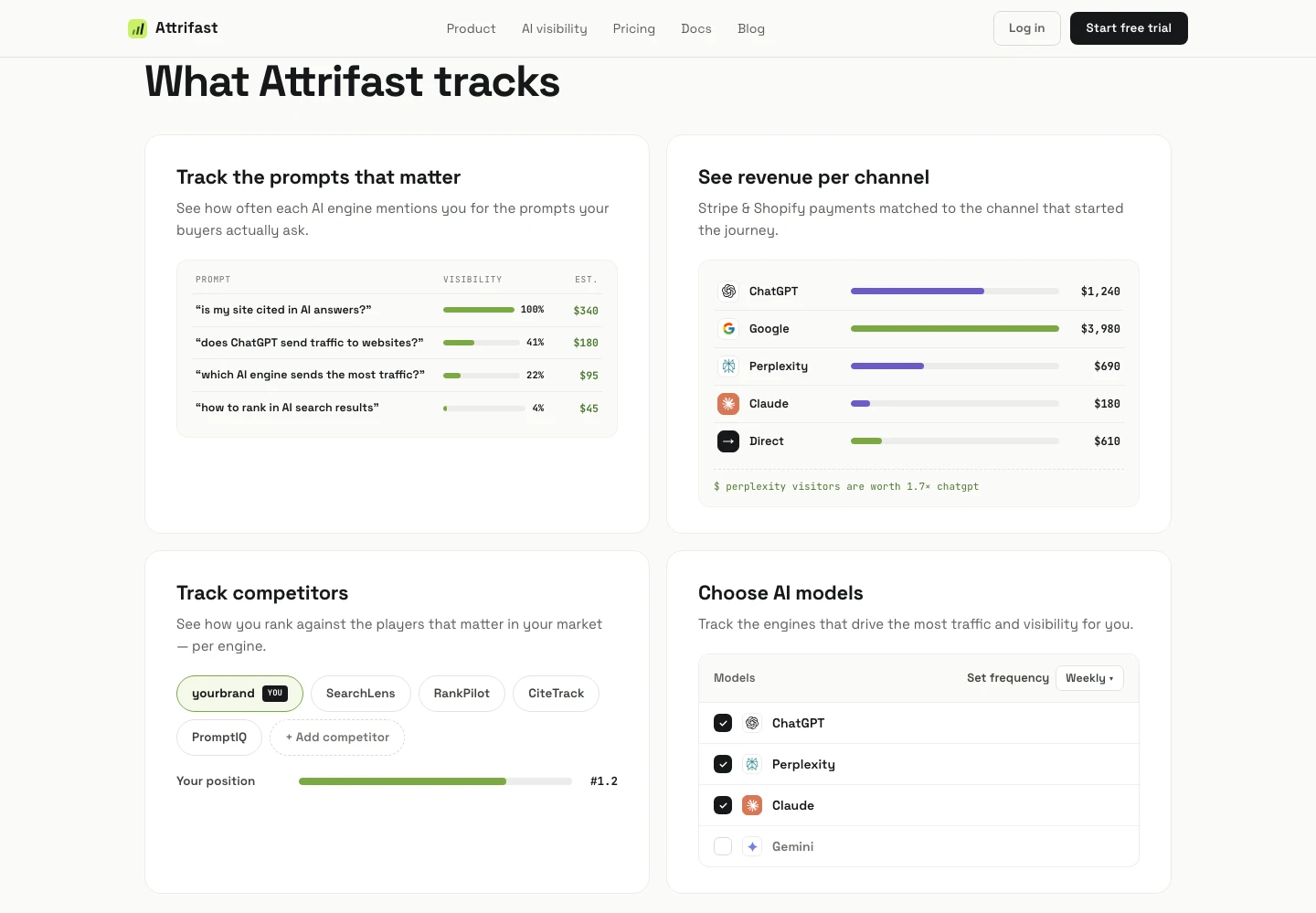
That second panel is the whole point of the exercise. Once payments are joined to sessions server-side, "revenue by channel" stops being an estimate assembled from tag fires and becomes an arithmetic breakdown of money that actually settled — with ChatGPT, Perplexity, Claude and Gemini broken out as their own lines rather than dissolved into direct. The prompt-level panel on the left is the same idea applied upstream — the AI visibility score ties individual prompts to the revenue the pages they cite went on to produce.
If you want the mechanics of the Stripe side specifically, the Stripe attribution guide covers the webhook and key setup, and Attrifast for Stripe covers what the restricted API key needs access to.
What should you keep in GTM, and what should you move?
You do not rip out the container. GTM is good at the job it was designed for. The move is to stop asking it to be the system of record.
| Job | Keep in GTM | Move server-side |
|---|---|---|
| Firing Meta / LinkedIn / TikTok pixels | Yes — these platforms need browser-side signal to optimise | — |
| Google Ads conversion signal | Yes, plus enhanced conversions | Optionally mirror via Measurement Protocol [13] |
| Counting how much revenue a channel made | No | Yes — join to the payment ledger [10][11] |
| Handling refunds and chargebacks | Not possible client-side | Yes — read the ledger |
| Attributing AI-assistant referrals | Partially, only when a referrer exists | Yes — resolve at the edge |
| Surviving consent denial and content blockers | No [5][7] | Yes — first-party, cookieless |
| A/B test exposure and UX events | Yes | — |
| Deciding budget allocation | No | Yes |
Google's own answer to some of this is server-side tagging: a tagging server you run on Google Cloud or a platform of your choice, receiving data through clients and executing tag logic outside the browser, with stated benefits of page performance, privacy controls and data quality [12]. It is a real improvement and worth doing if you have the infrastructure appetite — it moves the transport server-side.
It does not, by itself, move the truth server-side. A server container that receives a browser-originated purchase event still only knows what the browser told it. The step that changes the epistemics is reading the payment record. If you are weighing the DIY route against a hosted one, the marketing attribution software comparison lays out what each tier of tool can actually verify, and at what price.
How do you check your own setup this week?
A short audit I run on every container I inherit. None of it takes longer than an afternoon.
- View source on your checkout page. Confirm both container snippets are present and that
window.dataLayeris declared above the script block [1][2]. - Refresh your confirmation page three times with GTM Preview open. If
purchasefires three times, you have a page-view trigger where an event trigger belongs. - Compare last month's conversion count in GA4 against the payment count in Stripe. Not revenue — count. Write down the gap. That number is your measurement error, and it is the number to reduce.
- Check
transaction_idagainst a real payment ID. If you cannot paste it into your Stripe dashboard search and find the payment, your data cannot be audited. - Load your site in Safari, wait, and check whether the attributed source survives past the seven-day client-side cookie cap [8].
- Decline consent on your own banner, then buy something. Whatever appears in your reports is what a meaningful share of your EU traffic looks like [5][7].
- Check your UTM discipline. Inconsistent campaign tagging corrupts the join before it starts:
utm_source=newsletterandutm_source=Newslettersplit one channel into two rows, and neither one is right. Pick a casing convention, write it down, and see UTM to revenue tracking for what those tags look like once they carry dollars instead of session counts. - Segment your direct traffic by landing page. If deep pages such as comparison articles and docs are receiving "direct" sessions, those are almost certainly AI referrals arriving without a referrer.
If steps 3 and 8 both come back ugly — a conversion gap you cannot explain, and a direct bucket full of deep landing pages — you are not looking at a GTM configuration problem. You are looking at the limit of what browser-side tags can measure.
So where does that leave your container?
Google Tag Manager is a good tool that has been asked to do a job it was never designed for. It fires tags. It fires them reliably, flexibly, and without an engineering deploy, and that is worth a lot.
The mistake is treating "the tag fired" as the end of the measurement chain rather than the beginning. Stripe will not trust the browser to confirm a payment [9]. Safari caps the cookie your attribution depends on [8]. Consent-banner design moves your conversion count by tens of percent [7]. And a growing share of your highest-value visitors now arrives with no referrer at all.
None of that is fixed by a better trigger. It is fixed by moving the money question to where the money actually is — the payment ledger — and joining it back to the session that earned it.
Attrifast does that join with one script tag and a Stripe restricted API key. It is cookieless, so it needs no consent banner for analytics, and it splits ChatGPT, Perplexity, Claude and Gemini into their own revenue lines next to your search, paid and email channels. Starter is $9.99/month ($99.90/year), Pro is $49/month ($490/year), and a launch promo is currently running at 50% off. Every plan starts with a 7-day free trial with nothing due today. If you want to see how it compares to the tool you are probably already running, there is a side-by-side against Google Analytics, and a broader look at cookieless tracking approaches.
Keep the container. Just stop asking it what your revenue was.
FAQ
How do you set up conversion tracking with Google Tag Manager?
Five steps. Install the container in both required places — the script as high in the head as possible and the noscript iframe immediately after the opening body tag. Declare window.dataLayer above the container snippet so nothing pushed early is lost. Push a real conversion event from your application code with the money already attached, rather than inferring the conversion from a thank-you page view. Build a Custom Event trigger that listens for that exact event name and attach your GA4 or Ads conversion tag to it. Then configure consent mode before you launch, not after a regulator or a browser change forces it. The setup is finished when the tag fires with the right value — but the measurement is not finished until that fire has been reconciled against a settled payment.
What is the difference between a page-view trigger and a dataLayer event trigger?
A page-view trigger fires when a URL loads, so it measures navigation. If someone bookmarks your thank-you page, refreshes it, or gets bounced back to it by a browser restore, the tag fires again and you book a conversion that never happened. A dataLayer event trigger fires when your application explicitly pushes an event, which means your own code decides what counts as a conversion and can attach the transaction ID, value and currency at the same moment. For anything involving money, use the event trigger. The page-view trigger is a convenience that trades accuracy for setup speed.
Why does GTM report more conversions than Stripe?
Four mechanical reasons, none of them bugs. Duplicate fires from refreshed or re-visited confirmation pages. Payments that were authorised in the browser but later failed, were disputed, or were refunded — the browser saw a success screen, the ledger did not. Test and internal traffic that was never excluded. And ad-platform conversion windows that credit a click days before the payment, so two dashboards claim the same sale. GTM is measuring browser events, which is what it was built for. Stripe is measuring settled money. The two totals should not be expected to match, and the reconciliation has to happen somewhere outside both.
Does consent mode break conversion tracking?
It changes what you are allowed to collect, which changes what you can count. Google's consent mode exposes parameters including ad_storage, ad_user_data, ad_personalization and analytics_storage, and when ad_storage is denied, new cookies are not set for advertising purposes. Meanwhile the CHI 2020 study of consent pop-ups on the UK top 10,000 sites found that only 11.8% met minimal legal requirements, and that removing the opt-out button from the first screen moved consent by 22 to 23 percentage points. In other words your conversion count is partly a function of your banner design. A cookieless, first-party measurement path that never needs a consent banner for analytics sidesteps that whole variable.
What is a server-side payment join and why does it matter?
A server-side payment join takes the payment record your processor created — a Stripe checkout session, invoice or charge — and matches it to the first-party session that produced it, using a key you set yourself, such as client_reference_id or metadata on the Checkout Session. The match happens on your server when the webhook arrives, not in the visitor's browser. That matters because Stripe states plainly that you cannot trigger fulfillment only from the Checkout landing page, since someone can pay successfully and then lose their internet connection before that page loads. If the money event is only reliable server-side, the revenue number has to be built server-side too.
Can Google Tag Manager track ChatGPT and Perplexity conversions?
Only partially, and only for the sessions that arrive with a referrer. A large share of AI-assistant traffic comes from mobile apps and in-app browsers that send no referrer at all, so GTM sees a direct session with nothing to classify. In the Attrifast 200-site benchmark, 34% of what GA4 labels Direct is actually AI-referred, and SMBs undercount AI traffic by a median of 64%. GTM can carry whatever your first-party script already resolved into the dataLayer, but it cannot recover a source that was never sent. Resolving the AI channel needs first-party capture at the edge plus a payment join, not a smarter trigger.
Do I still need GTM if I have payment-verified attribution?
Usually yes, for a different job. GTM stays useful as the deployment layer for third-party marketing pixels, remarketing tags, and the ad-platform conversion signals those platforms need in order to optimise bidding. What it should stop being is the system of record for how much money a channel made. Keep GTM for firing tags at the platforms that need to be fed, and put the revenue truth in a system that reads the payment ledger directly. The two coexist fine once you stop asking the browser to answer a question only the server can answer.
References
- Set up and install Tag Manager — container snippet placement in head and body — Google Tag Manager Help (2026)
- Data layer — instantiate above the container snippet, push syntax, per-page persistence — Google for Developers (2026)
- Triggers — trigger types available in a web container — Google Tag Manager Help (2026)
- GA4 recommended events — purchase requires currency, value, transaction_id and items — Google for Developers (2026)
- Consent mode — ad_storage, ad_user_data, ad_personalization, analytics_storage and denied-state behaviour — Google for Developers (2026)
- Consent overview in Tag Manager — built-in consent checks on tags — Google Tag Manager Help (2026)
- Dark Patterns after the GDPR: Scraping Consent Pop-ups and Demonstrating their Influence — Nouwens, Liccardi, Veale, Karger & Kagal, CHI '20 (2020)
- Intelligent Tracking Prevention 2.1 — persistent client-side cookies capped to a seven-day expiry — WebKit (2019)
- Fulfill orders — do not trigger fulfillment only from the Checkout landing page — Stripe Docs (2026)
- Webhooks — server-side event delivery with automatic retries — Stripe Docs (2026)
- Checkout Session object — client_reference_id and metadata as attribution join keys — Stripe Docs (2026)
- Server-side tagging — tagging server, clients, and stated benefits — Google for Developers (2026)
- Measurement Protocol for Google Analytics 4 — sending events from a server — Google for Developers (2026)
- AI traffic revenue benchmark 2026 — 200 Stripe-connected sites, per-engine RPV and conversion rate — Attrifast (2026)