Mobile application tracking is the cluster of techniques used to identify the same user across an app install, the events they trigger inside the app, the mobile web sessions on either side of it, and the payment that closes the loop. Before April 2021 most of that ran on a single device-level identifier on iOS (IDFA) and a similar one on Android (GAID). Apple's App Tracking Transparency framework, mandatory from iOS 14.5, broke the IDFA assumption in one release. The pieces that survive in 2026 are narrower, slower, and split across four very different stacks. This piece is about what to actually wire up depending on which of those four problems you're solving.
Quick Facts
| Spec | Value |
|---|---|
| iOS ATT mandatory effective | April 26, 2021 (iOS 14.5) |
| Global ATT consent, share of users | 50% (AppsFlyer, April 24, 2025) |
| ATT opt-in, share of users shown the prompt | 40% (AppsFlyer, March 13, 2025, updated Nov 27, 2025) |
| ATT opt-in, share of all iOS users | 30% — adds restricted devices and system-level opt-outs (same source) |
| Android GAID opt-out (extended) | Android 12+, rolled out August 2021 |
| Firebase free-tier limits | 500 distinct event types, 25 user properties per app |
| SKAdNetwork conversion value | 6-bit integer (0-63), 24-48hr aggregated postback delay |
| MMP starting tier (AppsFlyer paid) | $1,000+/mo (free up to 12,000 attributions/mo) |
| GA4 mobile identifier | app_instance_id (resets on reinstall, by design) |
| iOS in-app browsers | SFSafariViewController inherits Safari ITP rules |
| Stripe reader-app exemption | Apple App Store guidelines §3.1.3 |
| First-party script size (Attrifast) | ~4kb |
A note before the rest: I came to mobile attribution from the web side, not the AppsFlyer side. Of the roughly 40 channels I've stitched first-party attribution into across my own properties and a handful of client SaaS apps, three were genuinely native iOS install funnels. The other 37 settle in a browser, even when the user thinks they're "in the app." If your stack looks like the latter, most of what's written about mobile tracking in 2026 is overshooting your problem.
Why Mobile Application Tracking Got Hard in 2021
The defining event is iOS 14.5, shipped April 26, 2021. From that release on, any app that wanted to read the Identifier for Advertisers (IDFA) had to call ATTrackingManager.requestTrackingAuthorization and surface Apple's "Allow Tracking / Ask App Not to Track" prompt. No prompt, no IDFA. Apple's developer documentation is explicit about what "tracking" covers: linking user or device data collected in your app with data from third parties for advertising or sharing with a data broker. The "Allow" rate — what the industry calls ATT opt-in — did not land where the 2021 forecasts put it, and the number you quote depends entirely on which denominator you pick. AppsFlyer's four-years-after-ATT data release (April 24, 2025) reports that "globally, 50% of users now consent to tracking, a significant 10% increase since ATT's initial rollout," with just under 51% in France and 47% in Germany. AppsFlyer's own measurement methodology post (published March 13, 2025, last updated November 27, 2025) is stricter about the denominator and lands lower: the "true opt-in rate is 40%, as it accounts only for users who actually see the prompt," and "if we take a broader view of targeting — factoring in users who don't see the prompt because they are restricted or have actively denied access at the system level — the rate drops to 30%."
Three numbers, one phenomenon, three denominators: consenting users as a share of all users, as a share of users who were prompted, and as a share of the whole addressable iOS base. For the rest of this article the working number is 30% — the share of all iOS users who end up yielding a readable IDFA — because that is the denominator that decides how much of your revenue an IDFA-based rollup can actually see. Both AppsFlyer pages were fetched and verified on August 1, 2026.
The more consequential fact is not the level, it is the shape. The users who opt in are not a random subset. AppsFlyer measures 45% opt-in when the prompt appears later in the session, after the SDK has initialized and an in-app event triggers it, against 36% when the prompt fires first — a nine-point swing driven purely by when you ask. Country spread runs at least 47% to 51% across two large European markets, and category spread is wider still (gaming routinely lands lower than utilities). So the opted-in population is selected on prompt design, session depth, geography, and vertical, every one of which correlates with how much a user spends. An IDFA-based "LTV by acquisition source" view is therefore not "a third of your revenue, multiply by three." It is a skewed subsample with an unknown multiplier, and nothing in the ATT flow tells you what that multiplier is. That, not a hollowed-out opt-in rate, is why IDFA cannot be the spine of revenue attribution.
Android did its own quieter version. From Android 12 onward (general availability August 2021) users can opt out of the Google Advertising ID entirely, and apps that read it after opt-out receive a string of zeros. Google extended that behavior to apps targeting older API levels in 2022. The opt-out rate is lower than iOS opt-in inversion, but planning around a non-zero share of zero-GAID Android users is now table stakes.
What broke specifically: deterministic device-to-ad-impression matching across publishers, retargeting pools built on IDFA, view-through attribution on iOS, and any "lifetime value by acquisition source" view that depended on rejoining the install record to per-user revenue over time. Every one of these is now either probabilistic, aggregated, or scoped to the Allow population — which is a minority of iOS users and, more damagingly, a self-selected one you cannot reweight back to the whole.
What didn't break: in-app analytics on signed-in users (you have your own user ID), first-party identifiers scoped to your own app, the StoreKit purchase event itself, and anything that happens once the user is in a web view on your domain.
Four Different Things People Mean by Mobile Application Tracking
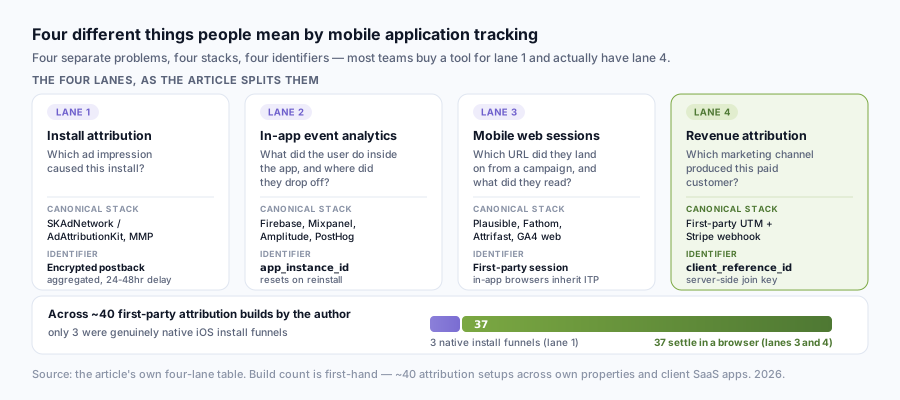
The phrase "mobile application tracking" gets used for at least four distinct problems, and most of the confusion in 2026 is people buying tools for one problem when they actually have another.
Install attribution. "Which ad impression caused this install?" This is the SKAdNetwork / AdAttributionKit lane on iOS and the install-referrer lane on Android. It's where AppsFlyer, Adjust, and Branch live. You need this if you run paid user acquisition with the install as a primary KPI.
In-app event analytics. "What did the user do inside the app, and where did they drop off?" This is Firebase Analytics, Mixpanel, Amplitude, PostHog mobile. The user identifier here is yours (a signed-in user ID, or app_instance_id if anonymous). ATT is mostly irrelevant. Privacy frameworks still apply (Apple's privacy nutrition labels, App Store data-collection disclosures, Android Data Safety) but the technical stack is intact.
Mobile web sessions. "Which URL did the user land on from a campaign, and what did they read before opening the app?" This is plain web analytics on mobile browsers, with the added wrinkle that iOS in-app browsers (SFSafariViewController, the WKWebView frame inside most apps) inherit Safari's Intelligent Tracking Prevention rules. Third-party cookies die here for the same reason they die on desktop Safari.
Revenue attribution. "Which marketing channel produced this paid customer?" This is the join between channel → session → user → Stripe charge (or App Store purchase). For App Store in-app purchases on iOS, the canonical answer goes through StoreKit and SKAdNetwork. For everything billed through Stripe Checkout, Stripe Billing, or a custom web flow, the canonical answer is a first-party session ID + a server-side webhook, and it works whether the user is on mobile Safari, in an SFSafariViewController, or inside your app's WKWebView.
These four are not the same problem. Buying AppsFlyer to solve the fourth one is overkill. Bolting Firebase onto the second one and hoping for the fourth is what most teams do, and it's why their attribution dashboard never reconciles with Stripe.
| Lane | Primary question | Canonical stack | Identifier |
|---|---|---|---|
| Install attribution | Which ad → install? | SKAdNetwork / AdAttributionKit / MMP | Encrypted postback |
| In-app events | What happened in-app? | Firebase, Mixpanel, Amplitude | app_instance_id or user ID |
| Mobile web sessions | What did they read? | Plausible, Fathom, Attrifast, GA4 web | First-party session |
| Revenue attribution | Which channel paid? | First-party UTM + Stripe webhook | Server-side join key |
What the GA4 Mobile SDK Actually Captures
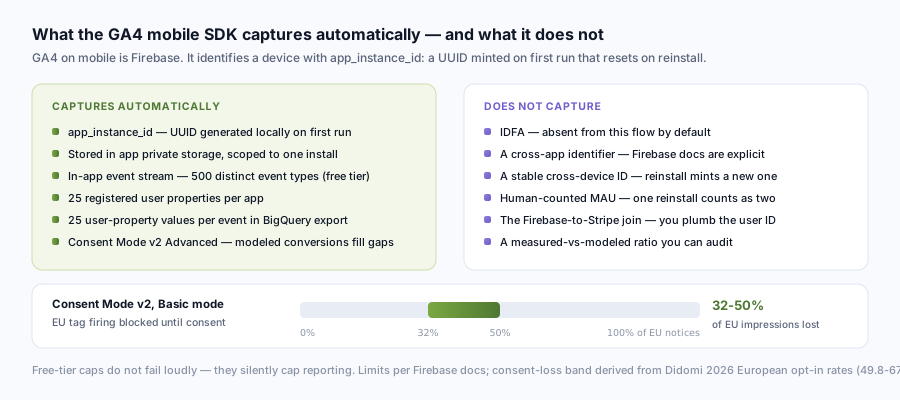
This lane — in-app event analytics — is what most people mean when they say app tracking analytics, and GA4 on mobile is Firebase under the hood. The Firebase SDK identifies a device with app_instance_id, a UUID generated locally on first run, stored in app private storage, and reset whenever the user uninstalls and reinstalls or wipes app data. There is no IDFA in this flow by default. The Firebase documentation is clear that app_instance_id is not a cross-app identifier and not a stable cross-device identifier; reinstalls produce a new ID.
That has three consequences. First, "monthly active users" in Firebase is install-instance counted, not human-counted, so a user who reinstalls is two MAU. Second, retention curves on long horizons get noisier the more uninstall/reinstall churn you have. Third, joining a Firebase event stream to a Stripe payment requires you to plumb a signed-in user ID into both sides, the SDK doesn't do that automatically.
Firebase free tier has hard limits worth memorizing: 500 distinct event types per app, 25 registered user properties, 25 user-property values logged per event in the BigQuery export. Hitting any of these doesn't fail loudly, it silently caps reporting. I got burned by the 500-event limit on a client project in Q3 2024, well, technically Q4 — we noticed in October that some custom events had been dropped silently for three weeks. The fix was straightforward; the audit to figure out which events were dropped was not.
Consent Mode v2, mandatory for EU traffic to read Google Ads conversions since March 2024, runs in two modes. Basic mode blocks all tag firing until consent is granted, so your EU loss is simply whatever share of banner impressions never produces an opt-in. Google's own Consent Mode documentation publishes no figure for that share, so the usable numbers come from the CMP vendors who actually measure it. Didomi's January 2026 State of Data Privacy benchmark, built on hundreds of millions of consent interactions collected through 2025, reports European opt-in rates — opt-ins divided by total notices displayed, which is the denominator you want here — of 55.7% in Western Europe rising to 67.6% in Eastern Europe, and 49.8% (High Tech & Telecom) to 64.4% (Media & Publishers) across sixteen industries. That puts Basic-mode loss at roughly 32-50% of EU banner impressions, and a mobile SaaS audience sits at the bad end of that range rather than the middle. Advanced mode lets the tag fire with consent signals attached and uses modeling to fill gaps where consent was refused. Advanced recovers some of the loss but the modeling quality depends on the rest of your data being clean, which on mobile it usually is not. GA4's own product documentation describes the modeled-conversion bucket but stops short of publishing a measured-vs-modeled ratio you can audit.
The Stripe Revenue Path: Mobile-Web + Webhook Join
This is the bit most analytics posts skip. If you're selling a subscription that settles through Stripe Checkout (or Stripe Billing, or Stripe Payment Links) and you're delivering the experience through an in-app browser or a mobile web view, the IDFA discussion is a sideshow. The actual identifier you need is a first-party session ID you generated yourself, joined server-side to the Stripe event via client_reference_id or session metadata. It works without cookies. It works in SFSafariViewController. It works in WKWebView. It works on plain mobile Safari.
The reason this path is underdiscussed in mobile attribution writing: it doesn't exist on the App Store. Apple's §3.1.1 anti-steering rules prevent most apps from sending users to a web flow to buy in-app content, and the §3.1.3 "reader app" exemption is narrow. But if your app is a SaaS dashboard, a B2B tool, a content app reading externally-purchased subscriptions, or anything else that bills through your own web flow, this is what works.
// 1. Client-side: capture UTMs and mint a first-party session ID
// (runs on your landing page or inside your WKWebView, your domain)
const sessionId = crypto.randomUUID();
const params = new URLSearchParams(window.location.search);
const utm = {
  source: params.get('utm_source'),
  medium: params.get('utm_medium'),
  campaign: params.get('utm_campaign'),
};
localStorage.setItem('af_session', JSON.stringify({ sessionId, utm }));
await fetch('/api/track', { method: 'POST', body: JSON.stringify({ sessionId, utm }) });

// 2. When the user clicks "Subscribe," pass sessionId to Stripe Checkout
const checkout = await stripe.checkout.sessions.create({
  mode: 'subscription',
  line_items: [{ price: 'price_xxx', quantity: 1 }],
  success_url: 'https://yourapp.com/success',
  client_reference_id: sessionId, // <-- this is the join key
});

// 3. Server-side: Stripe fires checkout.session.completed
// Your webhook handler looks up the UTMs and attributes revenue.
app.post('/webhooks/stripe', async (req, res) => {
  const event = req.body;
  if (event.type === 'checkout.session.completed') {
    const sessionId = event.data.object.client_reference_id;
    const utm = await db.tracking.findOne({ sessionId });
    await db.attribution.insert({
      stripeSessionId: event.data.object.id,
      amount: event.data.object.amount_total,
      utmSource: utm?.source ?? 'direct',
    });
  }
  res.json({ received: true });
});
Twelve lines that aren't there. The whole join. No cookies, no fingerprinting, no IDFA, no MMP. Stripe's API documentation describes client_reference_id as "a unique reference for the customer" and explicitly mentions reconciling with internal systems; this is the canonical use. The checkout.session.completed event is the canonical fulfillment trigger per Stripe's webhook docs. The technique survives Safari ITP because there's no cross-site cookie at any step. It survives ATT because IDFA was never involved. It survives consent banners in most jurisdictions because the session ID is first-party and the join happens server-side without leaving your infrastructure.
This is the join I duct-taped together for two years before I built Attrifast. The script worked; the joins didn't. Or rather, every one was bespoke, and any time a client added a new pricing page or a new traffic source the join broke quietly and nobody noticed until the month-end attribution report disagreed with Stripe by 20%. That gap is what Attrifast's revenue attribution by channel packages — the same pattern, but the wiring is the product, not something you maintain.
When You Actually Need a Mobile Measurement Partner (MMP)
Honest scope: an MMP exists to solve install attribution at scale. If you're spending money on app-install ad campaigns on iOS and you need to compare cost-per-install across Meta, TikTok, Apple Search Ads, Reddit, and DSPs, you need SKAdNetwork postback aggregation, attribution windows, probabilistic fingerprint fallback for the (rare and shrinking) cases it's still allowed, and a dashboard that reconciles all of it. AppsFlyer, Adjust, Branch, Singular, and Kochava all sell that. AppsFlyer's pricing page describes a free tier that covers up to 12,000 attributions per month; paid tiers commonly start in the $1,000-2,000/month range and grow with attributed events. Adjust and Branch occupy a similar price band, with enterprise tiers reaching well into five figures monthly.
What an MMP does not solve, and is not designed to solve: the Stripe-to-channel revenue join described in the previous section. Attribution at install does not equal attribution at revenue, especially for subscription apps where the install is free and the money arrives 14 days later via a web checkout or a 30-day free trial. Most MMPs do offer "revenue events," but in practice they require you to feed the revenue back into the MMP via server-to-server callbacks, by which point you've already built half the webhook plumbing yourself and might as well own the data.
So the decision rule I use when a SaaS founder asks "do we need AppsFlyer?":
- Paid app installs > $5k/month on iOS, with cost-per-install KPI → yes, MMP earns its keep.
- Subscription product, payment via Stripe, mostly desktop or mobile web acquisition → no, first-party + webhook is cheaper and more accurate.
- Mixed: some paid installs, some web acquisition → MMP for installs, first-party + webhook for the revenue join. Two stacks, but each is doing what it's designed for.
- B2B SaaS with sales-assisted conversions → no, your attribution lives in your CRM and your Stripe events, not in any mobile SDK.
For my own products and most of the bootstrapped SaaS clients I work with, lane two is where we sit. That's also the lane Attrifast was built for. If you're in lane one, the right answer is not Attrifast.
Comparison: Five Mobile Tracking Approaches in 2026
Before the side-by-side table, a rough sense of where each lane sits on the two axes that matter — how much ATT broke it, and what it costs to run:
ATT impact (high → low)                       Cost (high → low)
─────────────────────────────────────────     ─────────────────────────────
MMP (AppsFlyer/Adjust)  ████████████████      MMP (paid tier)      ████████████
Branch Deep Linking     ████████              Branch (paid)        ██████
Firebase Analytics      ██                    Firebase + BQ        ███
GA4 web on mobile       ██                    GA4 web              (free)
First-party + Stripe    (none — no IDFA)      DIY / Attrifast      ██
| Approach | Identifier | Best for | ATT-gated? | Starting cost |
|---|---|---|---|---|
| AppsFlyer / Adjust / Branch (MMP) | IDFA + SKAN postback + probabilistic | Native install attribution | Yes (IDFA) | Free → $1,000+/mo |
| Firebase Analytics (GA4 mobile) | app_instance_id (per-install UUID) | In-app event analytics | No (no IDFA used) | Free tier, BQ export billed |
| Branch Deep Linking | Branch session + deferred deep link | Cross-channel install + web→app | Partial | Free tier → paid |
| GA4 web (mobile Safari / WebView) | First-party _ga cookie | Mobile web sessions | No (ITP-gated) | Free |
| First-party UTM + Stripe webhook | Your sessionId + client_reference_id | Revenue attribution by channel | No | ~$0 (DIY) or Attrifast $9.99-49/mo |
Two reasons most subscription apps end up running rows 2 + 5 from this table: row 2 covers the in-app behavioral analytics for product decisions, row 5 covers the channel-to-revenue join for marketing decisions. The MMP rows are install-funnel infrastructure; if your install funnel isn't where you spend money, you don't need them.
If you want to walk through this comparison for your own stack rather than guess, Stripe-native revenue attribution is the page that walks through the integration end-to-end, and the cross-site tracking explained deep-dive covers what ITP does to the web-session lane in detail.
How to Set This Up in One Afternoon (Operator Playbook)
Concrete sequence. Total time: 2-4 hours, depending on how much UTM hygiene already exists in your paid campaigns.
Step 1 — Decide which lanes you actually need (15 min). Use the four-lane breakdown above. Most subscription apps need lanes 2 and 4 (in-app events + revenue). If you're not spending on paid installs, skip the MMP discussion entirely.
Step 2 — Tag every paid link with UTMs (30 min). Same advice as web. Use utm_source, utm_medium, utm_campaign. If you skip this step the rest doesn't help.
Step 3 — Install a first-party tracking script on every landing page (10 min). Whether the landing opens in mobile Safari, in an in-app browser, or inside your app's WKWebView. The script captures UTMs, mints a session ID, stores both in localStorage and (ideally) pings your server. Roll your own or use an off-the-shelf 4kb script.
Step 4 — Plumb client_reference_id through Stripe Checkout (15 min). When you create the Checkout Session server-side, pass the session ID from step 3 as client_reference_id. If you're using Stripe Billing or Payment Links, attach it via metadata instead.
Step 5 — Subscribe to the checkout.session.completed webhook (15-30 min). This is the one you should fulfill on, not the redirect URL, Stripe's docs are explicit about this. On receipt, look up the session ID, attach the original UTMs, write to your attribution store.
Step 6 — Reconcile against Stripe once a week (10 min recurring). Pick the top three traffic sources by claimed revenue. Pull the matching Stripe charges. They should agree to the dollar. If they don't, something is wrong with the join (usually a Checkout Session created without client_reference_id or a webhook handler that swallowed an error).
Step 7 — Resist the urge to do multi-touch modeling for at least 90 days. First-touch attribution is genuinely better signal-per-effort below ~100 conversions per channel. Layer in linear or time-decay only when you have the volume to support it and you've audited the basics.
For the no-wiring version: Attrifast's cookieless revenue analytics does steps 3-5 with a single 4kb script and a one-click Stripe connector. If you'd rather see the math first, the marketing ROI calculator projects channel ROI from your current numbers.
Limitations
- This article does not cover App Store in-app purchase attribution. StoreKit + SKAdNetwork is the canonical path for IAP, and the §3.1.1 anti-steering rules forbid most app developers from routing those flows through a web checkout.
- It does not deep-dive AdAttributionKit (iOS 17.4+) beyond the headline. The 4-postback model is more nuanced than SKAN 4.0, but the SDK ergonomics are still in flux and tooling support is uneven through 2026.
- Android Privacy Sandbox (Topics, Attribution Reporting on Android) is shipping but adoption is early. If you're spending heavily on Android paid installs, treat it as an emerging signal not the primary one.
- Fingerprinting workarounds for ATT (IP + UA + screen + locale hash) exist and are explicitly prohibited by Apple's developer guidelines. Don't.
- Enterprise B2B with multi-month sales cycles needs CRM-side attribution layered on top. The mobile session and the Stripe charge cover the first and last touch, the deal record covers everything in between.
FAQ
What is mobile application tracking in 2026?
Mobile application tracking is the set of techniques used to identify the same user across app installs, in-app events, mobile web sessions, and payment events. After iOS App Tracking Transparency shipped on April 26, 2021, the device-level identifier (IDFA) became opt-in only. The opt-in figure depends entirely on the denominator: AppsFlyer's April 24, 2025 data release reports that globally 50% of users now consent to tracking, while AppsFlyer's own measurement methodology post puts the rate at 40% counting only users who are actually shown the prompt, and 30% across all iOS users once people who never see the prompt (restricted devices, system-level opt-outs) are included. IDFA therefore reaches roughly 30-50% of iOS users depending on the denominator, and that surviving group is self-selected rather than a random half. Working tracking in 2026 splits into four lanes: native install attribution via SKAdNetwork/AdAttributionKit, in-app event analytics via Firebase or a mobile SDK, mobile web sessions via first-party scripts, and revenue attribution via Stripe webhooks joined server-side.
Is IDFA still usable for attribution?
Yes, but not as a census. ATT requires an explicit prompt before any code reads IDFA. AppsFlyer's April 24, 2025 release reports 50% global consent, and AppsFlyer's measurement methodology post (published March 13, 2025, last updated November 27, 2025) puts the opt-in rate at 40% among users actually shown the prompt and 30% across all iOS users once restricted devices and system-level opt-outs are counted. So plan as if IDFA is missing for half to seventy percent of iOS users, and — more importantly — as if the users who remain are a biased sample. AppsFlyer measures 45% opt-in when the prompt appears later in the session against 36% when it fires before the SDK initializes, and just under 51% in France against 47% in Germany. That means you can compare IDFA-attributed campaigns against each other within a fixed cohort, but you cannot scale IDFA-observed revenue up to a whole-population number, because the multiplier is unknown. Budget for SKAdNetwork/AdAttributionKit on the install side and a first-party server-side join on the revenue side. Android exposes Google Advertising ID, but Android 12+ lets users zero out the GAID, which has spread since August 2021.
Do subscription apps actually need a mobile measurement partner?
Only if you run paid user acquisition for native installs at meaningful scale. MMPs like AppsFlyer, Adjust, and Branch exist to handle install attribution, fingerprinting fallback, and SKAdNetwork postback aggregation. AppsFlyer's free tier covers up to 12,000 attributions per month; paid tiers commonly start north of $1,000/month. If your app monetizes via Stripe Checkout in an in-app browser or mobile web view (most B2B SaaS, many subscription apps using §3.1.3 reader-app rules) you can skip the MMP and use first-party UTMs joined to Stripe webhooks server-side.
Can you track a user from a mobile ad click to a Stripe payment?
Yes, if you settle payment through a web flow. The pattern is: capture utm_source and a first-party session ID on the landing page, pass that session ID into Stripe Checkout as client_reference_id, then on the checkout.session.completed webhook look up the session and join channel → revenue server-side. No cookies, no IDFA, no SDK. This works in SFSafariViewController, in WKWebView, and on plain mobile Safari. It does not work for App Store in-app purchases, those route through StoreKit and IDFA/SKAdNetwork.
How does SKAdNetwork actually report a conversion?
When a user taps an attributed ad and later installs and opens the app, the device delivers a postback to Apple, which forwards an aggregated, delayed signal to the ad network and (with SKAN 4.0) to the advertiser. The conversion value is a 6-bit integer (0-63) you encode meaning into, and the postback can arrive 24-48 hours after the trigger event with intentional noise added. It's good for top-of-funnel campaign comparison and terrible for per-user attribution. AdAttributionKit (iOS 17.4+) extends the same model with up to four postbacks per install.
Related reading from the Attrifast research stack
To dive deeper, explore UTM to revenue tracking.
References
- User Privacy and Data Use — App Tracking Transparency, Apple Developer. https://developer.apple.com/app-store/user-privacy-and-data-use/
- requestTrackingAuthorization(completionHandler:), Apple Developer Documentation. https://developer.apple.com/documentation/apptrackingtransparency/attrackingmanager/requesttrackingauthorization(completionhandler:)
- App Store Review Guidelines §3.1.3 (Reader Apps), Apple. https://developer.apple.com/app-store/review/guidelines/
- SKAdNetwork overview, Apple Developer Documentation. https://developer.apple.com/documentation/storekit/skadnetwork
- AdAttributionKit, Apple Developer Documentation. https://developer.apple.com/documentation/adattributionkit
- Firebase Analytics — app_instance_id and event limits, Google Firebase Docs. https://firebase.google.com/docs/analytics/configure-data-collection
- Google Analytics 4 Consent Mode, Google Analytics Help. https://support.google.com/analytics/answer/9976101
- Stripe Checkout Sessions API (client_reference_id, metadata), Stripe Docs. https://docs.stripe.com/api/checkout/sessions/create
- Fulfill orders with checkout.session.completed, Stripe Docs. https://docs.stripe.com/payments/checkout/fulfill-orders
- Google Play services — advertising ID changes (Android 12+), Google Play Console Help. https://support.google.com/googleplay/android-developer/answer/6048248
- Redefining ATT opt-in measurement for data accuracy — "the true opt-in rate is 40%, as it accounts only for users who actually see the prompt"; 30% once restricted and system-level opt-outs are included; 45% vs 36% by prompt timing. AppsFlyer, published March 13, 2025, last updated November 27, 2025. Verified live August 1, 2026. https://www.appsflyer.com/blog/measurement-analytics/att-opt-in-measurement/
- AppsFlyer Shows Mobile Ad Market Thrives 4 Years After ATT — "Globally, 50% of users now consent to tracking, a significant 10% increase since ATT's initial rollout"; France just under 51%, Germany 47%. AppsFlyer newsroom, April 24, 2025. Verified live August 1, 2026. https://www.appsflyer.com/company/newsroom/pr/post-att-growth/
- Branch deep linking documentation, Branch. https://help.branch.io/developers-hub/
- PostHog iOS SDK documentation, PostHog Docs. https://posthog.com/docs/libraries/ios
- Full Third-Party Cookie Blocking and More (ITP), WebKit. https://webkit.org/blog/10218/full-third-party-cookie-blocking-and-more/
- GDPR Article 6, Lawfulness of processing. https://gdpr.eu/article-6-how-to-process-personal-data-legally/
- Average consent rate in Europe — 2026 State of Data Privacy benchmark (data collected through 2025), Didomi. https://www.didomi.io/blog/benchmark-average-consent-rate-europe
- Consent rate by industry in Europe — 2026 benchmark, Didomi. https://www.didomi.io/blog/benchmark-consent-rate-by-industry-europe-2026
- What is the difference between consent rate and opt-in rate? (opt-in rate = opt-ins ÷ total notices displayed), Didomi Help Center. https://support.didomi.io/cmp-/-what-is-the-difference-between-consent-rate-and-opt-in-rate