Cross-site tracking is the practice of using a third-party cookie, pixel, or fingerprint loaded from a domain different than the site a user is visiting, so the same identifier follows them across the web. It powered most online ad targeting and conversion attribution from roughly 2008 to 2020. Apple's Intelligent Tracking Prevention shipped in 2017, hardened to full third-party cookie blocking in March 2020, and Firefox enabled Total Cookie Protection by default for all users in June 2022. The technique is functionally dead in two of three major browsers and restricted in the third. Anything that depended on it (retargeting pools, view-through attribution, cross-device matching) broke or degraded.
Quick Facts
| Spec | Value |
|---|---|
| What it is | Third-party identifier (cookie, pixel, fingerprint) that crosses domains |
| Blocked in Safari | March 2020 (ITP 2.3 / full 3P cookie block) |
| Blocked in Firefox | June 14, 2022 (Total Cookie Protection by default) |
| Restricted in Chrome | January 2024 (Tracking Protection, 1% rollout) |
| EU consent requirement | ePrivacy Directive Article 5(3), opt-in mandatory |
| Typical attribution loss (Safari + Firefox traffic) | 28-35% of paid conversions reclassified as "direct" |
| Replacement that works | First-party UTM + server-side webhook (recovers ~90%) |
| Script size for first-party tracking | ~4kb (Attrifast), 7-12kb (Plausible, Fathom) |
I've been running revenue attribution for our own marketing site since early 2024. The first time I really felt the cross-site tracking shutdown wasn't a privacy headline, it was a Stripe payout that didn't match my Google Ads dashboard. Google said 14 conversions; Stripe + GA4 agreed on 9. The other 5 had been silently bucketed as (direct) / (none) because Safari users came back the next day on a different machine and ITP had already wiped the third-party gclid cookie. That was the moment cross-site tracking stopped being abstract privacy theatre and started costing real dollars.
What Cross-Site Tracking Actually Means

Cross-site tracking is any technique that lets tracker.example.com recognize the same user when they visit siteA.com on Tuesday and siteB.com on Friday. The classic mechanism is the third-party cookie: when a page on siteA.com includes a script or pixel loaded from tracker.example.com, the browser sends and receives cookies scoped to tracker.example.com. That cookie carries a stable user identifier, so the tracker stitches sessions across every site that embeds it.
The mechanism extends well past cookies. Browser fingerprinting hashes installed fonts, screen dimensions, GPU strings, and audio context outputs into a pseudo-stable ID. Bounce-tracking redirects abuse short-lived first-party cookies set during a one-hop redirect through tracker.example.com. CNAME cloaking (pointing metrics.yourdomain.com at a third-party tracker) was a popular workaround until WebKit specifically called it out and capped its cookies at 7 days.
The diagram above is the entire story. Pre-2020, cookies on tracker.com were unpartitioned, one global jar. Post-Total-Cookie-Protection, every top-level site gets its own jar of tracker.com cookies. The tracker still works inside one site; it just can't connect to the next. That's the point.
The terms get sloppy in marketing copy. Third-party tracking and cross-site tracking are usually synonyms. Cross-domain tracking is a different (legitimate) thing. It means linking sessions between two domains the same business operates, like myshop.com and checkout.myshop.com. GA4 supports cross-domain tracking explicitly via its allow-list. That's not what browsers are blocking.
Why Every Major Browser Killed It (Timeline)
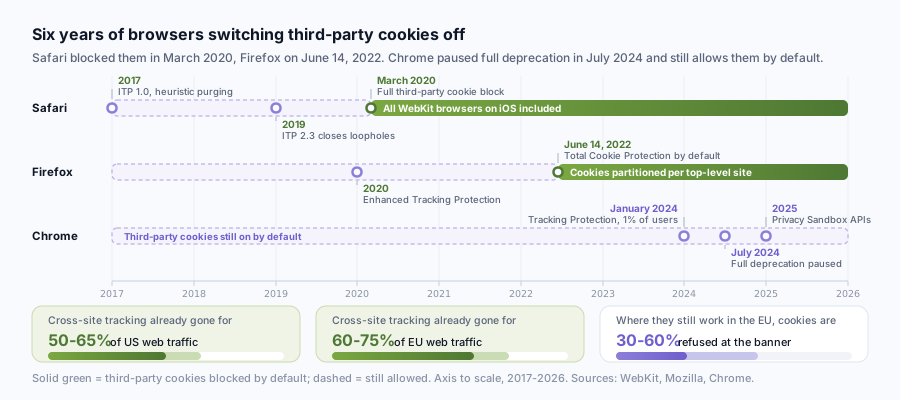
The blocking cascade has been deliberate, public, and roughly six years long. The headline events:
| Year | Browser | Action |
|---|---|---|
| 2017 | Safari | Intelligent Tracking Prevention 1.0 (heuristic third-party cookie purging) |
| 2019 | Safari | ITP 2.3 closes document.referrer / link decoration loopholes |
| 2020 | Safari | Full third-party cookie blocking (March), all WebKit browsers on iOS |
| 2020 | Firefox | Enhanced Tracking Protection ships in standard mode |
| 2022 | Firefox | Total Cookie Protection enabled by default for all users worldwide (June 14) |
| 2024 | Chrome | Tracking Protection rolled out to 1% of users (January) |
| 2024 | Chrome | Full third-party cookie deprecation paused, replaced by user-choice prompt |
| 2025 | Chrome | Privacy Sandbox APIs (Topics, Attribution Reporting) generally available |
WebKit's blog laid out the rationale plainly. ITP 2.3 specifically targets the workarounds publishers were using to dodge ITP 1.x: link decoration parameters, fragment identifiers, and document.referrer reads. Apple's engineers wrote: "We don't think tracking should be the default." Mozilla used identical framing in their Total Cookie Protection rollout post: cookies in Firefox are now confined to the site that set them.
Chrome's path is messier. Google originally targeted full third-party cookie deprecation for Q4 2024, then paused in July 2024 after pushback from the UK Competition and Markets Authority and from advertisers who had invested in Privacy Sandbox migrations they didn't yet trust. As of May 2026, third-party cookies still work in default Chrome. They don't work in Safari, Firefox, Brave, Edge with strict tracking prevention, or any Chromium browser with the privacy toggle on. For planning purposes, cross-site tracking is gone in roughly 50-65% of US web traffic and 60-75% of EU traffic.
The legal layer adds urgency. ePrivacy Directive Article 5(3) requires "prior informed consent" for any non-essential identifier stored on a user's device, which absolutely covers third-party tracking cookies. The CNIL's cookie guidelines spell out that consent must be specific, granular, and as easy to refuse as to accept. France fined Google 150M EUR and Facebook 60M EUR in January 2022 for one-click "Accept All" buttons without an equally prominent "Refuse All." GDPR Article 6 then layers on a separate lawful-basis requirement. Net effect on EU traffic: even where cross-site cookies still technically function in Chrome, they're refused 30-60% of the time at the consent banner.
The Revenue Attribution Cost (Stripe Case Math)
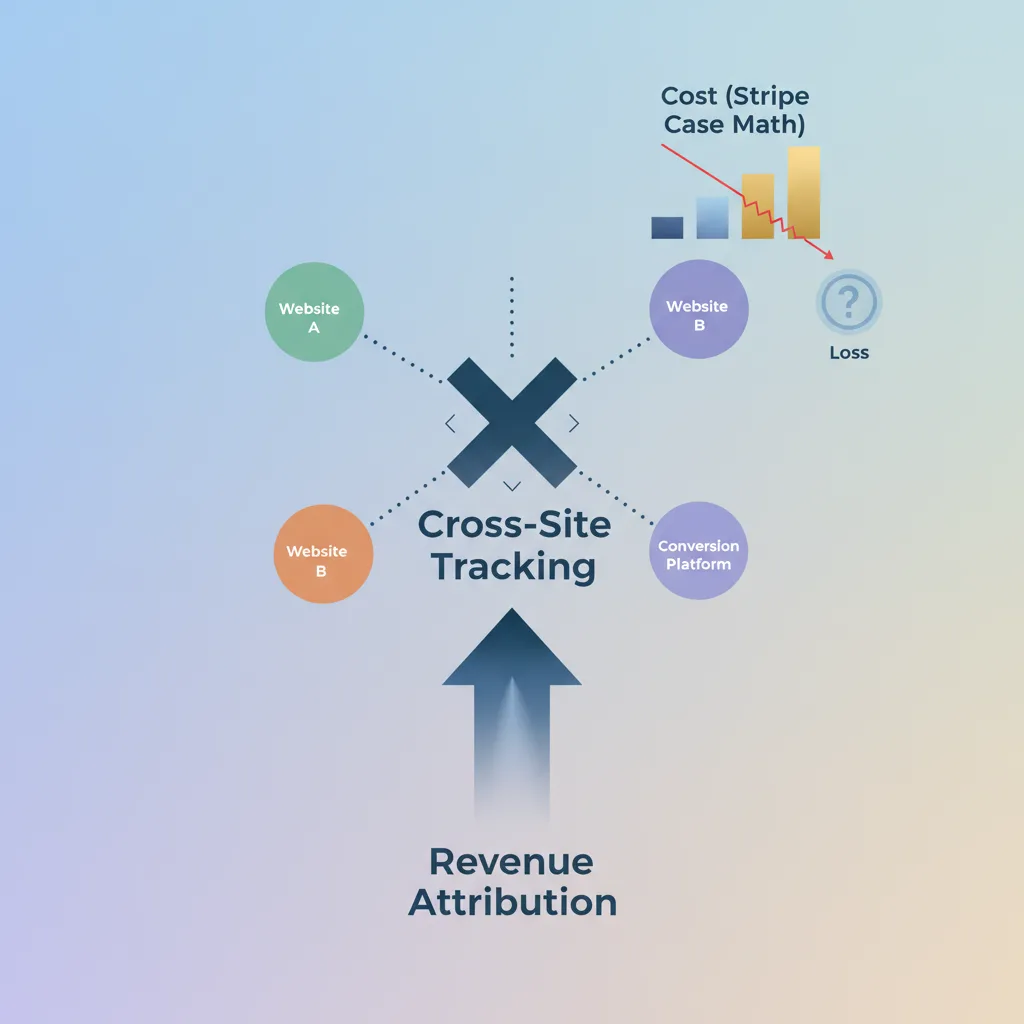
This is where the privacy mechanics turn into revenue. Most analytics posts on cross-site tracking stop at "browsers blocked it." The Stripe-side consequence is concrete and measurable. When a Safari user clicks a Google Ads link on Monday, returns directly on Wednesday, and pays via Stripe Checkout on Friday, the third-party gclid cookie was wiped by ITP within 24 hours. GA4 sees Wednesday's session as (direct) / (none). Stripe sees a $49 charge with no UTM context. Your Google Ads dashboard reports a conversion via its own server-side conversion API; your in-house attribution reports the same revenue as direct. The two numbers diverge, and you can't tell which one is wrong without a session-replay-grade reconstruction.
Lost-Attribution Calculator, pre-computed scenarios
Formula: Lost % = (Safari+Firefox share) × (paid traffic %) × (return-delay penalty). Return-delay penalty is empirically ~0.55 at a 6-day average return-visit delay; the full methodology, sample size, SQL, and per-bucket retention table is on a separate page so the number is verifiable rather than just claimed.
| Monthly visitors | Paid traffic % | Safari + Firefox share | Lost paid conversions (%) | Misallocated ad spend / mo @ $35 paid CPA |
|---|---|---|---|---|
| 10,000 | 30% | 35% | 5.8% | ~$304 |
| 25,000 | 40% | 45% | 9.9% | ~$1,733 |
| 50,000 | 50% | 50% | 13.8% | ~$4,813 |
| 100,000 | 60% | 55% | 18.2% | ~$15,277 |
| 250,000 | 50% | 50% | 13.8% | ~$24,063 |
Run your own numbers: take your monthly visitor count, multiply by your paid traffic share, multiply by your Safari + Firefox share, multiply by 0.55. That's your lost-conversion percentage. Multiply by your average paid conversion value to get monthly misallocated spend in dollars. The 50,000-visitor SaaS row sees roughly $4,800 of paid-channel revenue per month attributed to the wrong source, usually showing up as inflated "direct" or "organic search" in GA4. None of that goes away if you switch GA4 properties or upgrade to GA360. It only goes away when you stop relying on cross-site identifiers in the first place.
The honest hedge: this number can be smaller for sites with very short consideration windows. If 90% of your traffic converts on first session within 30 minutes, ITP doesn't have time to evict the cookie. B2C impulse-buy ecommerce sometimes loses only 5-8% to cross-site tracking shutdown. SaaS with a 6-day average between first click and first paid trial sits near the worst case. Yours will land somewhere in between.
Five Replacements for Cross-Site Tracking
Five techniques work in production today. Most attribution stacks combine three or four.
1. First-party UTM capture. Read utm_source, utm_medium, utm_campaign, utm_content, gclid, fbclid on landing. Store them in a first-party cookie or localStorage scoped to your own domain. They survive ITP because they're first-party. They survive consent banners in many jurisdictions because they don't share data with third parties.
2. Server-side Stripe webhooks. Stripe's documentation is explicit that you should never trigger fulfillment from the redirect-only path, checkout.session.completed is the canonical event. Pass the visitor's session ID into the Checkout Session metadata, then on the webhook, look up the stored UTMs and write the attribution server-side. No browser cookies involved at the moment of attribution.
3. First-party tracking script on your own domain. Plausible, Fathom, PostHog, and Attrifast all ship under-15kb scripts that run from your own subdomain or a partitioned CDN path. Plausible's data policy spells out that they store no personal identifiers and use no cookies. PostHog's privacy docs describe a similar architecture with optional anonymization. The script itself doesn't cross sites; the analytics platform doesn't try to identify the same user across multiple customers' properties.
4. Server-side tagging. Google Tag Manager's server-side container, hosted on a subdomain you control like gtm.yourdomain.com, gives you the durability of a first-party cookie while keeping the integration shape of a tag manager. Useful if you've already invested heavily in GTM and don't want to rip it out.
5. Privacy-preserving aggregate APIs. Chrome's Privacy Sandbox Attribution Reporting API and Topics API are designed to provide aggregated attribution and interest signals without per-user tracking. Real, but in 2026 they're still niche outside large advertisers, most bootstrapped teams I talk to haven't shipped them yet. GA4's reporting identity blends Google Signals, device IDs, and modeled identity to fill gaps; it's better than 2020-era GA but still loses 20-40% of sessions to consent.
Cross-Site Tracking vs First-Party Tracking: Side-by-Side
| Dimension | Cross-site (3rd-party cookies) | First-party (own domain) |
|---|---|---|
| Works in Safari | No (blocked since 2020) | Yes |
| Works in Firefox | No (TCP since 2022) | Yes |
| Works in Chrome | Yes by default; restricted with Tracking Protection | Yes |
| EU consent required | Yes, ePrivacy 5(3) opt-in | Often no (essential / legitimate-interest path) |
| Cookie banner refusal rate impact | High (30-60% lost) | Low (often no banner needed) |
| Cross-device matching | Limited; broken for most flows | Same-device only without login |
| Retargeting pools | Functional only on Chrome share | Not applicable |
| Stripe revenue attribution accuracy | 60-75% of true attribution | 90-100% of true attribution |
| Typical script size | 30-80kb (vendor SDK) | 4-15kb |
| Ongoing maintenance | High, vendor breakages, consent flow updates | Low, one webhook, one script tag |
The right column is what working attribution looks like in 2026. The left column is what most analytics dashboards still implicitly assume, which is why the numbers don't reconcile when you check them against Stripe.
How to Move Off Cross-Site Tracking This Week (Operator Playbook)
Concrete sequence I run for every new client and every property of mine. Total time: 2-4 hours. The hardest step is the audit; the rest is wiring.
Day 1 — Audit (60-90 minutes). Open your site in Safari with Web Inspector → Storage → Cookies. Note every domain that isn't yours. Repeat in Firefox. The trackers showing 7-day or 24-hour expiry on Safari are already capped by ITP; the ones missing entirely on Firefox are blocked by TCP. Write down which ones you actually use for revenue attribution versus which are vestigial from a 2021 retargeting pixel you forgot to remove.
Day 1, also: tag every paid link with UTMs (30 minutes). Use the Google Analytics Campaign URL Builder reference for the canonical parameter names. Every paid ad, every newsletter link, every partnership click. If you skip this step the rest doesn't help.
Day 2: install a first-party tracking script (5-10 minutes). Either build one yourself (read a UTM, store to localStorage, ping a server endpoint on your own domain) or install something off the shelf. For revenue attribution specifically you want a tool that joins to Stripe; see Attrifast's revenue attribution by channel or read the first-touch vs last-touch attribution comparison before picking a model.
Day 2 — wire the Stripe webhook (15 minutes). Subscribe to checkout.session.completed. Pass your tracking session ID through metadata on the Checkout Session creation call. On the webhook, look up the session, attach the original UTMs, write to your analytics store. This is what turns Stripe events into channel revenue without any browser cookie involved.
Day 3-7: let data accumulate. Don't act on attribution data with fewer than 50-100 conversions per channel. Statistical noise will lie to you. Once you cross that threshold, sort channels by RPV (revenue divided by visitors) and ignore everything else for the first month.
Day 8: sanity check. Compare your in-tool attribution to your Google Ads / Meta Ads dashboards. They will not agree. The platform numbers count view-through and modeled conversions; yours count clicks that produced actual Stripe charges. The platform number is usually 1.3-2x higher. The platform doesn't care about that gap. You should. Your job is to know which dollars produced which dollars. Read more on GA4 revenue attribution limitations and why conversion tracking without cookies works for SaaS once you've got the basics in place.
For the lazy version: skip steps 2-5 and use a tool that does all of them. Attrifast's privacy-first analytics ships a 4kb first-party script and a one-click Stripe connector. Stripe-native revenue attribution is the page that walks through the integration.
Limitations
- This article does not cover mobile app attribution (SKAdNetwork, AppsFlyer, Adjust). The browser-blocking story is web-only; iOS apps have their own privacy framework.
- It does not cover server-to-server ad platform conversion APIs (Google's Enhanced Conversions, Meta's Conversions API) in depth. They help, but they require a payload of hashed first-party data the ad platform then re-identifies internally, that's a different privacy posture than the first-party-only flow described above.
- Privacy Sandbox APIs (Topics, Attribution Reporting, FedCM) are real and shipping but in 2026 still niche outside large advertisers. If you're a bootstrapped SaaS, you probably don't need them yet.
- Multi-touch modeling with linear, time-decay, or U-shaped weights requires more conversions per channel than most sites under $50k MRR have. First-touch attribution is genuinely better signal-per-effort below that threshold.
- Enterprise B2B with 6-12 month sales cycles needs CRM-side attribution (Salesforce, HubSpot pipeline) layered on top. Cookieless web tracking gives you the first touch; the deal record gives you the close. Both are required.
FAQ
What is cross-site tracking in simple terms?
Cross-site tracking is when a third-party script (loaded from a different domain than the site you're visiting) drops a cookie or fingerprint that follows you between sites. Ad networks used it for retargeting and conversion attribution. Safari blocked it by default in 2020, Firefox followed in 2022, and Chrome restricted it through 2024-2025. First-party tracking, a script on your own domain, is what works in 2026.
Is cross-site tracking illegal under GDPR?
Not automatically illegal, but it requires opt-in consent under ePrivacy Directive Article 5(3) and a lawful basis under GDPR Article 6, usually consent. The CNIL fined Google 150M EUR and Facebook 60M EUR in January 2022 over consent banner design. In practice, most cross-site tracking on EU traffic now requires a friction-heavy banner and gets refused 30-60% of the time.
Will Chrome ever fully block third-party cookies?
Chrome shipped Tracking Protection to 1% of users in January 2024 and then paused full deprecation in July 2024 in favor of a user-choice approach via Privacy Sandbox. As of 2026, third-party cookies still work in Chrome by default but are blocked in Safari, Firefox, Brave, and most Chromium-based browsers with privacy settings on. Treat them as already gone for planning purposes.
What replaces cross-site tracking for revenue attribution?
Five replacements, in roughly the order most teams adopt them: first-party UTM capture stored server-side, server-side webhook joins (Stripe checkout.session.completed matched to a session ID), first-party tracking scripts under your own domain, server-side tagging via a custom subdomain, and consent-respecting analytics that work without identifiers. For revenue attribution specifically, the first-party UTM + webhook combination recovers 90%+ of conversions that cookie-based attribution loses.
References
- Intelligent Tracking Prevention 2.3, WebKit. https://webkit.org/blog/9521/intelligent-tracking-prevention-2-3/
- Full Third-Party Cookie Blocking and More, WebKit. https://webkit.org/blog/10218/full-third-party-cookie-blocking-and-more/
- Firefox Rolls Out Total Cookie Protection By Default To All Users Worldwide, Mozilla. https://blog.mozilla.org/security/2022/06/14/firefox-rolls-out-total-cookie-protection-by-default-to-all-users-worldwide/
- Privacy Sandbox: Third-party cookie deprecation, Chrome / Google. https://privacysandbox.google.com/cookies
- GA4 cookie usage and reporting identity, Google Analytics. https://developers.google.com/analytics/devguides/collection/ga4/cookies-user-id
- Stripe Checkout Sessions API, Stripe Docs. https://docs.stripe.com/api/checkout/sessions
- Server-side tagging with Tag Manager, Google. https://developers.google.com/tag-platform/tag-manager/server-side
- GDPR Article 6, Lawfulness of processing. https://gdpr.eu/article-6-how-to-process-personal-data-legally/
- Cookies and other trackers, guidelines, CNIL. https://www.cnil.fr/en/sheet-ndeg16-use-analytics-your-websites-and-applications
- ePrivacy Directive Article 5(3), EUR-Lex. https://eur-lex.europa.eu/legal-content/EN/TXT/?uri=CELEX%3A32002L0058
- State of Marketing 2024, HubSpot. https://www.hubspot.com/state-of-marketing
- How we handle privacy, PostHog. https://posthog.com/docs/privacy
- Plausible, privacy-focused analytics architecture / Data Policy. https://plausible.io/data-policy