I have set up GA4 conversion tracking more times than I can count — on my own products, on client SaaS apps, and once at 2am the night before a board meeting because someone discovered the purchase event had been firing with value: 0 for five months.
It is not hard. It is fiddly, the vocabulary changed underneath everyone, and roughly half the public guides still describe an interface Google retired. So the first two-thirds of this article is the setup done properly, in the order that actually works, with each step tied to Google's own documentation.
The last third is the part almost nobody writes down. Once your GA4 conversion tracking is perfect — every event firing, purchase values correct, Google Ads linked — there is still a specific class of question it cannot answer. Not because you configured it wrong. Because of how the system is built. I want you to know exactly where that wall is before you plan a quarter around a number that sits on the other side of it.
What counts as a conversion in Google Analytics now?
Start here, because the vocabulary is where most setups go wrong before a line of code is written.
Google Analytics renamed conversions to key events. A key event is an event you have flagged as important to the business; once flagged, it gets its own column in reports like Landing pages and User acquisition, and you can use key-event metrics in explorations [1]. The important property is that any event you collect can become a key event — there is no separate "conversion" object to create in Analytics.
Meanwhile, conversion now means something narrower and lives in Google Ads. You create a Google Ads conversion from a Google Analytics key event, and that object is what campaigns bid against. Google's documentation states plainly that Google Ads conversions do not appear in standard Google Analytics reports [1]. If you have ever had a marketer and an analyst arguing across a table with two dashboards open, that sentence is usually the whole explanation.
Then there is a third unit that neither of them measures: the settled charge in your payment processor. Here is how the three actually differ:
| GA4 key event | Google Ads conversion | Settled charge (Stripe) | |
|---|---|---|---|
| Where it lives | Analytics property | Google Ads account | Payment processor |
| What triggers it | A tagged event you marked as key [1] | Created from a GA4 key event [1] | A card actually charged |
| Appears in GA4 standard reports | Yes | No [1] | No |
| Usable for bidding | Not directly | Yes | No |
| Reflects refunds | Only if you send a refund event [4] | No | Automatically |
| Reflects failed or disputed payments | No | No | Yes |
| Survives 14+ months | No — user and key-event data capped at 14 months [11] | Per Ads retention | Yes |
None of these is wrong. They are three different questions. Trouble starts when a team uses one to answer another one's question — usually asking a key-event count to explain a revenue number.
How do you set up GA4 conversion tracking, step by step?
This is the order I use. Doing it out of order is what produces the "we've had tracking for months and the data is garbage" situation.
Step 1: Install the Google tag once, correctly
Paste the full gtag.js snippet immediately after the opening <head> element on every page, and do not add more than one Google tag per page. Duplicate tags are the quiet cause of doubled event counts.
Step 2: Decide which four or five actions matter
Resist the urge to mark everything. A property with 22 key events has no key events. For most SaaS the honest list is: sign_up, begin_checkout, purchase, and one activation event that predicts retention.
Use Google's recommended event names wherever one fits your action [2]. The recommended list includes purchase, sign_up, generate_lead, login, search, refund, plus the full online-sales set — add_to_cart, begin_checkout, add_payment_info, view_item and so on [2]. These names are not cosmetic: they are what populate the Ecommerce purchases and Lead acquisition reports, and what future integrations key off.
Step 3: Mark them as key events
In Admin → Data display → Events, toggle the event to a key event. That is the entire action. The event has to have fired at least once for it to appear in the list, which trips people up on brand-new properties — send a test event first.
Step 4: Send the purchase event with real money in it
This is the step that matters most and gets the least attention. The minimum viable payload, straight from Google's own tutorial [3]:
gtag("event", "purchase", {
  transaction_id: "T_12345_1",
  value: 30.03,
  currency: "USD",
  items: [{ item_id: "SKU_12345", item_name: "Pro annual", price: 30.03, quantity: 1 }]
});
Four things to get right:
transaction_idmust be unique and stable. It is the deduplication key. Reusing it, or regenerating it on page refresh, silently inflates or drops revenue.valueshould be the amount you will actually collect. Not list price, not price before discount.- Set
currencyat the event level whenever you send revenue data — Google calls this out explicitly, and it is the primary currency used for standard reporting [4]. - Do not fire it on a page that can be refreshed without guarding on the transaction ID. A thank-you page with a reloadable URL is a revenue-inflation machine.
The items array accepts up to 200 elements and up to 27 custom parameters beyond the prescribed ones [4], which is more room than most businesses need. Send every parameter you actually have, even the optional ones — Google's stated recommendation, and it costs nothing.
Step 5: Link Google Ads — and know what the link changes
In Admin → Product links → Google Ads links, click Link. You need administrator or editor on the property and administrative access in Ads. You can create up to 400 links per property, and Google Ads data appears in Analytics reports within 48 hours [5].
The part that surprises people: when you enable ads personalization on a linked Google Ads account, Analytics automatically marks these events as key events in your property — add_to_cart, add_to_wishlist, begin_checkout, session_start, view_item, view_item_list, view_search_results [5]. That includes session_start, which means your key-event count can jump by an order of magnitude overnight and nobody touched a tag. Check the list after linking.
Step 6: Set attribution and the lookback window deliberately
Under Admin → Data display → Events → Attribution settings there are three controls, and the defaults are decisions someone should make on purpose [6]:
- Reporting attribution model. Only three exist now: data-driven, paid and organic last click, and Google paid channels last click. First click, linear, time decay, and position-based were removed in November 2023 [7]. If your team's attribution doc still references them, it is out of date.
- Channels that can receive credit. Paid and organic is the broader cross-channel view; Google paid channels narrows it to Ads [6].
- Key event lookback window. Default 90 days for most key events, with 30 and 60 available; for acquisition key events (
first_open,first_visit) the default is 30 days, switchable to 7 [6]. Changes apply going forward only. If your sales cycle is 45 days and you left acquisition at 30, you are structurally discarding first-touch data.
Step 7: Verify before you trust
Enable debug mode and watch events land in DebugView in real time [4]. Then wait — purchase data takes roughly 24 hours to appear in standard reports, explorations, and the API [3]. Most "it isn't working" tickets are filed inside that 24-hour window.
Should you use gtag, server-side tagging, or the Measurement Protocol?
All three are legitimate. They solve different problems and they are not mutually exclusive.
| gtag.js (client-side) | Server-side tagging | Measurement Protocol | |
|---|---|---|---|
| What it is | Browser snippet on every page | A server container you host and own [10] | Direct HTTP events to Google's servers [9] |
| Setup cost | Minutes | Cloud Run or App Engine plus a mapped domain [10] | Engineering work per event |
| Survives ad blockers | Poorly | Better — first-party domain [10] | Yes |
| Survives consent rejection | No | No — consent still governs collection | No |
| Can send offline / backend events | No | Partly | Yes, that is its purpose [9] |
| Can fully replace tagging | Yes | No | No — Google states it augments, not replaces [9] |
| Identity join | Browser client_id | Browser client_id | Joined via client_id or app_instance_id [9] |
| Common failure | Blocked, throttled, or fired twice | Container cost and maintenance drift | Device defaults to desktop if not supplied [9] |
Two details worth internalising before you spend a sprint on this. First, the Measurement Protocol explicitly cannot stand alone: Google's documentation says only partial reporting is available if you send events solely that way, and some event and parameter names are reserved for automatic collection and simply cannot be sent through it [9]. Second, rules that generate or rename events are not triggered by Measurement Protocol events [9] — so a server-sent event will not pick up the tidy renaming logic your web container applies, and you end up with two spellings of the same conversion.
Server-side tagging is the strongest of the three for data quality, because the collection endpoint sits on your own domain and you get finer privacy controls [10]. It is also the one with real running costs and a maintenance surface. For a business under a few hundred conversions a month, gtag plus a payment-joined revenue layer usually beats a server container you will forget to patch. The full trade-off across categories is in the conversion tracking software comparison.
What can GA4 conversion tracking never tell you?
Here is the wall. Everything below survives a perfect setup.
1. GA4's unit of truth is an event, not a payment. A purchase event with value: 199 is a claim your website made. Whether the card cleared, whether the customer charged back in week three, whether the annual plan was prorated on upgrade — none of that reaches GA4 unless you build it. There is a refund event [4], and almost nobody implements it. The result is a revenue number that drifts upward from reality all year.
2. Direct is not just unlabelled — it is ineligible. This is the one that changed how I think about GA4 reports. Google's documentation states that all attribution models exclude direct visits from receiving attribution credit, unless the path to the key event consists entirely of direct visits [7]. So a session that arrives with no referrer does not merely get a vague label. It is removed from the credit pool, and the credit flows to whatever paid or organic touch happens to be in the path. The channel you can't see doesn't get a small share. It gets zero.
3. The buyer who returns three days later on a laptop is a different person. GA4 identity is device-scoped unless User-ID is set and the user actually logs in. Even with User-ID configured, Analytics stitches events from before sign-in to that ID within a session, but events after sign-out detach again [13]. B2B buying — discover on a phone, evaluate on a work laptop, expense it through someone else's card — breaks this constantly.
4. History evaporates. On standard properties, user-level retention maxes out at 14 months, and that same period applies to key-event data [11]. Worse, when a standard property crosses into Google's "Large" tier, event-level retention is automatically reduced to 2 months and anything older is permanently deleted [11] — so the reward for growing is a shorter memory. Any year-over-year cohort comparison you want to run in an exploration is pressing against that ceiling. On top of it, system-defined data thresholds withhold rows when user counts are low, and Google's documentation is blunt that you can't adjust them [12].
5. It cannot see the payment processor at all. No amount of GA4 configuration will tell you which channel produced charge ch_3PqX.... That join requires carrying a first-party identifier through checkout — Stripe's Checkout Session object exposes client_reference_id and metadata for exactly this [16] — and GA4 has no facility to store or read it.
Where is your AI-referred revenue actually going?
This is where limits two and five compound into a real number.
I did not set out to build a benchmark. I set out to close a spreadsheet.
For about two years I ran the same reconciliation at the end of every month: GA4's revenue export in one column, the Stripe payout in the other. They never matched, which is normal — modelled conversions, sampling, refunds, the usual drift. What was not normal was the direction. GA4's Direct row kept growing, and the months it grew fastest were the months Stripe came in ahead of everything GA4 had credited to a channel I was actually spending money on.
That is a strange shape for a reporting error. Noise is symmetrical. This only ever leaned one way.
It resolved when I stopped trying to reconcile totals and started carrying a first-party visitor ID through checkout, so each settled charge could name the session that produced it. The charges that had been piling up in Direct had arrived from answer engines — no referrer, no UTM, nothing for GA4 to file them under, and under limit two, nothing GA4 was willing to credit even if it could.
Running that same join across 200 Stripe-connected sites is where the Attrifast figures in this section come from — the rest are Clickport's and Otterly's, cited where they appear. I am quoting cohort medians rather than my own property's numbers on purpose: one site is an anecdote, 200 is a distribution. But the shape I found on mine is the shape the cohort shows.
Google's default channel group now includes an AI Assistants channel, described as covering sources like ChatGPT, Gemini, DeepSeek, Copilot, and Grok. Two things it explicitly does not do: it excludes Google's AI Overviews and AI Mode, which are counted as Organic Search, and Perplexity does not appear on that published list [8]. So a Perplexity referral with an intact referrer lands in Referral, next to your directory backlinks.
And that is the good case. Clickport's April 2026 measurement found that roughly two-thirds of ChatGPT traffic carried a referrer and sat in Referral, while the other third arrived with no referrer and no UTM and landed in Direct [14] — where, per limit two above, GA4 refuses to give it credit at all.
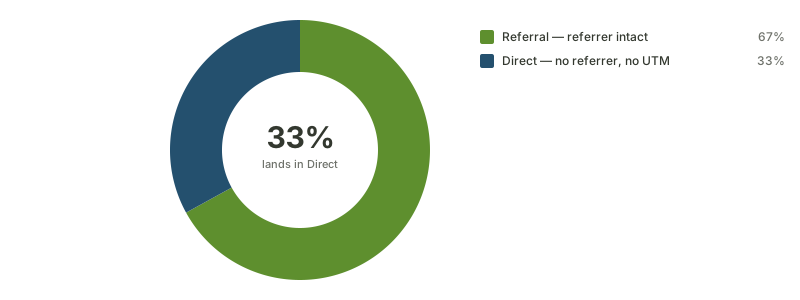
Source: Clickport — referrer measurement of ChatGPT outbound traffic, April 2026
That third is not a rounding error you can shrug off. It is precisely the slice GA4's attribution rules then remove from the credit pool.
The size of the hole in the 200-site payment-verified benchmark [17]:
| Signal | What GA4 shows on default settings | What payment-joined data shows |
|---|---|---|
| Share of "Direct" that is actually AI-referred | 0% — Direct is Direct | 34% |
| AI-referred revenue, median undercount | 64% low | baseline |
| B2B SaaS conversion rate, AI vs Google organic | Not separable | 2.7% vs 1.4% |
| Revenue per visitor, Perplexity | Filed under Referral | $1.42 |
| Revenue per visitor, Claude | Folded into Direct | $1.18 |
| Revenue per visitor, ChatGPT | Split across AI Assistants and Direct | $0.87 |
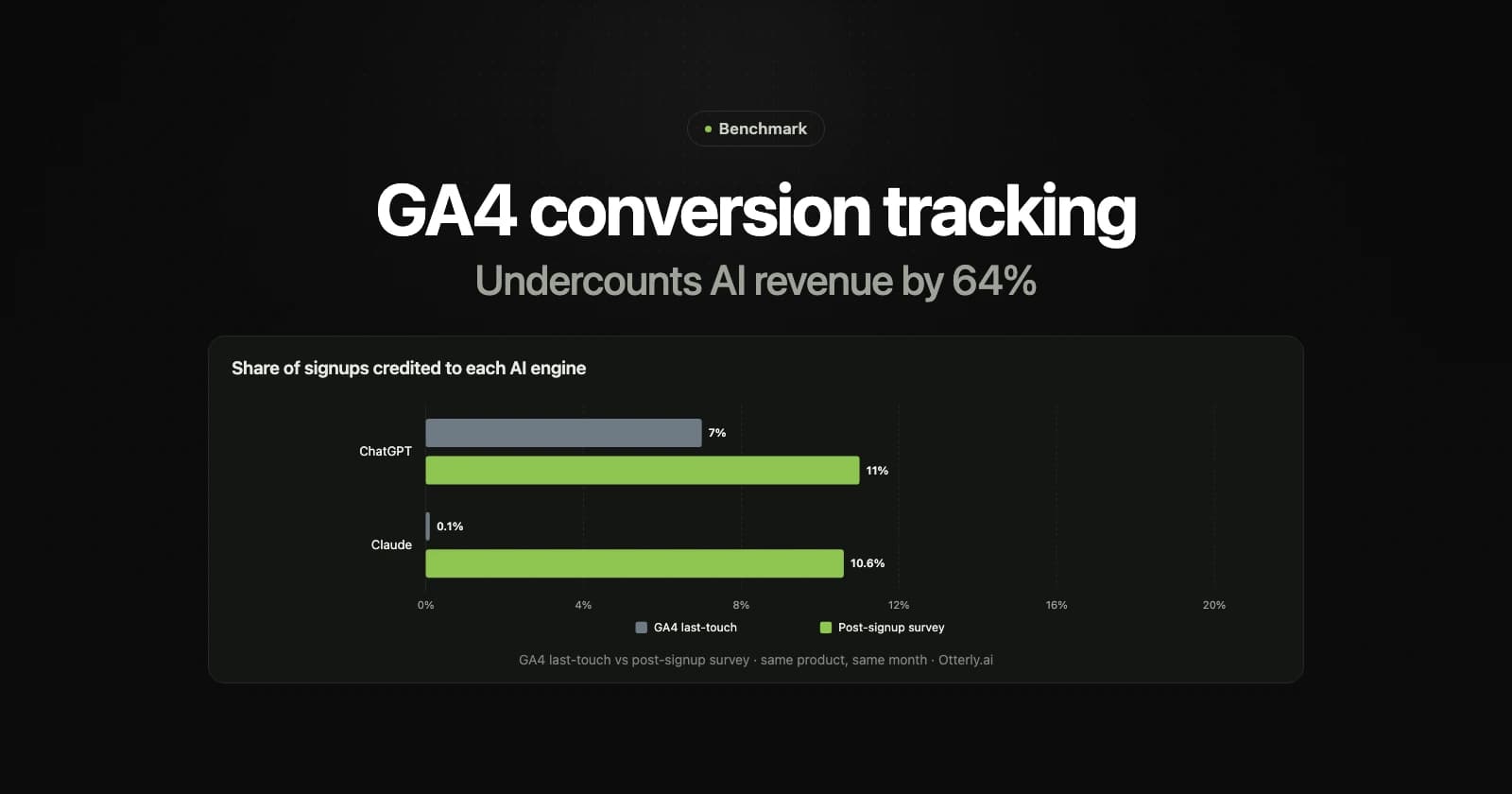
Otterly published the same shape of finding from the other direction: GA4 last-touch credited Google Search with 35% of their signups, ChatGPT with 7%, and Claude with 0.1% — while a post-signup survey put ChatGPT at 11% and Claude at 10.6% [15]. Same product, same month, two orders of magnitude apart on one channel.
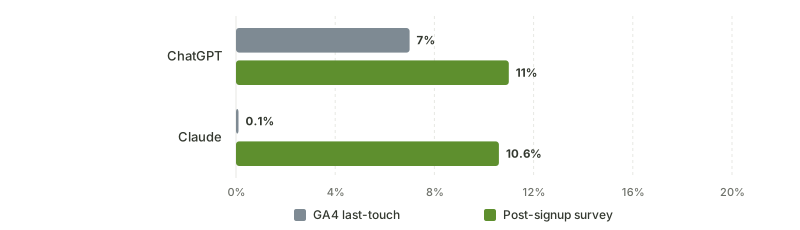
Source: Otterly.ai — 'Claude drives 10.6% of our signups; Google Analytics says 0.1%'
Look at the Claude pair. GA4 did not report a smaller number than the survey; it reported a number about a hundred times smaller. A channel producing better than one in ten signups was, as far as every dashboard and every budget meeting was concerned, not there. If you want to run the same comparison on your own funnel, the "how did you hear about us" survey guide covers the question, the options and how far to trust the answers.
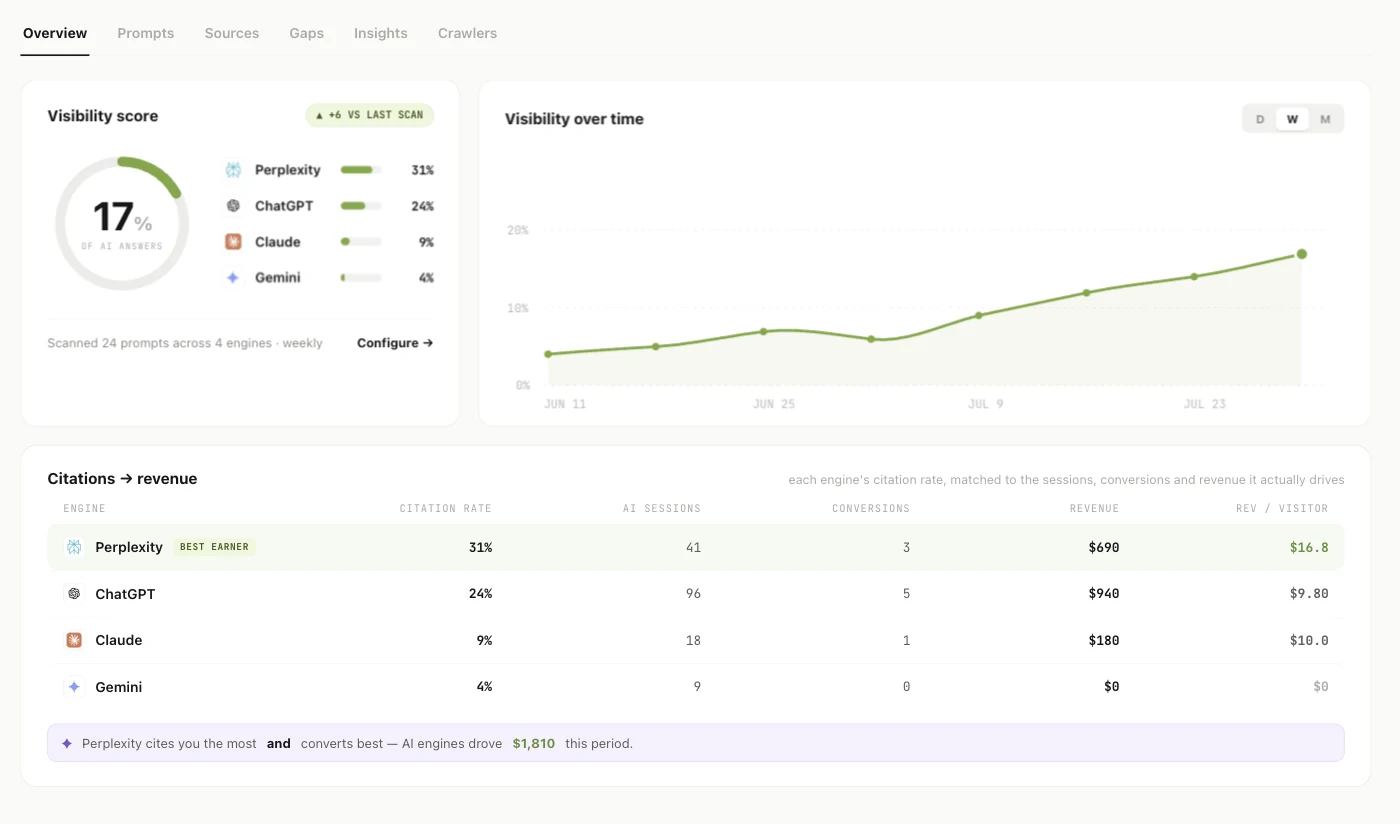
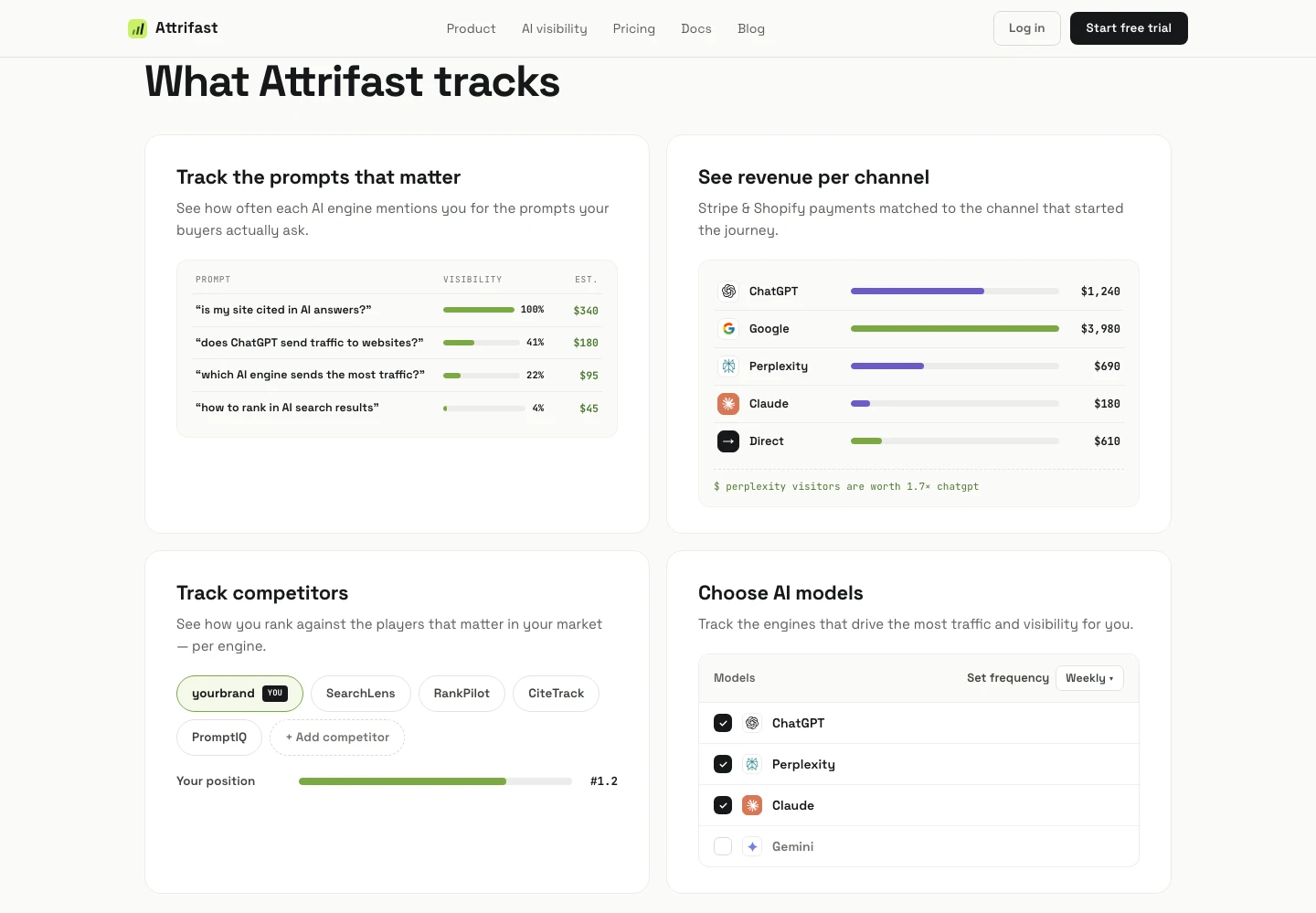
That is the same question GA4 is asking — which channel produced the revenue — answered against settled charges instead of events, with the AI engines broken out as their own lines rather than folded into Direct. The right-hand columns are the ones GA4 structurally cannot fill: sessions, conversions and settled revenue per engine, sitting next to how often that engine cited you at all.
What is that gap worth on your site?
Percentages are easy to nod at and hard to act on, so do the arithmetic with your own numbers instead of mine. It is three fields:
Direct sessions last month × 0.34 × your revenue per visitor.
The 0.34 is the benchmark's median share of Direct that turns out to be AI-referred; your revenue per visitor is total revenue divided by total sessions, which GA4 will give you in about thirty seconds. A site with 20,000 Direct sessions a month and a $1.50 RPV lands on roughly $10,200 a month — revenue that is real, already banked, and filed under the one channel Google's attribution rules refuse to credit [7]. Over a year that is $122,000 attributed to nothing in particular.
Two things make that estimate conservative rather than generous. First, an AI visitor is worth more than an organic search visitor — every engine in the cohort out-earns Google organic per head, Perplexity by better than two to one:
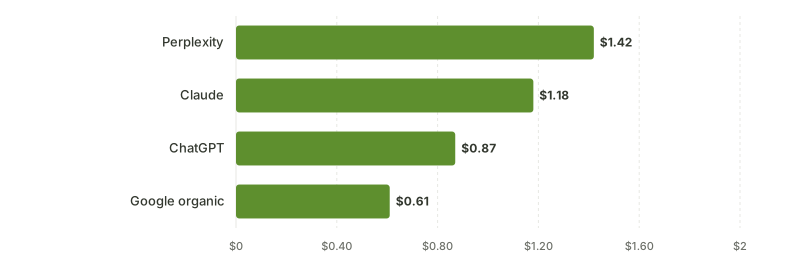
Source: Attrifast 200-site benchmark, cohort-blended RPV across Stripe-connected sites
Second, they convert at close to double the rate of the channel most teams spend their entire content budget on:
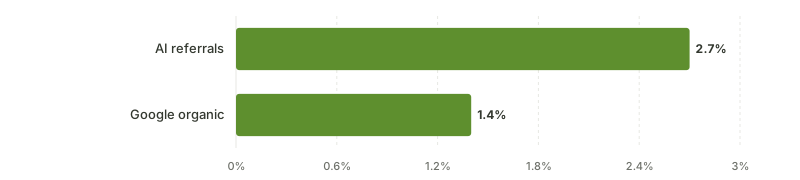
Source: Attrifast 200-site benchmark — AI-referred sessions vs Google organic sessions on the same sites
That is the uncomfortable part. The traffic GA4 is least able to see is the traffic converting best. You are not missing a rounding error at the bottom of the report — you are missing the top of it.
"Can't I just fix this inside GA4?"
Partly, and you should do the free part first. A custom channel group that pattern-matches AI referrers recovers a meaningful chunk of the labelled traffic — the custom channel group setup for AI traffic is the exact configuration, and what's really inside your Direct bucket shows you how to size the problem before spending anything.
What no amount of GA4 configuration reaches is the other two-thirds of the problem. Regrouping a channel does not restore a referrer that was never sent, so the no-referrer third stays in Direct and stays ineligible for credit [7]. And even for the sessions you do label correctly, GA4's unit is still an event with a value parameter — it has no field for a Stripe charge ID, no way to learn that the card was declined or refunded in week three, and no way to reconcile a purchase event against a payout. Those are not settings. Relabelling gets you a better-looking channel report over the same unreconciled numbers.
How do you close the gap without ripping out GA4?
You don't rip it out. That is the wrong instinct and I have watched teams waste a quarter on it.
GA4 is genuinely good at things a revenue layer is not: on-site behaviour, funnels and path exploration, audience building for Ads, free retention of aggregate reports. The gap is narrow and specific — it is about the join between a visitor and a payment. So add that one layer and leave the rest alone.
| GA4 conversion tracking | Payment-joined revenue attribution | Run both | |
|---|---|---|---|
| Behaviour, funnels, on-site paths | Strong | Not the point | GA4 |
| Audience building for Google Ads | Native [5] | No | GA4 |
| Which channel produced charge X | Structurally cannot | Yes, via client_reference_id [16] | Revenue layer |
| Refunds and failed payments | Only if you build it [4] | Automatic | Revenue layer |
| AI engines as separate revenue lines | Partial — one blended channel, Perplexity excluded [8] | ChatGPT, Perplexity, Claude, Gemini reported separately | Revenue layer |
| Direct-bucket recovery | Excluded from credit by design [7] | Recovered where first-party signals exist | Revenue layer |
| History beyond 14 months | No [11] | Yes | Revenue layer |
| Cost | Free | $9.99/mo Starter, $49/mo Pro | Both |
| Consent banner needed for analytics | Yes in most EU setups | No — cookieless | — |
Once each engine is its own revenue line, the follow-on question stops being how much and becomes why — which is the part GA4 was never in a position to answer, because the answer happens inside an AI response before any session exists. That is a rankings problem, not an analytics one:
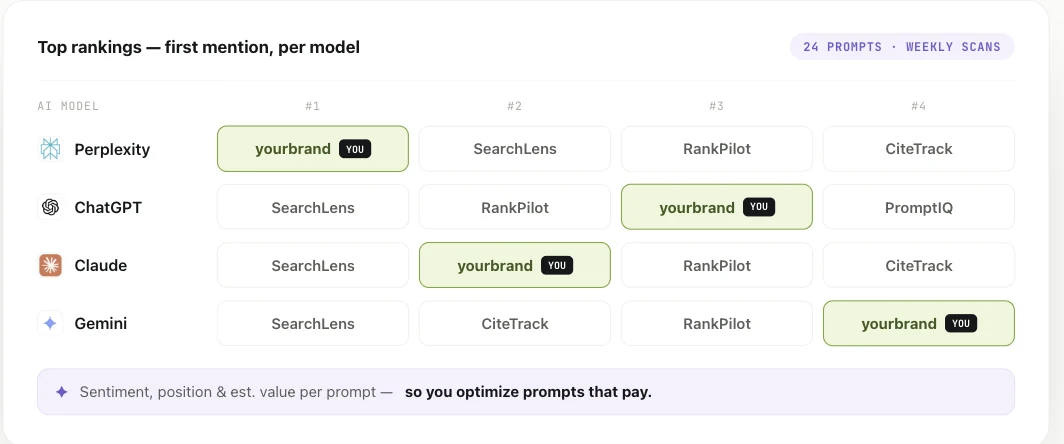
Read across, that is a per-engine competitive position — first mention on Perplexity, second on Claude, third on ChatGPT, fourth on Gemini. Read against the revenue table above, it tells you which of those positions is worth defending. In that sample the Perplexity #1 is also the best earner, so the position is real; when the two disagree — a top slot on an engine that sent nine sessions and closed nothing — you have found a vanity metric rather than a growth channel.
Does this apply to you? The join needs a payment processor to join to, so the honest qualifier is: if you charge through Stripe or Shopify, everything above works on your data as written. If you are lead-gen, marketplace-billed, or invoicing offline, the AI-channel labelling still helps but the revenue join does not — and you should stop reading here rather than start a trial.
The setup on the revenue side is deliberately small, because the whole argument falls apart if it costs another hour: one script tag, and one Stripe restricted API key. It is cookieless, so it does not need a consent banner for analytics — which for EU traffic means it keeps measuring the visitors your GA4 property loses at the banner. Removing it is deleting one line from your <head>; nothing is written into your checkout and no code is added to your payment flow.
On price: Starter is $9.99/mo ($99.90/yr), Pro is $49/mo ($490/yr), and a launch promo is running at 50% off. Both start with the same 7-day free trial, the trial unlocks the Pro feature set on either plan, and nothing is due on day one. Set that against the worked example above — if the median site is misattributing five figures a month, the entry plan costs roughly a tenth of a percent of the number it exists to make visible. There is no free tier. I would rather say that plainly here than let you find out at the end of a signup flow.
If you want the head-to-head rather than the complement framing, Attrifast versus Google Analytics lays out where each one wins, the Stripe attribution setup covers the payment-side join, and the broader attribution software comparison puts both against the incumbent tools. For the specific AI question, ChatGPT revenue attribution is the narrow version, and UTM-to-revenue tracking covers the campaign-level join. If you would rather see the GA4-versus-Stripe numbers side by side before deciding anything, that reconciliation is written up here.
FAQ: Google Analytics conversion tracking
How do I set up conversion tracking in Google Analytics 4?
Install the Google tag on every page, send an event when the action happens, then mark that event as a key event under Admin → Data display → Events [1]. For revenue, use the recommended purchase event with transaction_id, value, currency, and items rather than a custom name, because the prescribed events are what populate the ecommerce reports [2][3]. Verify in DebugView, allow roughly 24 hours for standard reports to fill, and only then link Google Ads and create Ads conversions from the key events you trust.
What is the difference between a key event and a conversion in GA4?
A key event is an Analytics concept — an event you flagged as important, which then gets its own reporting column. A conversion is now a Google Ads object created from a key event, and it is what campaigns bid against. Google's documentation is explicit that Google Ads conversions do not appear in standard Analytics reports [1], which is why the two interfaces routinely disagree about what feels like the same number.
Why do GA4 and Google Ads report different conversion numbers?
Because the defaults differ in at least four places. Google Ads reports default to Google paid attribution while Analytics defaults to paid and organic [6]. The two products use their own account time zones. Ads conversions never surface in standard Analytics reports [1]. And the key event lookback window — 90 days by default for most key events, 30 for acquisition key events [6] — can include a touchpoint in one system that the other has already aged out.
Does GA4 conversion tracking work without cookies or consent?
Partially. GA4 depends on a client-side identifier, so a rejected banner, an ad blocker, or browser storage limits detach the session from earlier ones. Modeling fills some of the aggregate gap, but modeled key events are estimates rather than records. Analytics also applies data thresholds you cannot adjust [12], and standard properties cap user-level and key-event retention at 14 months [11]. A per-payment record that survives all of that has to live outside GA4.
Can GA4 tell me which channel produced a specific Stripe payment?
No. GA4's unit is an event with a value parameter, not a settled charge, so refunds and failed payments never reconcile. And every GA4 attribution model excludes direct visits from receiving credit unless the entire path is direct [7], which means the sessions most likely to carry AI referrals are also the ones least able to earn credit. Carrying a first-party visitor ID through Stripe's client_reference_id [16] is what actually closes that loop.
Where does AI traffic land in GA4 conversion reports?
Three places. The AI Assistants default channel covers sources like ChatGPT, Gemini, DeepSeek, Copilot and Grok, and explicitly excludes AI Overviews and AI Mode, which count as Organic Search; Perplexity is not on the published list, so it lands in Referral [8]. Anything arriving without a referrer goes to Direct — about a third of ChatGPT clicks, by Clickport's April 2026 measurement [14]. In the 200-site benchmark, 34% of GA4 "Direct" is AI-referred and default-settings sites undercount AI revenue by a median 64%.
Do I have to replace Google Analytics to fix attribution?
No, and replacing it is usually the wrong move. GA4 stays the better tool for on-site behaviour, funnel and path exploration, and Ads audiences, and it is free. The gap is one join — visitor to settled payment — so add that layer and leave the rest of your tagging alone. The teams I have watched rip GA4 out spent a quarter rebuilding behaviour reporting they already had.
What if I do not use Stripe?
The join needs a processor to join to. Stripe and Shopify are supported, so per-charge attribution works as described on either. If you bill by invoice, through a marketplace, or on a processor that is not connected, labelling AI referrals as their own channel still helps, but the settled-charge attribution will not — better to know that now than three days into a trial.
How long does setup take, and what is in the free trial?
One script tag in your <head> and one Stripe restricted API key. No server container to host, nothing added to your checkout, and removing it later is deleting that one line. Both plans start on the same 7-day trial, the trial unlocks the Pro feature set on either one, and nothing is charged on day one.
The bottom line
Google Analytics conversion tracking is worth doing properly, and doing it properly takes about an hour: one tag, four or five well-named events, marked as key events, a purchase event carrying a stable transaction_id and a real value, the Google Ads link, and a lookback window you chose rather than inherited. That is a genuinely useful system and it costs nothing.
What it will not do is tell you which channel produced the money in your bank account. That is not a gap you can configure away — it is the difference between counting events and reading settled charges, plus an attribution rule that removes direct sessions from the credit pool entirely [7]. Three years ago that gap was an academic quibble. Now that a third of ChatGPT clicks arrive with no referrer [14] and 34% of the Direct bucket is AI-referred, it is where a meaningful slice of your growth is hiding.
Keep GA4. Add the layer that reads payments. The measurement you are missing is not a report you have to build — it is one script tag and one Stripe restricted key, and the first honest per-engine revenue split shows up about a day later. If you want to know what your own Direct bucket has been holding: start the 7-day trial, nothing due today — or compare the two plans first if you would rather see the ceiling before the floor.
References
- About key events — any event can be marked as a key event; Google Ads conversions do not appear in standard Analytics reports — Google Analytics Help (2026)
- Recommended events — prescribed event names including purchase, sign_up, generate_lead, begin_checkout — Google Analytics Help (2026)
- Set up a purchase event — gtag payload with transaction_id, value, currency and items; ~24 hours to reporting — Google Analytics Developers (2026)
- Measure ecommerce — items array limits, currency at event level, refund event, debug mode — Google Analytics Developers (2026)
- Connect Google Ads to Google Analytics — 400 links per property, 48-hour data flow, auto-marked key events — Google Analytics Help (2026)
- Select attribution settings — reporting model, channels eligible for credit, key event lookback window — Google Analytics Help (2026)
- Get started with attribution — three available models; direct visits excluded from credit unless the path is entirely direct — Google Analytics Help (2026)
- Default channel group — the AI Assistants channel, and AI Overviews counted as Organic Search — Google Analytics Help (2026)
- Measurement Protocol — server-to-server events joined by client_id; augments rather than replaces tagging — Google Analytics Developers (2026)
- What is server-side tagging? — server containers, page performance, privacy controls — Google Tag Platform (2026)
- Data retention — user-level and key event data capped at 14 months on standard properties — Google Analytics Help (2026)
- About data thresholds — system-defined, cannot be adjusted — Google Analytics Help (2026)
- About User-ID — reporting identity, and how events before sign-in and after sign-out are handled — Google Analytics Help (2026)
- Why ChatGPT traffic shows as Direct in GA4 — roughly two-thirds Referral, one-third Direct, April 2026 — Clickport (2026)
- Claude drives 10.6% of our signups; Google Analytics says 0.1% — Otterly.ai (2026)
- Checkout Session object — client_reference_id and metadata as attribution join keys — Stripe (2026)
- AI traffic revenue benchmark 2026 — 200 Stripe-connected sites, per-engine RPV and conversion rate — Attrifast (2026)