Comparison Guide

Best conversion tracking software 2026: 12 tools compared

Most businesses know how many visitors they get. Very few can answer the more important question: which visitors actually convert? Conversion tracking software closes that gap — but in 2026, consent choices, browser privacy controls, blockers, and multi-channel complexity make choosing a conversion tracking platform harder than ever. This guide compares 12 website conversion tracking tools by price, implementation model, privacy posture, and who each one is actually built for. No affiliate links. No sponsored rankings.

Methodology: we applied the same decision rubric to all 12 tools, checked public pricing and documentation, and used hands-on product access where it was available. Demo-only and enterprise products are identified from published evidence rather than presented as identical lab tests.

Updated August 2026 · 19 min read
Attrifast comparison desk · 2026

Start with the decision, then pick the tool.

12 tools · 1 rubric
Revenue decision01

Which source produced the payment?

Choose a session-to-payment join

Product decision02

Which steps cause activation?

Choose event and funnel analytics

UX decision03

Where does the page frustrate users?

Choose replay and heatmaps

Attrifast fit

Traffic source → session → Stripe revenue

Evidence standard

Pricing + docs + hands-on access disclosed

TL;DR
  • Consent, browser policy, blockers, and implementation quality all affect observed conversions; no tool honestly guarantees 100% capture.
  • Many analytics tools can receive purchase events but still require custom work to join each Stripe payment back to its originating session.
  • Choose enterprise software for a concrete modeling, governance, support, or integration requirement — not an arbitrary spend threshold.
  • For SMBs: Attrifast ($9.99/mo, 7-day free trial) provides revenue-level attribution in 2 minutes, no engineering required.

What is conversion tracking software?

Conversion tracking software identifies which marketing channels, campaigns, and touchpoints lead visitors to take desired actions — completing a purchase, starting a free trial, submitting a contact form, or requesting a demo. It answers the question that traffic analytics cannot: not just who visited, but who converted.

The fundamental difference from traffic analytics is what gets measured. Tools like GA4 and Plausible count sessions, pageviews, and traffic sources. Conversion tracking connects those sessions to outcomes — which channels produced paying customers, which campaigns generated trial signups, how much revenue each source of traffic actually generates.

Traffic analytics measures
  • Sessions and pageviews by channel
  • Bounce rate and time on site
  • Traffic source distribution
  • Which pages attract the most visits

Useful for site optimization. Insufficient for marketing budget decisions.

Conversion tracking measures
  • Paying customers and revenue by channel
  • Conversion rate per traffic source
  • Cost per conversion per campaign
  • Revenue per visitor by channel

The data you need to decide where to invest and where to cut.

Macro conversions vs micro conversions

Macro conversions are the primary business outcomes: completed purchases, paid subscriptions, signed contracts. Micro conversions are intermediate steps that signal intent: email signups, free trial starts, demo requests, add-to-cart events. A complete conversion tracking setup measures both — macro conversions for revenue attribution, micro conversions for funnel optimization.

In 2026, effective conversion tracking also has to navigate three structural challenges: consent-dependent measurement, browser privacy controls and blockers, and multi-channel customer journeys that cross devices before a conversion. Any conversion tracking tool you evaluate should have a credible answer to all three.

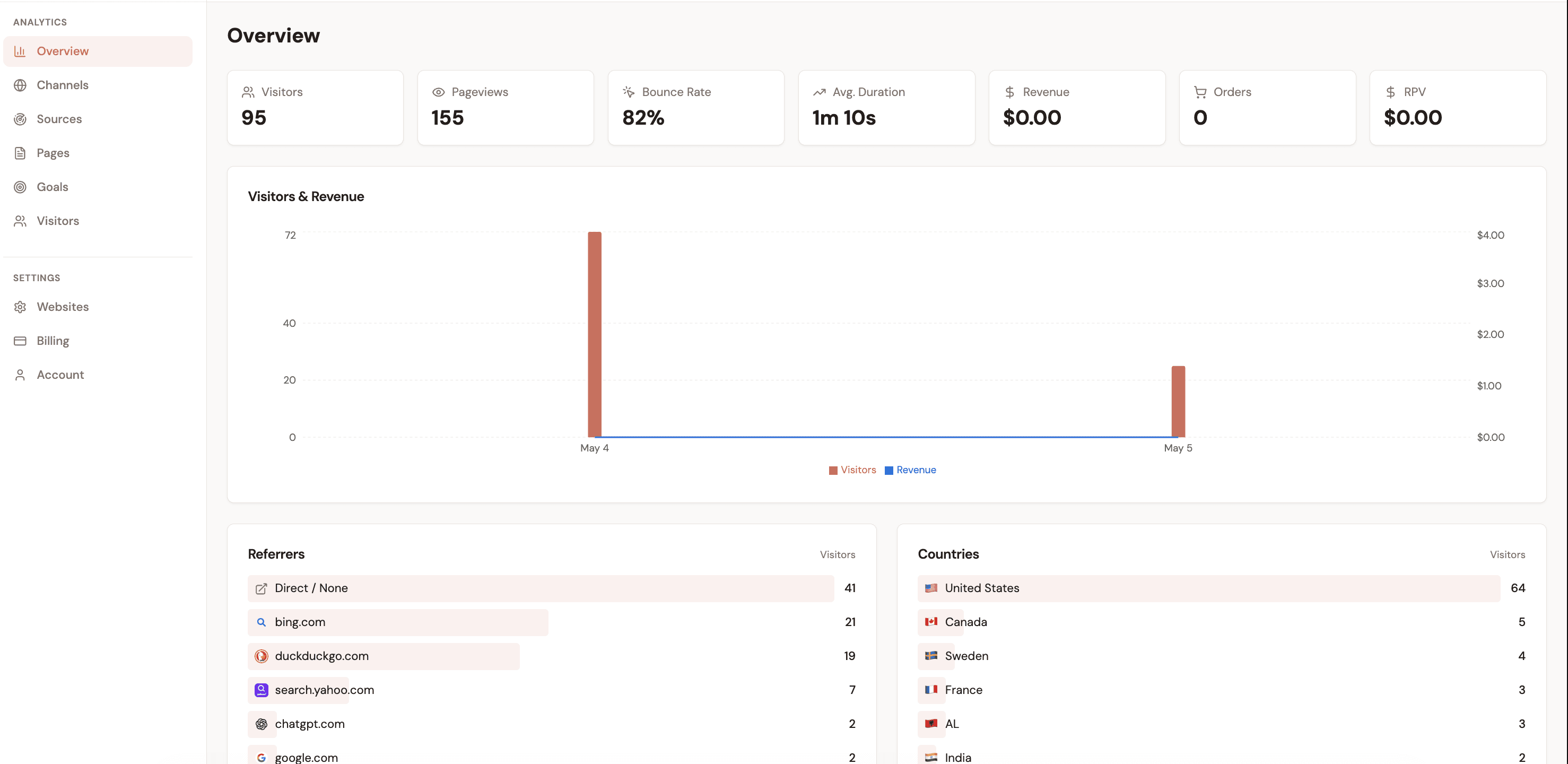
Attrifast — one of the 12 conversion-tracking tools reviewed below. Visitors, conversion rate, Revenue, and RPV unified in a single dashboard.
One of the 12 tools reviewed below. Attrifast unifies visitors, conversions, and revenue with no third-party cookies and no fingerprinting — the same data category GA4 splits across three reports.

8 features to look for in conversion tracking software

Not all conversion tracking tools are built to the same standard. These eight features separate genuinely useful tools from analytics dashboards that look comprehensive but leave critical questions unanswered. The first three matter most because they determine whether the tool can preserve a first-party source signal, connect to your payment processor[11], and explain how attribution credit is assigned.

1

Multi-channel attribution

Critical

Identifies which marketing channels — organic search, paid ads, email, referral, social — get credit when a visitor converts. Without this, you cannot make informed decisions about where to allocate your marketing budget.

2

Real-time conversion data

Critical

Shows conversions as they happen, not with a 24–48 hour reporting delay like GA4 default views. Real-time data matters when you are running paid campaigns and need to pause underperforming ads quickly.

3

Cookie-free / privacy-compliant tracking

Critical

Understand whether the tool relies on analytics cookies, first-party storage, or server-side events. Each design has different continuity, consent, blocker, and implementation trade-offs; “cookieless” does not guarantee complete capture or automatic exemption from consent rules.

4

Payment processor integration

Critical

Native connection to Stripe, PayPal, or WooCommerce that links payment events to marketing channels server-side. Without this, you are tracking clicks and pageviews — not actual revenue-generating conversions.

5

Custom conversion goals

Define conversions beyond pageview tracking — form submissions, button clicks, free trial signups, demo requests, checkout completions. A tool locked to pageviews as its only conversion type severely limits what you can measure.

6

Funnel visualization

Shows each step in your conversion funnel with drop-off rates at every stage. Lets you identify whether users are abandoning at the pricing page, checkout form, or email confirmation step — and prioritize where to optimize.

7

UTM parameter support

Reads and stores UTM parameters (utm_source, utm_medium, utm_campaign) from URLs to correctly attribute visitors from specific campaigns. Essential for any business running paid ads or email campaigns.

8

API access and data export

Lets you pull raw conversion data into your own systems — data warehouse, BI tool, spreadsheet, or CRM. Without this, your attribution data is locked inside the vendor's platform and cannot be joined with other data sources.

12 conversion tracking tools: comparison matrix

Side-by-side overview of all 12 tools. Setup time is an informed estimate based on hands-on access where available and published implementation requirements elsewhere.

AttrifastRecommended

SMBs needing accurate revenue attribution without enterprise cost

Price

$9.99/mo (7-day free trial)

Setup time

2 minutes

Cookie-free

Yes

Native payment join

Yes

Google Analytics 4

Teams with engineering resources for custom event setup

Price

Free

Setup time

4–8 hours+

Cookie-free

No

Native payment join

No

Hotjar / Contentsquare

UX teams understanding on-site user behavior

Price

$0–99+/mo

Setup time

30 minutes

Cookie-free

No

Native payment join

No

PostHog

Developer-led teams wanting self-hosted product analytics

Price

Free tier / open-source

Setup time

2–4 hours

Cookie-free

No

Native payment join

No

Mixpanel

Product-led SaaS teams tracking user engagement

Price

Free; paid from $28/mo

Setup time

2–4 hours

Cookie-free

No

Native payment join

No

Amplitude

Growth teams at scale with dedicated analysts

Price

Free tier; enterprise pricing

Setup time

4–8 hours

Cookie-free

No

Native payment join

No

Heap

Teams that want auto-captured events without manual tagging

Price

Free tier; custom paid

Setup time

1–2 hours

Cookie-free

No

Native payment join

No

Plausible Analytics

Privacy-conscious websites wanting simple traffic metrics

Price

From $9/mo

Setup time

10 minutes

Cookie-free

Yes

Native payment join

No

Matomo

Organizations requiring full data sovereignty

Price

Free (self-hosted); from $23/mo

Setup time

1–4 hours

Cookie-free

No

Native payment join

No

Piwik PRO

Regulated industries needing compliance-first analytics

Price

Custom (enterprise)

Setup time

1–2 weeks

Cookie-free

No

Native payment join

No

ClickMagick

Affiliate marketers tracking click-level performance

Price

$69–199/mo

Setup time

1–2 hours

Cookie-free

No

Native payment join

No

Usermaven

Startups wanting privacy-first analytics without cookies

Price

From $14/mo

Setup time

15 minutes

Cookie-free

Yes

Native payment join

No

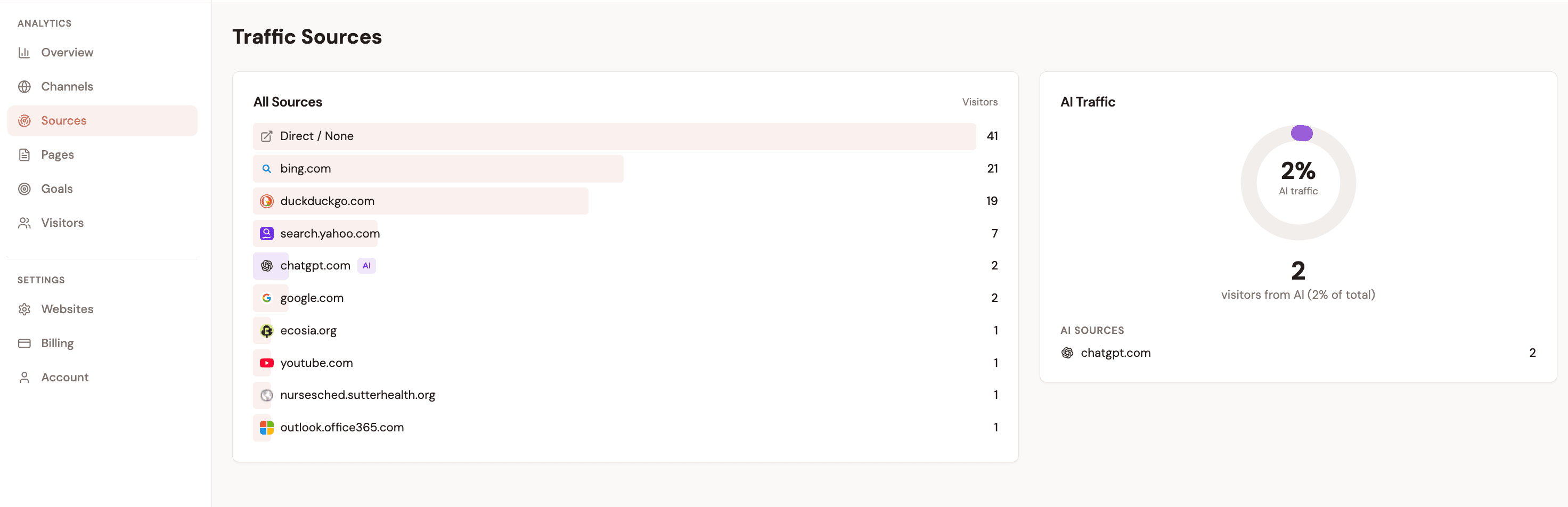
Attrifast Sources view showing per-channel attribution including AI traffic from ChatGPT — what the recommended tool's UI actually looks like.
The shape of useful conversion-tracking output: every source ranked by visitors with revenue rolled in. The AI Traffic widget on the right is what most older tools miss entirely.

Individual tool reviews

Detailed breakdown of each conversion tracking tool — strengths, weaknesses, and who it is actually built for. Ordered from our top recommendation for most SMBs to more specialized tools.

Attrifast

Cookieless revenue attribution for Stripe

$9.99/mo

Attrifast is a lightweight, cookieless conversion tracking software built for SMBs running on Stripe. It connects browser sessions to actual payments using server-side matching — no third-party cookies, no fingerprinting, no engineering required. Setup takes two minutes: paste one script tag and connect Stripe with a read-only restricted API key.

Strengths
  • Deterministic attribution when a source signal and payment-session join are present
  • 2-minute setup — no engineering or developer time required
  • Privacy-first by design — no third-party cookies and no cross-site tracking
  • Native Stripe revenue integration out of the box
Weaknesses
  • First-touch attribution only — no multi-touch models yet
  • No native ad platform integration (Facebook CAPI, Google offline conversions)
  • Newer product with a smaller feature set than enterprise tools
Verdict

The best conversion tracking software for SMBs under $100K/month in revenue who need to know which channel drives paying customers. Ninety percent of the answer for five percent of the enterprise price.

Google Analytics 4

Google's free analytics platform with event-based conversion tracking

Free

GA4 is the world's most widely deployed analytics platform, with built-in conversion tracking via custom events. It works well for pageview-based goals and integrates tightly with Google Ads. But it was designed as a traffic analytics tool, not a revenue attribution platform — and that distinction matters significantly in 2026.

Strengths
  • Free with no usage limits — hard to beat the price
  • Extensive ecosystem of tutorials, integrations, and community support
  • Native Google Ads integration for paid search attribution
  • Flexible event-based model can track almost any conversion type
Weaknesses
  • Observed coverage varies with consent, browser policy, blockers, and implementation quality
  • No native Stripe revenue integration without custom engineering
  • Steep learning curve — event taxonomy and reporting require significant time investment
  • Consent requirements and observed coverage depend on configuration and jurisdiction
Verdict

Great for traffic analytics. Inadequate for revenue-level conversion tracking without substantial custom engineering. Most teams should use GA4 for traffic and a dedicated tool for revenue attribution.

Hotjar / Contentsquare

Session replay, heatmaps, and visual funnel analysis

$0–99+/mo

Hotjar (now part of Contentsquare) is the leading session replay and heatmap platform. It shows you exactly how users interact with your pages — where they click, where they scroll, where they rage-click. The funnel analysis feature visualizes where users drop off before converting. It is, however, a behavior analytics tool, not a conversion tracking tool in the attribution sense.

Strengths
  • Excellent session recordings reveal exactly why users do not convert
  • Heatmaps and scroll maps identify high-friction page elements
  • Visual funnel analysis shows step-by-step drop-off rates
  • Low technical barrier — works without developer involvement
Weaknesses
  • Does not answer where converting visitors came from — no attribution capability
  • No connection to revenue data from Stripe, or any payment processor
  • Requires a separate tool for marketing channel attribution
  • Session replay storage limits can become expensive at high traffic volumes
Verdict

Excellent for understanding why users do not convert. Tells you nothing about where those users came from. Pair it with a dedicated conversion tracking tool — do not use it as a standalone attribution solution.

PostHog

Open-source product analytics with feature flags, session replay, and A/B testing

Free tier / open-source

PostHog is an all-in-one open-source product analytics platform that combines conversion funnels, session replay, feature flags, and A/B testing in a single tool. It can be self-hosted for complete data ownership or used as a managed cloud service. The breadth of features is impressive — but so is the setup complexity.

Strengths
  • Open-source and self-hostable — complete data ownership on your own servers
  • Combines product analytics, session replay, and experiments in one platform
  • Generous free tier makes it accessible for early-stage startups
  • Active open-source community with frequent releases
Weaknesses
  • Steep learning curve — requires technical setup and ongoing configuration
  • Self-hosted option demands server maintenance and infrastructure management
  • No native payment processor integration — revenue tracking requires manual event setup
  • Cookie-dependent by default (cookieless mode available but requires configuration)
Verdict

Powerful for product teams that want to own their full analytics stack. If you have engineering resources and want a single platform for product analytics, PostHog is the strongest open-source option. Non-technical teams will find it overwhelming.

Mixpanel

Event-based product analytics with funnel visualization and cohort analysis

Free; paid from $28/mo

Mixpanel is built around event tracking and funnel analysis. It excels at showing which steps in a product flow lead to conversion, which user segments convert best, and how retention changes over time. It is a product analytics tool, not a marketing attribution platform — the distinction matters when you need to know which ad campaign drove a customer, not just which in-app step they completed.

Strengths
  • Best-in-class funnel visualization with step-by-step drop-off analysis
  • Cohort analysis shows conversion rates across different user segments
  • Strong mobile SDK for tracking in-app conversions
  • Clean interface with a reasonable learning curve compared to GA4
Weaknesses
  • Event-based pricing scales poorly — costs increase quickly at high event volumes
  • Focused on product analytics, not marketing channel attribution
  • No native revenue tracking from Stripe without custom events
  • Cookie-dependent tracking loses Safari users and ad-blocker users
Verdict

The best choice for product teams tracking which in-app flows lead to activation and retention. Not the right tool for marketers trying to measure ad spend ROI or connect campaigns to actual payments.

Amplitude

Enterprise product analytics with behavioral cohorting and experimentation

Free tier; enterprise pricing

Amplitude is the enterprise-grade product analytics platform, used by companies like Notion, Atlassian, and Ford. It offers deep behavioral analytics, a built-in experiment platform, and integrations with most CDPs and data warehouses. The feature depth is exceptional — but so is the complexity and cost at scale.

Strengths
  • Deep behavioral analytics with advanced cohort segmentation
  • Built-in experiment platform for running A/B tests at scale
  • CDP and data warehouse integrations for unified data pipelines
  • Strong enterprise support and account management
Weaknesses
  • Enterprise-focused pricing becomes expensive quickly past the free tier
  • Complex setup requires dedicated analytics engineers to configure correctly
  • Overkill for teams with fewer than 10 people working on analytics
  • Like Mixpanel, focused on product behavior — not marketing channel attribution
Verdict

If your analytics team has 10 or more people and you need enterprise behavioral analytics, Amplitude delivers. For anything smaller, the complexity and cost outweigh the benefits. Most SMBs will never use 20% of what Amplitude offers.

Heap

Auto-capture analytics that records every user interaction automatically

Free tier; custom paid

Heap takes a fundamentally different approach to event tracking: it captures every click, tap, and form submission automatically, without requiring manual event tagging. This means you can retroactively analyze any interaction that happened before you thought to track it. The auto-capture approach is powerful — but it generates significant data noise.

Strengths
  • Automatic event capture eliminates the need for manual event tagging
  • Retroactive analysis — query interactions that happened before you defined them as events
  • Visual journey mapping shows paths users take through your product
  • Lower setup barrier than manual event tracking tools
Weaknesses
  • Auto-capture creates data noise — filtering relevant events from irrelevant ones is time-consuming
  • Session-based pricing can become expensive at high traffic volumes
  • Less precise than manual tracking for critical conversion events
  • No native integration with revenue data from payment processors
Verdict

Valuable if you want to track everything without upfront setup investment. The auto-capture firehose can overwhelm teams without dedicated analysts to manage signal-to-noise. Pair with a revenue attribution tool for complete conversion tracking.

Plausible Analytics

Lightweight, cookie-free web analytics with a privacy-first architecture

From $9/mo

Plausible is a simple, privacy-focused analytics tool for pageviews, traffic sources, and goal events. Its low-complexity reporting is a genuine strength and a limitation when your needs extend to payment-level attribution. Confirm your own consent obligations rather than assuming a vendor category automatically removes them.

Strengths
  • Privacy-focused design with a deliberately limited data model
  • Script is under 1KB and loads instantly, with no page speed impact
  • Simple, clean dashboard that is accessible to non-technical users
  • Affordable pricing starting at $9/month for most small sites
Weaknesses
  • No conversion attribution — cannot tell you which channel drove a purchase
  • No revenue tracking or payment processor integration
  • Goal tracking is limited to pageviews and custom events — no funnel analysis
  • Limited integrations compared to GA4 or Mixpanel
Verdict

Excellent for basic traffic measurement and simple pageview goals. Not a conversion tracking tool in any meaningful attribution sense. Use Plausible for traffic visibility and add a dedicated tool if you need to connect visitors to revenue.

Matomo

Open-source Google Analytics alternative with self-hosting option

Free (self-hosted); from $23/mo

Matomo is the most widely deployed open-source analytics platform, offering a GA-like experience with the option to run entirely on your own servers. It is a comprehensive traffic and behavior analytics tool with ecommerce tracking, funnel reports, and goal conversion tracking. The self-hosted option gives complete data sovereignty — your data never leaves your infrastructure.

Strengths
  • Full data ownership — self-hosted option keeps all data on your servers
  • GDPR compliant in self-hosted mode without third-party data sharing
  • Familiar GA-like interface reduces onboarding time for teams migrating from GA4
  • Ecommerce tracking module for basic order and revenue reporting
Weaknesses
  • Self-hosted option requires server maintenance, updates, and infrastructure cost
  • Ecommerce tracking does not natively connect to Stripe — requires custom implementation
  • Smaller ecosystem and fewer integrations than GA4
  • Interface feels less polished than modern SaaS analytics tools
Verdict

The strongest choice if your primary requirement is keeping all analytics data on your own servers. For organizations in regulated industries or with strict data residency requirements, Matomo self-hosted is the default-safe option.

Piwik PRO

Enterprise privacy analytics with consent management and customer data platform

Custom enterprise pricing

Piwik PRO is an enterprise analytics suite that bundles analytics, a consent management platform (CMP), tag manager, and a customer data platform in one product. It is designed specifically for organizations that must comply with strict privacy regulations — healthcare, government, financial services — where standard analytics tools create compliance risk.

Strengths
  • Built-in consent management platform eliminates the need for third-party CMPs
  • Designed from the ground up for GDPR, HIPAA, and public sector compliance
  • Bundled tag manager and CDP reduce integration complexity at the enterprise level
  • Dedicated enterprise support and data processing agreements
Weaknesses
  • Enterprise pricing with no public rate card — requires a sales conversation
  • Significant setup and onboarding time before data flows correctly
  • Overkill for any business that is not in a regulated industry
  • Feature depth creates complexity that small teams struggle to manage
Verdict

For regulated industries — healthcare, finance, government — where standard analytics tools create legal exposure, Piwik PRO is the right answer. For everyone else, simpler and more affordable tools deliver 90% of the value.

ClickMagick

Click tracking and link optimization for performance marketers and affiliates

$69–199/mo

ClickMagick is a click tracking and link management platform built specifically for performance marketers, affiliate marketers, and media buyers. It tracks which links and traffic sources drive conversions, provides click-level fraud detection, and supports split testing of landing pages and offers. It is a specialized tool for a specific use case.

Strengths
  • Click-level tracking with built-in fraud detection to filter bot traffic
  • Link rotators and split testing for optimizing landing page and offer performance
  • Real-time reporting with sub-second click tracking
  • Tracking links that work across multiple ad platforms simultaneously
Weaknesses
  • Focused exclusively on click and link tracking — not a full-site analytics tool
  • No website-level behavior analytics, funnels, or session recordings
  • Interface and feature set are tailored to affiliate marketers — generic marketers may find it specialized
  • Pricing starts at $69/month — significant cost for what is essentially a link tracker
Verdict

Purpose-built for affiliate marketers and media buyers who need click-level accuracy across multiple traffic sources. Not the right tool for general website conversion tracking or SaaS product analytics.

Usermaven

Privacy-friendly website and product analytics without cookies

From $14/mo

Usermaven combines website and product analytics in a privacy-focused platform. Its positioning is similar to lightweight web analytics with added product-journey features; verify the storage mode and consent configuration you plan to use.

Strengths
  • Privacy-focused tracking options across web and product analytics
  • Combines website and product analytics in one platform
  • Clean, accessible interface suitable for non-technical users
  • Affordable entry pricing relative to more established competitors
Weaknesses
  • Newer product with a smaller community and less documentation than established tools
  • Limited integrations compared to Mixpanel, Amplitude, or GA4
  • No native revenue tracking from Stripe, or other payment processors
  • Growing feature set means some capabilities are still maturing
Verdict

A promising option for teams that want privacy-first analytics with both website and product insights. Still maturing — teams that need deep integrations or revenue attribution will need to supplement with additional tools.

How to choose: a decision framework for conversion tracking software

Work through these five questions in order. Each answer eliminates tools that do not fit your situation. By the end you should have one or two candidates worth trialing rather than 12 to evaluate in parallel.

1

Do you need revenue-level tracking or just conversion counts?

If you need to know which channels drive actual paying customers and revenue amounts, you need a tool with native payment processor integration. Attrifast connects directly to Stripe to surface revenue per channel. If you only need to count goal completions (form fills, pageviews, button clicks), simpler tools like GA4, Plausible, or Mixpanel are sufficient.

Tools to consider: Revenue tracking: Attrifast. Goal counts only: GA4, Plausible, Mixpanel.
2

What payment processor do you use?

Most popular conversion tracking tools are built for Shopify and do not support Stripe. If you run a Stripe-powered SaaS or subscription business, your options narrow significantly: Attrifast is the clearest plug-and-play option. Shopify merchants have broader choice including Attrifast, Triple Whale, and Cometly.

Tools to consider: Stripe: Attrifast. Shopify: Attrifast, Triple Whale, Cometly. Both: Attrifast.
3

How important is privacy compliance for your business?

If you have European traffic, GDPR requires consent before setting analytics cookies — and 30–40% of visitors reject those banners. If you sell to developers, founders, or technical users, ad blocker penetration can reach 40%. Cookie-dependent tools will systematically undercount your most valuable visitors.

Tools to consider: Cookie-free: Attrifast, Plausible, Matomo (self-hosted). Enterprise compliance: Piwik PRO.
4

What is your budget?

Buy the least complex tool that answers your decision. Enterprise products can be justified by governance, data volume, multi-touch modeling, support, or integrations — not by a single ad-spend threshold. Validate the shortlist against your own payments before committing.

Tools to consider: Free: GA4, PostHog (free tier). Under $30/mo: Attrifast, Plausible. Mid-tier: Mixpanel, Heap. Enterprise: Amplitude, Piwik PRO.
5

How much engineering time can you invest in setup and maintenance?

GA4 ecommerce and custom Stripe joins can require meaningful implementation and maintenance, depending on the stack. Attrifast packages a narrower script-plus-Stripe workflow. Validate setup time on your framework and match the tool to the engineering capacity your team actually has.

Tools to consider: No engineering: Attrifast, Plausible, Hotjar. Some engineering: PostHog, Mixpanel. Full engineering team: GA4 custom, Amplitude.

The shortcut for most SMBs

If you run a Stripe-powered SaaS or a Shopify store doing under $100K/month in revenue, the answer is almost always a lightweight, cookieless attribution tool. You need to know which channels drive paying customers. You need that answer in minutes, not weeks. And you need a price that does not consume 10% of your marketing budget.

Start with Attrifast — two-minute setup, seven-day free trial, cancel anytime. Verify the accuracy against your actual Stripe revenue data, then upgrade to a more complex tool only if you hit a specific limitation that requires it.

Free conversion tracking software: what free actually gets you

“Free” in this category means free event tracking, not free revenue attribution. Here is where each free option ends — and what you pay to close the gap.

GA4

Free gets you: Unlimited free event and conversion tracking, Google Ads integration

Where it stops: No native session-to-Stripe join; Explorations may sample high-volume queries; consent and coverage vary by implementation

PostHog (free tier)

Free gets you: 1M events/month, session replay, feature flags

Where it stops: Revenue attribution requires wiring payment webhooks to person profiles yourself — an engineering project, not a toggle

Matomo (self-hosted)

Free gets you: Full analytics suite, no per-event fees, total data ownership

Where it stops: You run the server, updates, and backups; e-commerce revenue tracking needs manual instrumentation

Attrifast ($9.99/mo after trial)

Free gets you: A packaged first-party session-to-Stripe workflow, with revenue grouped by attributable source

Where it stops: Not free — but the 7-day trial lets you verify accuracy against real Stripe data before paying

If your revenue runs through Stripe, the cheapest reliable setup is a free analytics tool for traffic plus a lightweight conversion tracker for revenue — see how the Stripe integration attributes Checkout, Billing, and Payment Links out of the box.

Key takeaways

1Conversion tracking and traffic analytics are different tools solving different problems. Traffic analytics counts visitors; conversion tracking connects visitors to revenue. Using one as a substitute for the other leads to bad budget decisions.
2Consent choices, browser storage limits, blockers, and implementation errors can all reduce observed conversion coverage. First-party and server-side designs remove some failure modes, but no architecture guarantees complete capture.
3Most popular conversion tracking tools (Triple Whale, Cometly, Northbeam) are built for Shopify and do not support Stripe. Stripe-powered SaaS businesses have a narrower set of options.
4Enterprise tools earn their cost only when their governance, modeling, integration, or support depth solves a specific requirement. Price alone is not a proxy for attribution quality.
5Start with the simplest tool that answers your core question — which channel drives paying customers. Add complexity only when you hit a specific, concrete limitation in your current setup.

Frequently asked questions

What is conversion tracking software?

Conversion tracking software identifies which marketing channels, campaigns, and touchpoints lead visitors to complete desired actions — purchases, free trial signups, form submissions, or demo requests. Unlike traffic analytics tools that count sessions and pageviews, conversion tracking connects visitor behavior to outcomes and revenue. It tells you not just how many people visited, but which visitors actually became customers.

How much does conversion tracking software cost?

Pricing ranges from free tiers to lightweight monthly plans and custom enterprise contracts. The right budget depends on event volume, required integrations, attribution model, support, and the cost of implementation — not on a universal revenue or ad-spend threshold. Verify current vendor pricing before buying because packaging changes frequently.

Is there good free conversion tracking software?

Yes, with trade-offs. GA4 is free and can track ecommerce events, but a direct session-to-Stripe join requires custom implementation. PostHog and Matomo also offer free or self-hosted paths, with more setup work. Free tools can be sufficient when your team can own the event schema, payment join, validation, and maintenance.

Can I track conversions without cookies?

Yes. Attrifast uses a random first-party ID in localStorage and joins the resulting session to a Stripe payment server-side, without third-party cookies, fingerprinting, or a cross-site identity graph. It still depends on the tracking request and payment join succeeding, so no responsible tool should promise 100% capture or immunity from every blocker.

What is the difference between conversion tracking and web analytics?

Web analytics measures traffic: sessions, pageviews, bounce rates, traffic source distribution. Conversion tracking connects that traffic to outcomes: which channels produce purchases, which campaigns generate trial signups, how much revenue each traffic source actually generates. You can think of web analytics as the answer to "how many people came?" and conversion tracking as the answer to "how many people bought, and where did they come from?" Both questions matter, but only conversion tracking informs budget allocation decisions.

Which conversion tracking software is best for Shopify?

Choose by workflow. Attrifast is designed for a lightweight first-party traffic-to-revenue view across Shopify and Stripe. Triple Whale is better suited to DTC teams that need deeper creative and ad-platform analysis. If conversion feedback to advertising platforms is the main requirement, compare tools on their server-side destination integrations before choosing. For store-specific setup steps, see our ecommerce conversion tracking guide.

Do I need conversion tracking software if I already use Google Analytics?

Not necessarily. GA4 can track ecommerce purchase events and may be enough when your implementation is already reliable. A dedicated tool becomes useful when you want a simpler payment-processor join, a privacy-first first-party model, or a clearer channel-to-revenue view. Run both in parallel and reconcile them against actual orders before replacing either one.

Conversion tracking tools — entry-tier monthly cost (USD)

Source: Verified from each vendor's pricing page or third-party reviews

Sources

Primary sources for the claims in this article. Numbered citations in the text link to the matching entry.

  1. [1]Plausible Pricing 2025 — $9 (10k pv), $19 (100k), $69 (1M)Simple Analytics (third-party verified) (2025).
  2. [2]Fathom Analytics Pricing 2025 — $14/mo (100k pv, unlimited sites)Simple Analytics (third-party verified) (2025).
  3. [3]SegMetrics — funnel attribution from $57/moSegMetrics (2025).
  4. [4]Wicked Reports Pricing — starts at $250/mo, invite-only at higher tiersWicked Reports (2025).
  5. [5]Northbeam pricing — Starter from $999/mo, Professional ~$2,500/mo, Enterprise customSalesHive (third-party verified) (2025).
  6. [6]Triple Whale Pricing — GMV-tiered ($549/mo at $1–2.5M GMV; $1,129/mo at $5–7M; $1,849/mo at $10–15M)Triple Whale (2025).
  7. [7]HubSpot Marketing Hub Pricing — Pro $800/mo (no attribution), Enterprise $3,600/mo (multi-touch revenue attribution)HubSpot (2025).
  8. [8]Mixpanel Pricing — Free up to 1M events, $2,520/mo at 10M, $5,320/mo at 20MMixpanel (2025).
  9. [9][GA4] About data sampling — Standard properties begin sampling above 10 million events per queryGoogle Analytics Help (2025).
  10. [10]Google Click Identifier (GCLID) — required for Google Ads conversion trackingGoogle Ads Help (2025).
  11. [11]Stripe Webhooks — payment_intent.succeeded, charge.succeeded, invoice.paid event referenceStripe Docs (2025).
  12. [12]Stripe Checkout — client_reference_id passes session metadata to webhooksStripe Docs (2025).
  13. [13]Ecommerce Conversion Rate by Industry — Food/Beverage 4.5–6.0%, Apparel 2.0–3.0%, Luxury 0.8–1.2%Shopify Plus (2026).
  14. [14]Ad Blocker Usage Statistics 2025 — 29.5% of users use ad blockers (~1.77B people)Backlinko (2025).
  15. [15]EDPB Guidelines 2/2023 on the Technical Scope of Article 5(3) of ePrivacy Directive (Final, October 2024)European Data Protection Board (2024).

See which channels drive your conversions

Install the 4 KB script, connect Stripe, and validate a source-to-revenue dashboard against your own completed payments.

  • One script tag and a Stripe key — live in minutes
  • First-party measurement without third-party cookies
  • Recognized AI referrals joined to Stripe payments
Start free trial →

7-day free trial · $0 due today · then $9.99/mo · cancel anytime

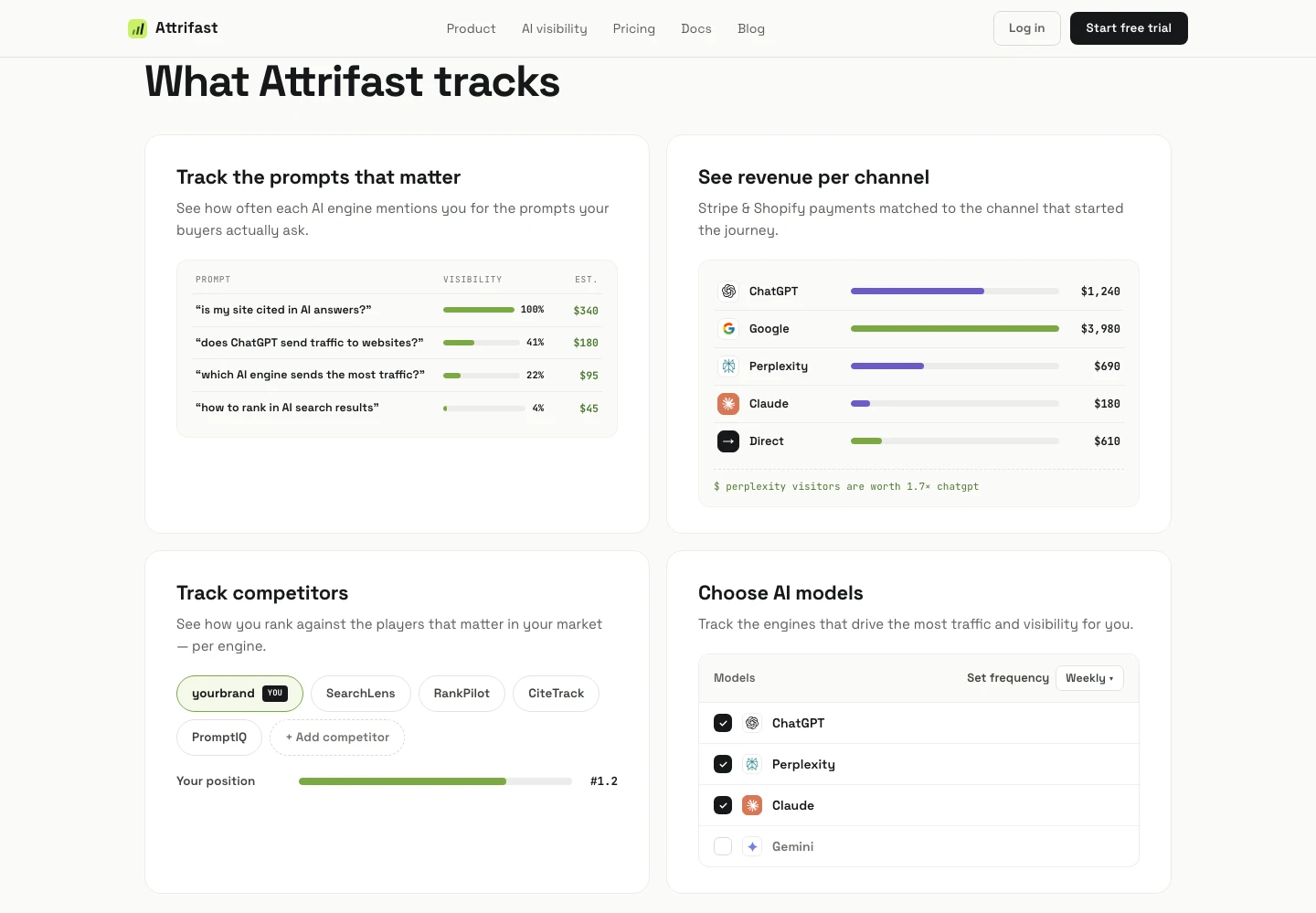
Attrifast dashboard: prompt-level AI visibility with estimated value, revenue split by channel across ChatGPT, Google, Perplexity, Claude and Direct, competitor position tracking, and per-engine scan settings.